


Offsetting the frame of the spritesheet animation
BMM_Archive · July 15, 2026

Original Source
- Original title: Offsetting the frame of the spritesheet animation
- Original author: LMichelle
- Original date: June 8, 2019
- Source thread: https://forums.rpgmakerweb.com/threads/offsetting-the-frame-of-the-spritesheet-animation.109815/
- Source forum path: Game Development Engines > Legacy Engine Support > RPG Maker MV Support
Summary
My problem is the following: whenever I stand still with some followers, and then start walking, they all show the 'same' frame on the spritesheets. This makes it really obvious that the base I used for my custom sprites is the same. Whenever followers gather on the same spot or enter a new map and then start walking/running, they all play a relative different frame of their animation. This behaviour is what I pretty much always want to happen! (I should say this: I'm using GALV's character animation plugin) So...
Archived First Post
Whenever followers gather on the same spot or enter a new map and then start walking/running, they all play a relative different frame of their animation. This behaviour is what I pretty much always want to happen!
(I should say this: I'm using GALV's character animation plugin)
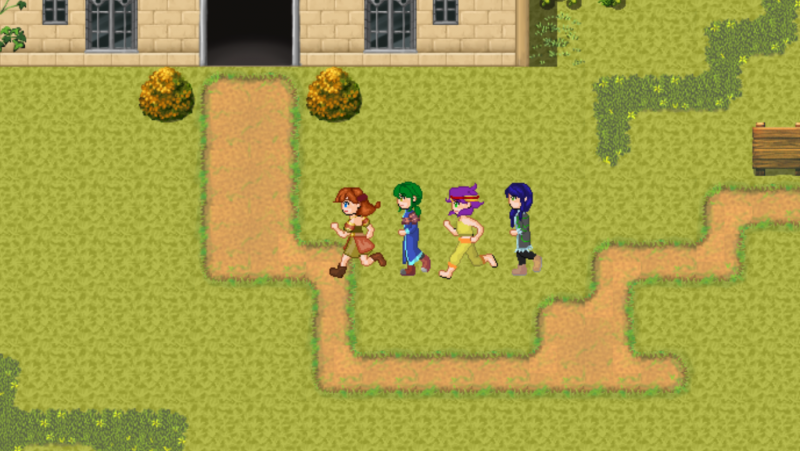
So this is how it looks when I enter a map and immediatly run (or when the player starts walking when all followers were standing in the same place)
The first actors running animation is currently on the 3rd frame, the second actor is on the 2nd frame of his running animation, the third actor on the first frame of her running animation, the last actor on the 2nd frame.
Protected download
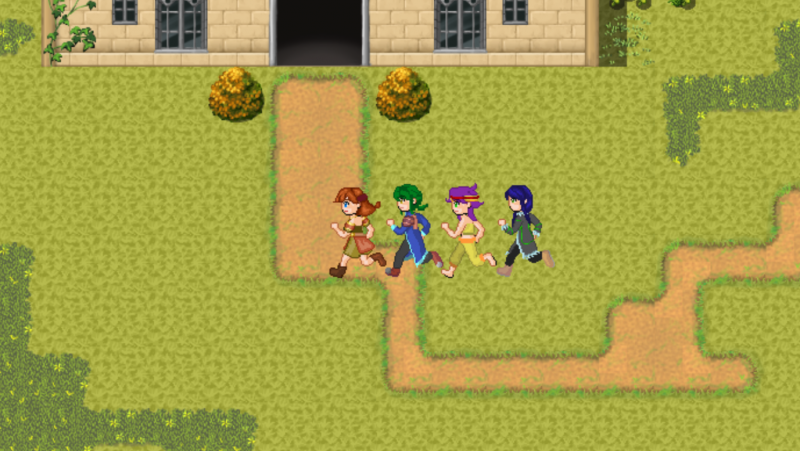
This is what happens when I start and stop walking/running again:
Protected download
They're all on the same frame. It looks like they're running perfectly in sync but it looks bad.
I hope this is the right thread for this problem and I hope someone can help me. Is this an option somewhere in MV?
Or is this a 'problem' with the plugin itself?
Thank you all for your time!
Downloads / Referenced Files
Log in, then follow the RPG Maker Developers Group to see these download links.
Log in to downloadReferenced Images / Attachments
Creator Claims / Removal
If you are the original creator and want this listing reassigned, edited, or removed, join BMMPlay and contact the moderators with proof that matches the original RPG Maker Web profile, linked GitHub, itch.io page, or another public creator identity.
Replies (0)
No replies yet.
Topic Summary
Loading summary...

