


LIb's Combat Motion Extension adding the added motion in action sequence YEP_X_Action Sequence 2
BMM_Archive · July 15, 2026

Preserved forum archive. This topic stores the original first post and locally mirrored RPG Maker Web attachments when available. It is posted by the BMMPlay archive account, not by the original creator.
Original Source
- Original title: LIb's Combat Motion Extension adding the added motion in action sequence YEP_X_Action Sequence 2
- Original author: ramedina1234
- Original date: September 30, 2018
- Source thread: https://forums.rpgmakerweb.com/threads/libs-combat-motion-extension-adding-the-added-motion-in-action-sequence-yep_x_action-sequence-2.100602/
- Source forum path: Game Development Engines > RPG Maker Javascript Plugins > Javascript/Plugin Support
Summary
Hi again. How do i add the added motion into yep_x_action sequence in skill note tags? For example this: { "lightbox_close": "Close",


Archived First Post
Hi again. How do i add the added motion into yep_x_action sequence in skill note tags?
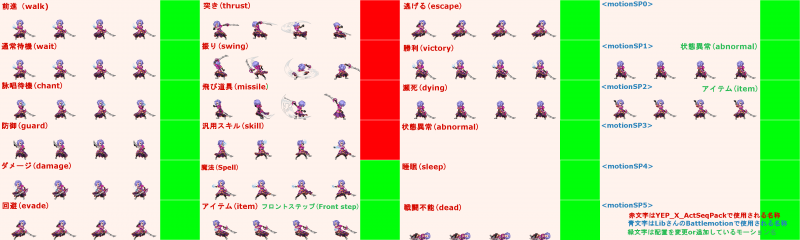
For example this:
Protected download
As shown in the picture above there is <motionSP#>. In YED_Sideview Battler all you have to do is put <custom motion type: target>. How about in LIb's Combat Motion Extension? How do i put it?
Oh and here is the plugin.
http://librpg.zatunen.com/
Thanks for the help.
EDIT: I've found a way. But it's tiring because every time you note a tag, for example:
animation 6: target
move user: target, front base, 12
motion swing: user
wait for movement
This is what I do or rather what i've found. By using Eval YEP_WeaponAnimation. So it should be like this:
animation 6: target
Eval: user.addState(ID)
move user: target, front base, 12
motion swing: user
wait for movement
Eval: user.removeState(ID)
It's tiring. Before making a motion i'll always add that and not to mention gonna need a lot of states for this one.
So is anybody have an easiest way or rather alternative way or simply shortest way to do this?
For example this:
Protected download
As shown in the picture above there is <motionSP#>. In YED_Sideview Battler all you have to do is put <custom motion type: target>. How about in LIb's Combat Motion Extension? How do i put it?
Oh and here is the plugin.
http://librpg.zatunen.com/
Thanks for the help.
EDIT: I've found a way. But it's tiring because every time you note a tag, for example:
animation 6: target
move user: target, front base, 12
motion swing: user
wait for movement
This is what I do or rather what i've found. By using Eval YEP_WeaponAnimation. So it should be like this:
animation 6: target
Eval: user.addState(ID)
move user: target, front base, 12
motion swing: user
wait for movement
Eval: user.removeState(ID)
It's tiring. Before making a motion i'll always add that and not to mention gonna need a lot of states for this one.
So is anybody have an easiest way or rather alternative way or simply shortest way to do this?
Downloads / Referenced Files
Log in to download
Log in, then follow the RPG Maker Developers Group to see these download links.
Log in to downloadReferenced Images / Attachments
Creator Claims / Removal
If you are the original creator and want this listing reassigned, edited, or removed, join BMMPlay and contact the moderators with proof that matches the original RPG Maker Web profile, linked GitHub, itch.io page, or another public creator identity.
Replies (0)
No replies yet.
0
replies
6
views
Topic Summary
Loading summary...
