Preserved forum archive. This topic stores the original first post and locally mirrored RPG Maker Web attachments when available. It is posted by the BMMPlay archive account, not by the original creator.
Original Source
- Original title: State Icon displaying Under Battler [SOLVED]
- Original author: Jory4001
- Original date: June 5, 2016
- Source thread: https://forums.rpgmakerweb.com/threads/state-icon-displaying-under-battler-solved.63071/
- Source forum path: Game Development Engines > Legacy Engine Support > RPG Maker MV Support
Summary
: Did a bit more testing, if I switch the animated battler graphic to a static one the State Icon is drawn in the correct spot, but the State Overlay stops being drawn all together. Looking through the code I can't see anything that would support this behavior either. Edit #2: SOLVED
Archived First Post
I am using the newest, unmodified version of Yanfly's Animated Sideview Enemies.
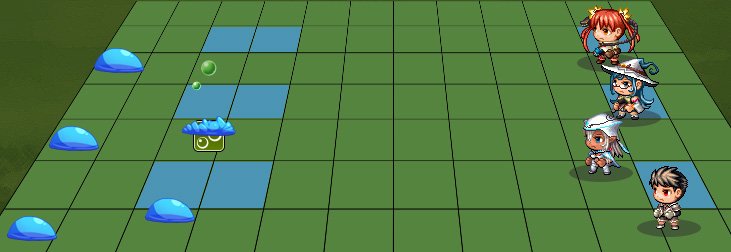
When an ability adds a state to an enemy it appear under the enemy graphic.
Protected download
This is a problem with the Anchor.
Changing the anchor to put the Icon in a correct position moves the Status Overlay, Shadow, Movement, and Skill animations all out of position.
I am looking for the code that sets the X & Y of the State Icon so I can offset it from everything else but i cant seem to find it.
I looked through the code in YEP_X_AnimatedSVEnemies.js and found these 3 functions that govern the State Icon however,
making adjustments to the height for either the Icon or the overlay made no changes in game. Even setting this._stateIconSprite.y = to various numbers didn't change its y position at all.
Line 1412
Yanfly.SVE.Sprite_Enemy_updateStateSprite =
Sprite_Enemy.prototype.updateStateSprite;
Sprite_Enemy.prototype.updateStateSprite = function() {
if (this._enemy && this._enemy.hasSVBattler()) {
this.updateSVStateSprite();
} else {
Yanfly.SVE.Sprite_Enemy_updateStateSprite.call(this);
}
this.updateFloatingStateSprite();
};
Line 1424
Sprite_Enemy.prototype.updateSVStateSprite = function() {
return;
var height = this._enemy.spriteHeight() * -1;
height -= Sprite_StateIcon._iconHeight;
this._stateIconSprite.y = height;
this._stateSprite.y = (this._enemy.spriteHeight() - 64) * -1;
this._stateSprite.visible = this._enemy.enemy().sideviewStateOverlay;
};
Line 1726 - this sets the scale of the icon, so 32x32 I tried to find this ".updateMirror" as I don't know what it does but it only exists as a .call 3-4 times in this one .js, and no others.
Yanfly.SVE.Sprite_StateIcon_updateMirror =
Sprite_StateIcon.prototype.updateMirror;
Sprite_StateIcon.prototype.updateMirror = function() {
this.scale.x = 1 / Math.max(1 / 10000, Math.abs(this.parent.scale.x));
this.scale.y = 1 / Math.max(1 / 10000, Math.abs(this.parent.scale.y));
Yanfly.SVE.Sprite_StateIcon_updateMirror.call(this);
};
Ive always been able to find and modify anything in the game i needed to be it within the base .js files or Plugins. I'm no Java scripter but I have done coding in several other languages and haven't run into a problem like this with java script yet.
This one really has me stumped. I found the code for displaying state Icons in the base rpg_sprite.js but altering that didn't change the position either.
Some Help would be awesome!
Edit #1:
Did a bit more testing, if I switch the animated battler graphic to a static one the State Icon is drawn in the correct spot, but the State Overlay stops being drawn all together. Looking through the code I can't see anything that would support this behavior either.
Edit #2:
SOLVED
I placed console.log("stuff'); in all the enemy icon functions to trace its draw route and found that the Yanfly plugin doesn't use any of the code for enemy Icons save for a 1 line function at the bottom. Needless to say, I found the Enemy Icon Anchor variables within rpg_sprite.js and made my adjustments, then adjusted Yanfly's Buff & State Counter to match.
When an ability adds a state to an enemy it appear under the enemy graphic.
Protected download
This is a problem with the Anchor.
Changing the anchor to put the Icon in a correct position moves the Status Overlay, Shadow, Movement, and Skill animations all out of position.
I am looking for the code that sets the X & Y of the State Icon so I can offset it from everything else but i cant seem to find it.
I looked through the code in YEP_X_AnimatedSVEnemies.js and found these 3 functions that govern the State Icon however,
making adjustments to the height for either the Icon or the overlay made no changes in game. Even setting this._stateIconSprite.y = to various numbers didn't change its y position at all.
Line 1412
Yanfly.SVE.Sprite_Enemy_updateStateSprite =
Sprite_Enemy.prototype.updateStateSprite;
Sprite_Enemy.prototype.updateStateSprite = function() {
if (this._enemy && this._enemy.hasSVBattler()) {
this.updateSVStateSprite();
} else {
Yanfly.SVE.Sprite_Enemy_updateStateSprite.call(this);
}
this.updateFloatingStateSprite();
};
Line 1424
Sprite_Enemy.prototype.updateSVStateSprite = function() {
return;
var height = this._enemy.spriteHeight() * -1;
height -= Sprite_StateIcon._iconHeight;
this._stateIconSprite.y = height;
this._stateSprite.y = (this._enemy.spriteHeight() - 64) * -1;
this._stateSprite.visible = this._enemy.enemy().sideviewStateOverlay;
};
Line 1726 - this sets the scale of the icon, so 32x32 I tried to find this ".updateMirror" as I don't know what it does but it only exists as a .call 3-4 times in this one .js, and no others.
Yanfly.SVE.Sprite_StateIcon_updateMirror =
Sprite_StateIcon.prototype.updateMirror;
Sprite_StateIcon.prototype.updateMirror = function() {
this.scale.x = 1 / Math.max(1 / 10000, Math.abs(this.parent.scale.x));
this.scale.y = 1 / Math.max(1 / 10000, Math.abs(this.parent.scale.y));
Yanfly.SVE.Sprite_StateIcon_updateMirror.call(this);
};
Ive always been able to find and modify anything in the game i needed to be it within the base .js files or Plugins. I'm no Java scripter but I have done coding in several other languages and haven't run into a problem like this with java script yet.
This one really has me stumped. I found the code for displaying state Icons in the base rpg_sprite.js but altering that didn't change the position either.
Some Help would be awesome!
Edit #1:
Did a bit more testing, if I switch the animated battler graphic to a static one the State Icon is drawn in the correct spot, but the State Overlay stops being drawn all together. Looking through the code I can't see anything that would support this behavior either.
Edit #2:
SOLVED
I placed console.log("stuff'); in all the enemy icon functions to trace its draw route and found that the Yanfly plugin doesn't use any of the code for enemy Icons save for a 1 line function at the bottom. Needless to say, I found the Enemy Icon Anchor variables within rpg_sprite.js and made my adjustments, then adjusted Yanfly's Buff & State Counter to match.
Features Mentioned
- Yanfly.SVE.Sprite_StateIcon_updateMirror =
- Sprite_StateIcon.prototype.updateMirror;
- Sprite_StateIcon.prototype.updateMirror = function() {
- this.scale.x = 1 / Math.max(1 / 10000, Math.abs(this.parent.scale.x));
- this.scale.y = 1 / Math.max(1 / 10000, Math.abs(this.parent.scale.y));
- Yanfly.SVE.Sprite_StateIcon_updateMirror.call(this);
- Ive always been able to find and modify anything in the game i needed to be it within the base .js files or Plugins. I'm no Java scripter but I have done coding in several other languages and haven't run into a problem like this with java script yet.
- This one really has me stumped. I found the code for displaying state Icons in the base rpg_sprite.js but altering that didn't change the position either.
- Some Help would be awesome!
- Edit #1:
- Did a bit more testing, if I switch the animated battler graphic to a static one the State Icon is drawn in the correct spot, but the State Overlay stops being drawn all together. Looking through the code I can't see anything that would support this behavior either.
- Edit #2:
- SOLVED
- I placed console.log("stuff'); in all the enemy icon functions to trace its draw route and found that the Yanfly plugin doesn't use any of the code for enemy Icons save for a 1 line function at the bottom. Needless to say, I found the Enemy Icon Anchor variables within rpg_sprite.js and made my adjustments, then adjusted Yanfly's Buff & State Counter to match.
Downloads / Referenced Files
Log in to download
Log in, then follow the RPG Maker Developers Group to see these download links.
Log in to downloadReferenced Images / Attachments
Creator Claims / Removal
If you are the original creator and want this listing reassigned, edited, or removed, join BMMPlay and contact the moderators with proof that matches the original RPG Maker Web profile, linked GitHub, itch.io page, or another public creator identity.
Replies (0)
No replies yet.
0
replies
1
view
Topic Summary
Loading summary...