


Indoor Doors, Doorway and Loop issue - trying to mix two events, both work separately
BMM_Archive · July 15, 2026

Original Source
- Original title: Indoor Doors, Doorway and Loop issue - trying to mix two events, both work separately
- Original author: 4rc4n3
- Original date: December 15, 2017
- Source thread: https://forums.rpgmakerweb.com/threads/indoor-doors-doorway-and-loop-issue-trying-to-mix-two-events-both-work-separately.88478/
- Source forum path: Game Development Engines > Legacy Engine Support > RPG Maker MV Support
Summary
Hey there, I'm trying to find a good system to have indoor doors in my project. I've watched many tutorials and while many were functional, I'm trying to push the limit. You see, most of the events required a ''Move Forward'' command which I don't want. I want to give my players an option to stay in the doorway if they wish. I'm also the Dark Cover plugin, which is working totally fine, but when trying to call the plugin in the doorway, the eventing I'm doing is wrong. Let...
Archived First Post
I'm trying to find a good system to have indoor doors in my project. I've watched many tutorials and while many were functional, I'm trying to push the limit. You see, most of the events required a ''Move Forward'' command which I don't want. I want to give my players an option to stay in the doorway if they wish.
I'm also the Dark Cover plugin, which is working totally fine, but when trying to call the plugin in the doorway, the eventing I'm doing is wrong. Let me show you with pictures.
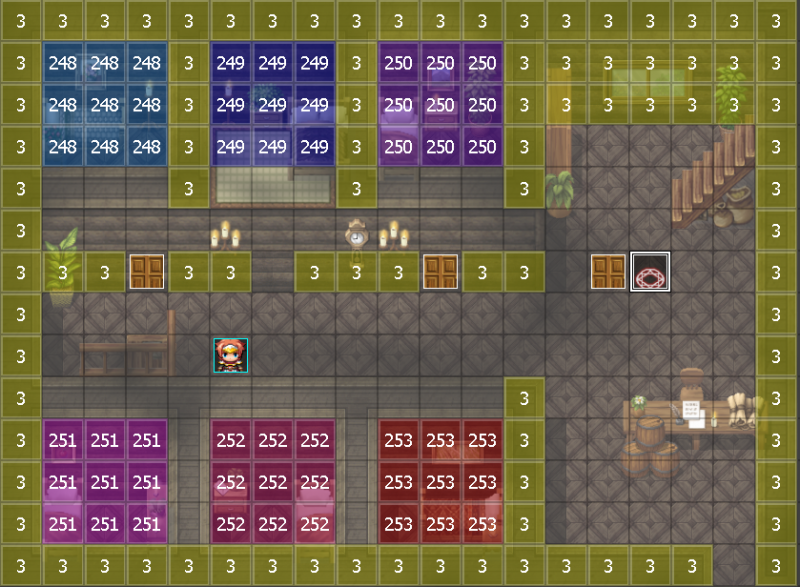
PART 1: I'm trying to reveal the Dark Cover 250 from the following picture, while standing in the doorway, after the door opening animation.
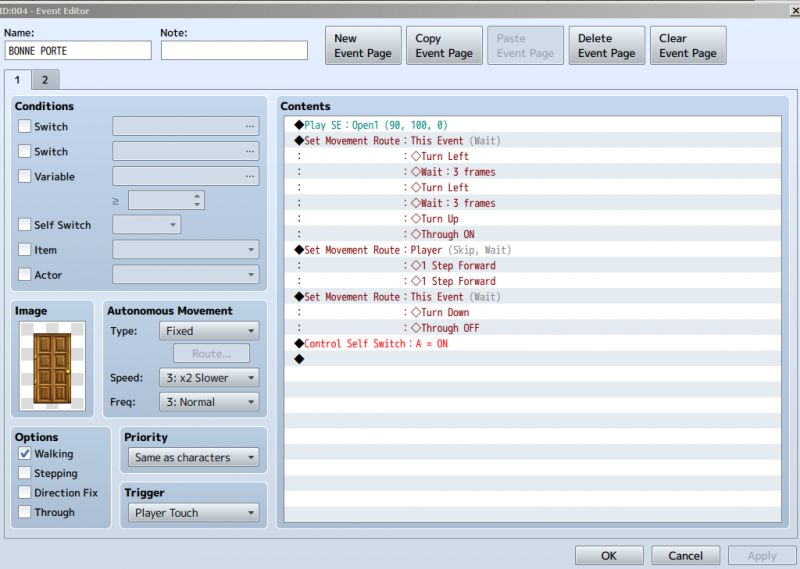
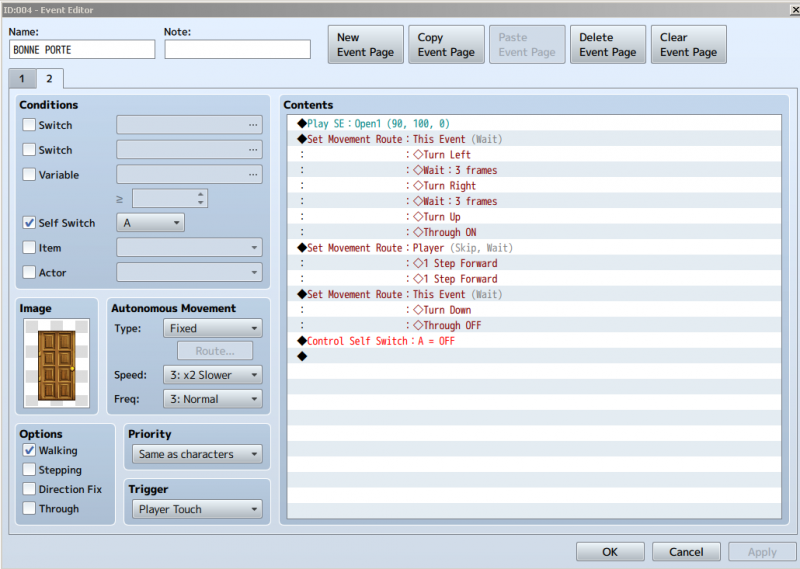
PART 2: This is the base door event I'm trying to use and fuse with the Dark Cover thing. Two pages, both are shown.
Protected download
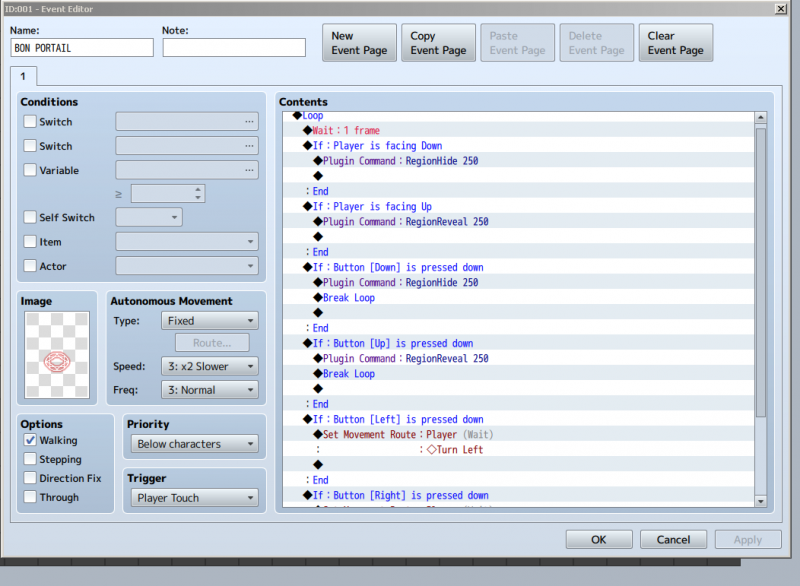
PART 3: The working hide/show Dark Cover thing. I found a tutorial explaining loop, which is what I tried to copy. Long story short, when not mixed with a door opening (aka: when it's working, occupying the only space of a doorway), if I look up, the room will show. If I look down, the room will go black. Of course it will work when I enter and leave a round. I had to add the turn right/left conditional because for some reason (I guess it's the loop?) I couldn't look either way. This works like charm on its own.
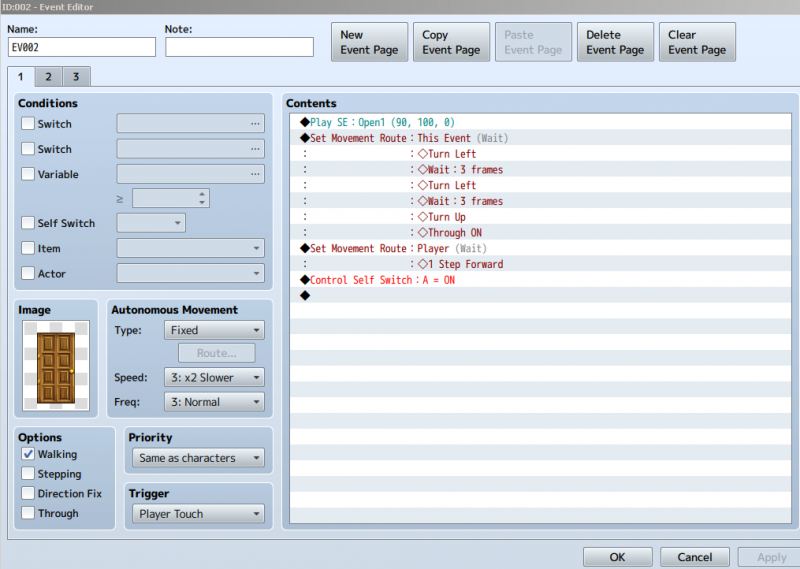
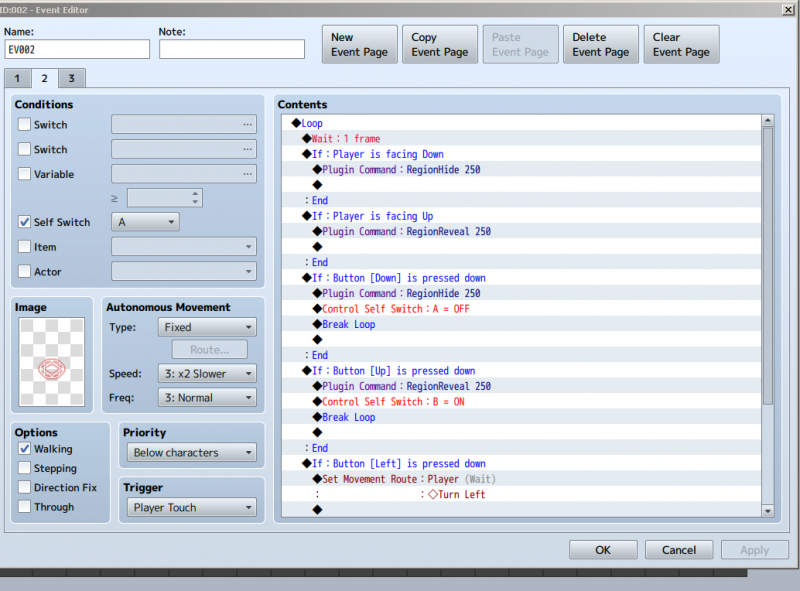
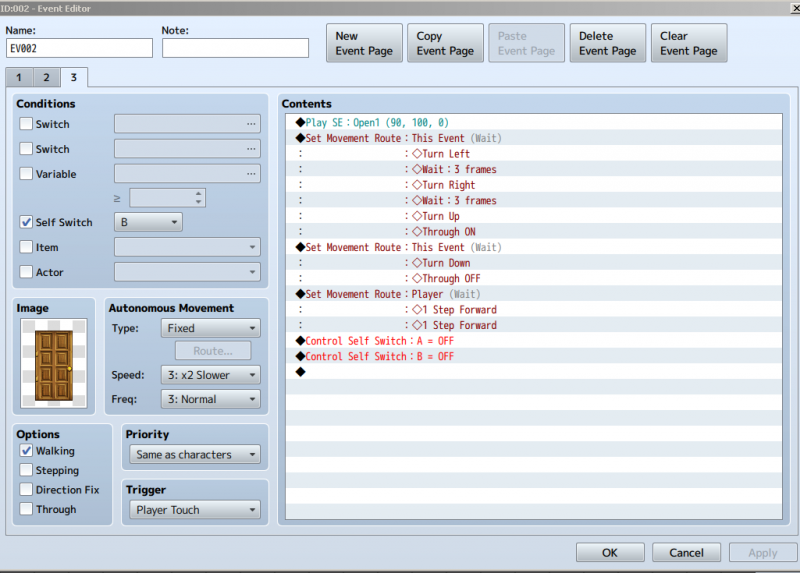
PART 4: I tried to mix the Dark Cover thing and the door via Self Switch. It's a 3 part event: a door to move up like normal, the ''dark cover portal'' (just a visual help until it's working) that SHOULD show/hide the region (but doesn't), and then the last page which would be the second page of the working door event seen in Part 2.
The first page of the event seems to work properly: the character is moved up, the door change for a portal, it seems Self Switch A is activated because the portal is shown. However, despite me facing top, the room is not revealed. I thought that would be the first thing the loop checked, well, if doesn't. Either the loop isn't working for various reason (maybe because the character is moved by an event, and not by the player) or the loop is working but my conditions/events inside are wrong.
From that point, where the character is sitting on the portal in the door, it is POSSIBLE to move inside the room. However, nothing will be shown, everything is still dark. And then, when I exit the room, the door takes its place properly.
I might totally be wrong, but it feels like the loop isn't checking if the character is facing anywhere or what the character does. So for fun, I tried to put the second page in parallel process, but then anywhere in the room, if I moved top or bot, it would hide/reveal the Dark Covers. I presume a solution with a Hero XY variable could be useful but there has to be an easier solution.
So what's the issue? I've been at a lost for hours now. A little bit of help would be appreciated.
Thank you very much!
Downloads / Referenced Files
Log in, then follow the RPG Maker Developers Group to see these download links.
Log in to downloadReferenced Images / Attachments
Creator Claims / Removal
If you are the original creator and want this listing reassigned, edited, or removed, join BMMPlay and contact the moderators with proof that matches the original RPG Maker Web profile, linked GitHub, itch.io page, or another public creator identity.
Replies (0)
No replies yet.
Topic Summary
Loading summary...

