

What is this window in the equip scene when using YEP Item Core + YEP Equip Core
BMM_Archive · July 15, 2026

Original Source
- Original title: What is this window in the equip scene when using YEP Item Core + YEP Equip Core
- Original author: dragon3025
- Original date: May 30, 2016
- Source thread: https://forums.rpgmakerweb.com/threads/what-is-this-window-in-the-equip-scene-when-using-yep-item-core-yep-equip-core.62664/
- Source forum path: Game Development Engines > RPG Maker Javascript Plugins > Javascript/Plugin Support
Summary
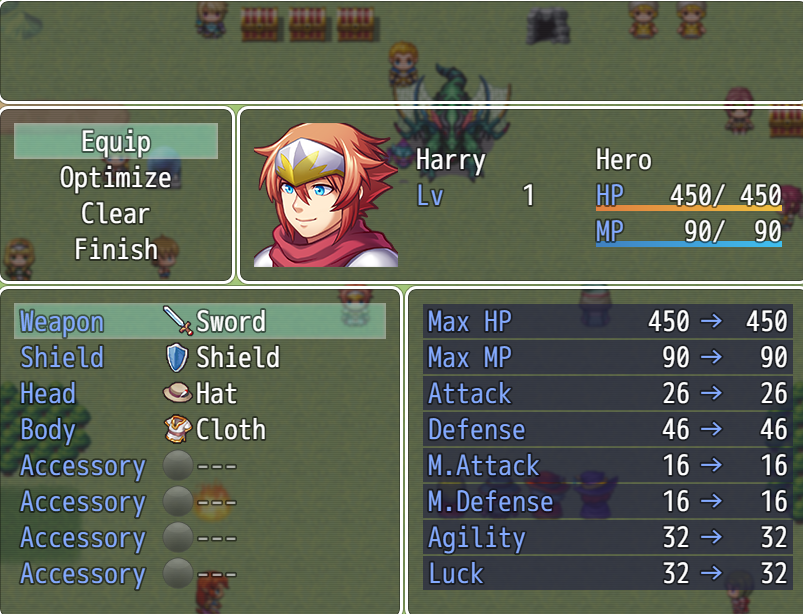
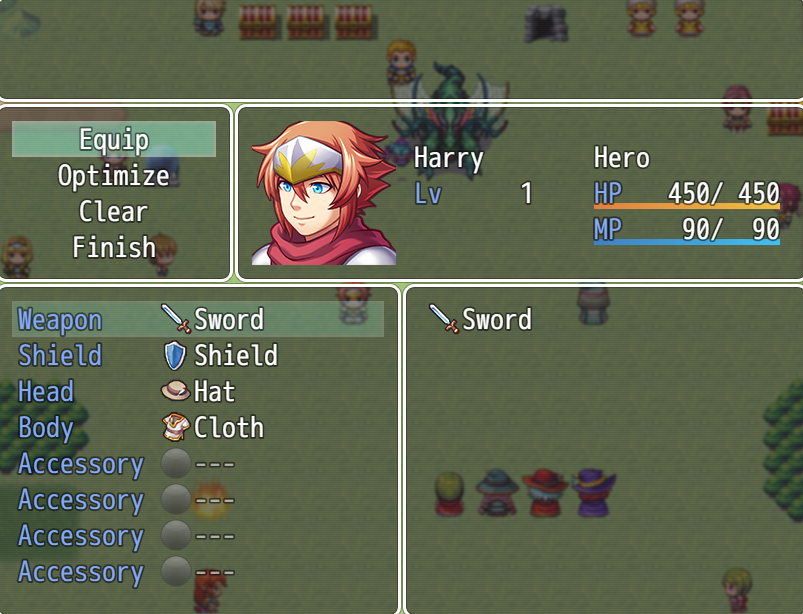
I'm using YEP_ItemCore: https://www.dropbox.com/s/bga5auuxaiwmc4s/YEP_ItemCore.js?dl=0 and YEP_EquipCore: https://www.dropbox.com/s/n0c5vukwfao6af2/YEP_EquipCore.js?dl=0. When using these plugins together there's a window that appears in the bottom right of the equip scene. When you select an equipment slot, then press right on the keybord, it shows a window that has nothing in it other than the item you selected. What window is this, does it do anything useful, and is there a way to remove it? I attached some pictures of what I'm talking about. Before Pressing Right Spoiler {
Archived First Post
Before Pressing Right
After Pressing Right
Downloads / Referenced Files
RPG Maker Web attachments are mirrored locally when available. Other external links remain hosted by their original creator or third-party service.
- Download: https://www.dropbox.com/s/bga5auuxaiwmc4s/YEP_ItemCore.js?dl=0
- Download: https://www.dropbox.com/s/n0c5vukwfao6af2/YEP_EquipCore.js?dl=0
- Local mirror: 23330-1264b37265c3a20e60d635825a57c724.png
SHA-256:e6cfd1b38af3444f83bd6af664f32ed2083ed130a24a4bdfa882933f90c41fe4
Original attachment URL: https://forums.rpgmakerweb.com/attachments/equip-scene-before-pressing-right-png.39085/ - Local mirror: 23331-23f3d4beb3b5b943a8072435c0e88dc4.png
SHA-256:f2f788a90f2211ffd41b4739eb20b9c789539736a5beac1e97ba89e30ae79259
Original attachment URL: https://forums.rpgmakerweb.com/attachments/equip-scene-after-pressing-right-png.39086/
Referenced Images / Attachments
Creator Claims / Removal
If you are the original creator and want this listing reassigned, edited, or removed, join BMMPlay and contact the moderators with proof that matches the original RPG Maker Web profile, linked GitHub, itch.io page, or another public creator identity.
Replies (0)
No replies yet.
Topic Summary
Loading summary...