

Yanfly Jump (seperate issue)
BMM_Archive · July 15, 2026

Original Source
- Original title: Yanfly Jump (seperate issue)
- Original author: Skunk
- Original date: July 3, 2016
- Source thread: https://forums.rpgmakerweb.com/threads/yanfly-jump-seperate-issue.64676/
- Source forum path: Game Development Engines > RPG Maker Javascript Plugins > Javascript/Plugin Support
Summary
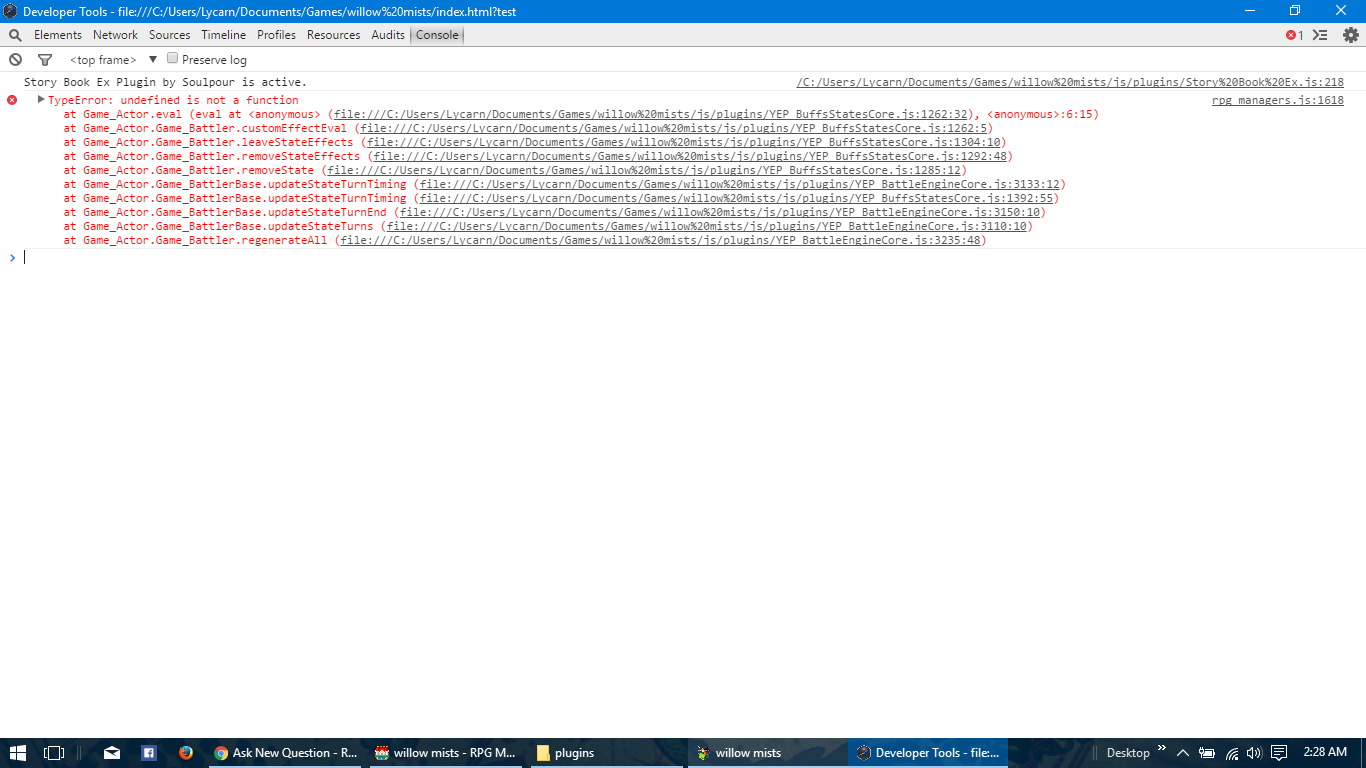
Hey guys, so I have been working at getting this skill set up for a while now and have watched the video several times and made sure I have it set up properly. Here is my issue. The jump aspect of it works, the char goes into the air for two turns, is not selectable by me but can be selected by the enemy and dealt damage. Then as soon as he goes to land, rpg maker crashes with "TyperError - undefined is not a function.
Archived First Post
Here is my issue.
The jump aspect of it works, the char goes into the air for two turns, is not selectable by me but can be selected by the enemy and dealt damage.
Then as soon as he goes to land, rpg maker crashes with "TyperError - undefined is not a function.
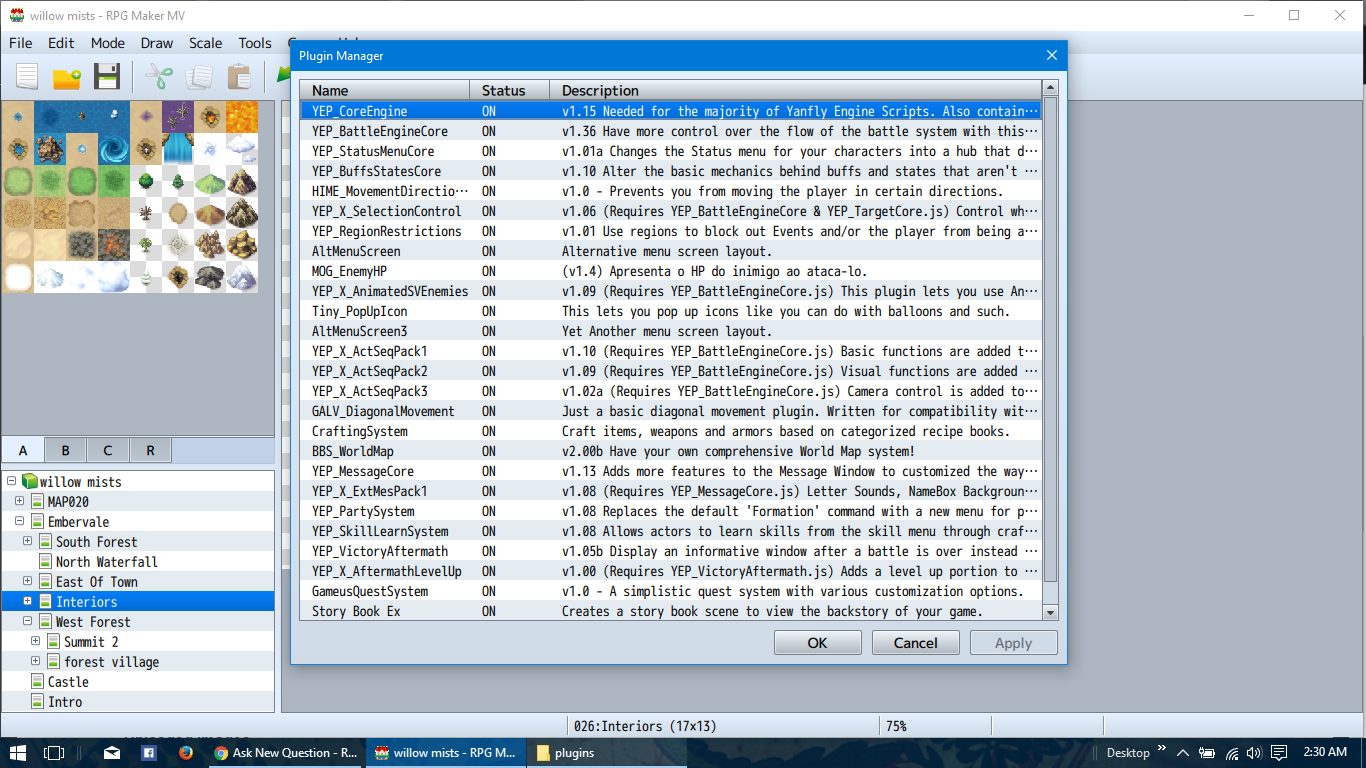
I am also getting a bunch of script errors all from battle core and buffs/states plugin from yanfly.
Here are the lines of code I am using for the movements (supplied by Yanfly)
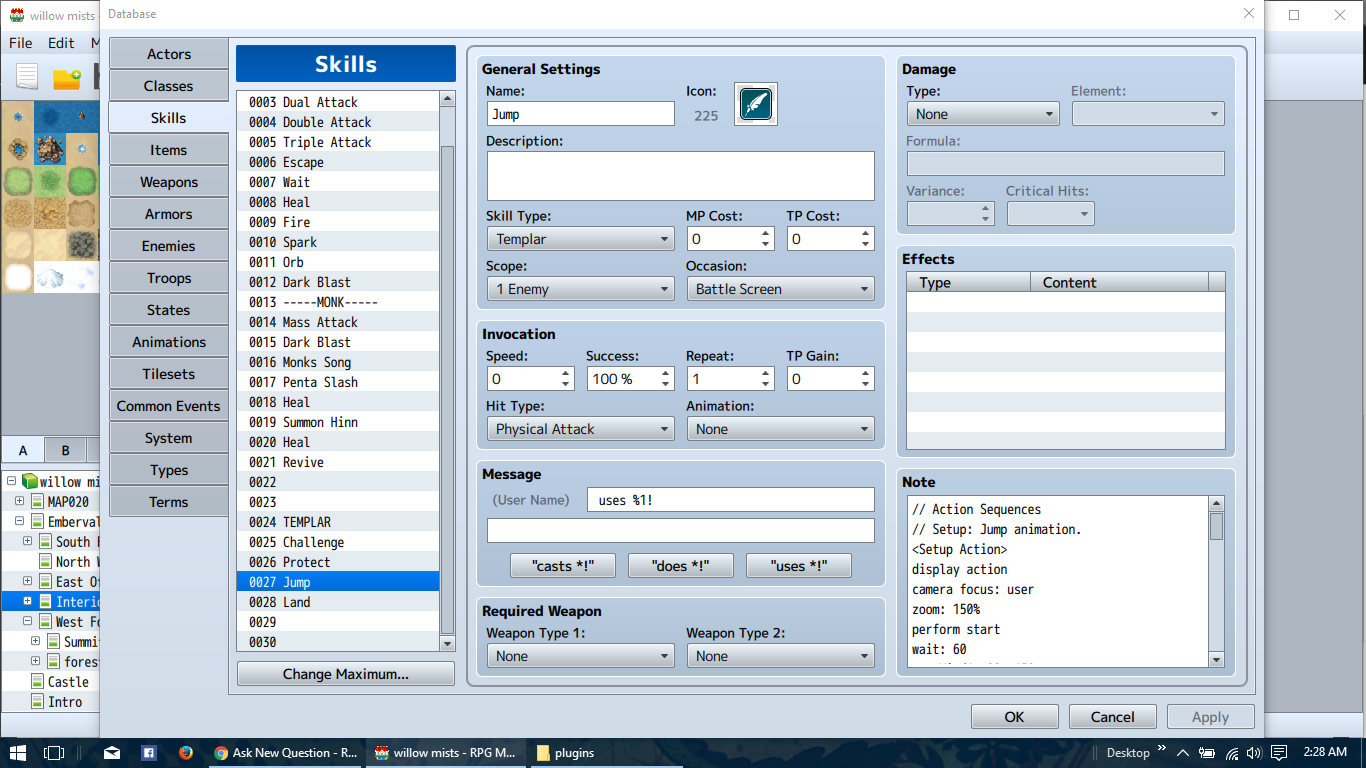
// Setup: Jump animation.
<Setup Action>
display action
camera focus: user
zoom: 150%
perform start
wait: 60
se: Wind1, 80, 150
float user: 495%, 20
opacity user: 0%, 20
wait for float
</Setup Action>
// Whole: Ensure nothing happens.
<Whole Action>
</Whole Action>
// Target: Flag the target.
<Target Action>
action effect
</Target Action>
// Follow: Apply Jump state to user.
<Follow Action>
add state 159: user
</Follow Action>
// Finish: Without landing.
<Finish Action>
clear battle log
reset camera
reset zoom
wait for camera
wait for zoom
</Finish Action>
Spoiler
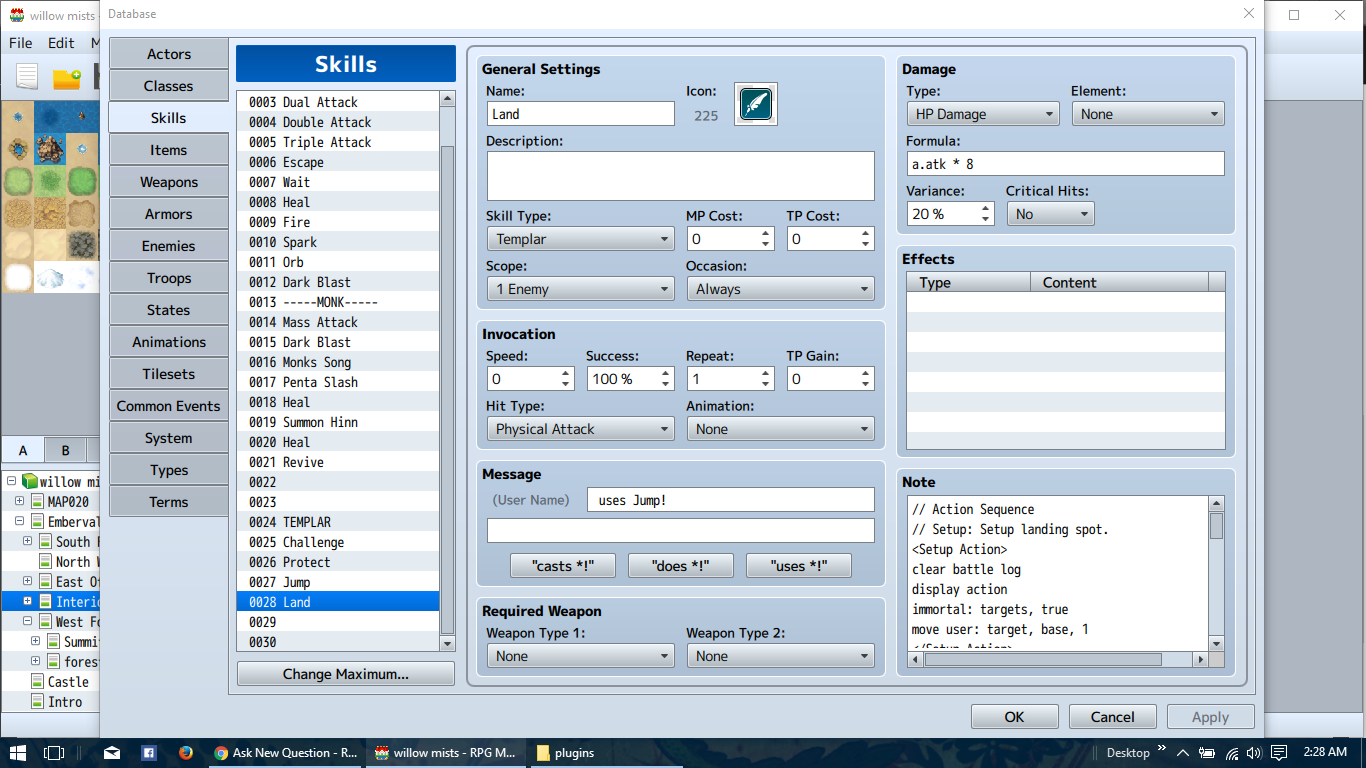
// Action Sequence
// Setup: Setup landing spot.
<Setup Action>
clear battle log
display action
immortal: targets, true
move user: target, base, 1
</Setup Action>

// Whole: Land and deal damage to all targets.
<Whole Action>
camera focus: target
zoom: 150%
wait: 60
motion attack: user
opacity user: 100%, 1
float user: 0, 20
wait: 10
animation [COLOR=rgb(255,0,0)]2[/COLOR]: targets
action effect
shake screen: 5, 5, 5
wait for animation
</Whole Action>

// Target: Ensure nothing happens.
<Target Action>
</Target Action>

// Follow: Reset everything.
<Follow Action>
reset camera
reset zoom
jump user: 200%, 30
move user: return, 30
wait for movement
</Follow Action>
Spoiler
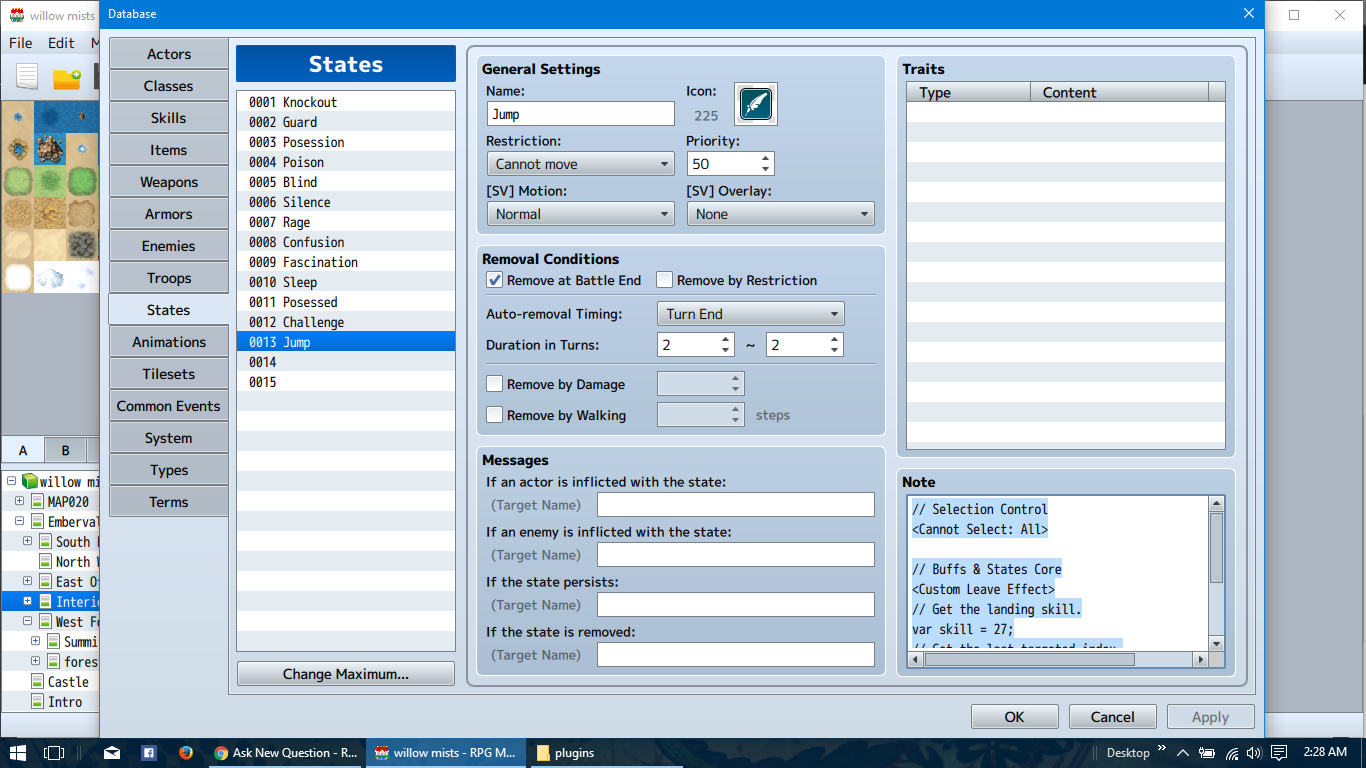
// Selection Control
<Cannot Select: All>

// Buffs & States Core
<Custom Leave Effect>
// Get the landing skill.
var skill = [COLOR=rgb(255,0,0)]200[/COLOR];
// Get the last targeted index.
var target = -2;
// Queue the forced action.
BattleManager.queueForceAction(user, skill, target);
</Custom Leave Effect>
Here are pictures of my skills and state.
Downloads / Referenced Files
RPG Maker Web attachments are mirrored locally when available. Other external links remain hosted by their original creator or third-party service.
- Local mirror: 25232-ab0ea097c2577aabf9c59a58f03f0e9e.png
SHA-256:cb0f45e4b9a86357abd01739ef1ab1bcd646a577ace5463f9380e77e2ec5c83c
Original attachment URL: https://forums.rpgmakerweb.com/attachments/2016-07-03-1-png.41926/ - Local mirror: 25233-4237d640a25c4f0c616e7cd65e0c819e.png
SHA-256:60656424ba148c6715bc2aa6a2392b6b7f229efb7253449e69e627b9bf79c365
Original attachment URL: https://forums.rpgmakerweb.com/attachments/2016-07-03-2-png.41927/ - Local mirror: 25234-f3a8c3f49f80c139d66d0645c408e568.png
SHA-256:92e28afdfcaad131e05b3dd71a3fc9bb4bed40faec2dbffe44b9330e6a553ac0
Original attachment URL: https://forums.rpgmakerweb.com/attachments/2016-07-03-3-png.41928/ - Local mirror: 25235-7e9854ae4af602df922292530c74f376.png
SHA-256:2c8e8ea69a044536031466e233b108c41e08b33bc1366a24794fee44a8f0bc5a
Original attachment URL: https://forums.rpgmakerweb.com/attachments/2016-07-03-4-png.41929/ - Local mirror: 25236-548271788358db0d3fb1dafd5328d246.png
SHA-256:b189dd14f08b5113952dc9801cf061ca348211baefea6300d0e54a2f16a1d3b6
Original attachment URL: https://forums.rpgmakerweb.com/attachments/2016-07-03-5-png.41930/
Referenced Images / Attachments
Creator Claims / Removal
If you are the original creator and want this listing reassigned, edited, or removed, join BMMPlay and contact the moderators with proof that matches the original RPG Maker Web profile, linked GitHub, itch.io page, or another public creator identity.
Replies (0)
No replies yet.
Topic Summary
Loading summary...