

Yanfly Main Menu Manager Plugin - How to add 'Finish', 'Close' or 'Cancel' command to the Item, Save
BMM_Archive · July 15, 2026

Original Source
- Original title: Yanfly Main Menu Manager Plugin - How to add 'Finish', 'Close' or 'Cancel' command to the Item, Save
- Original author: ACECORP
- Original date: June 9, 2016
- Source thread: https://forums.rpgmakerweb.com/threads/yanfly-main-menu-manager-plugin-how-to-add-finish-close-or-cancel-command-to-the-item-save.63251/
- Source forum path: Game Development Engines > RPG Maker Javascript Plugins > Javascript/Plugin Support
Summary
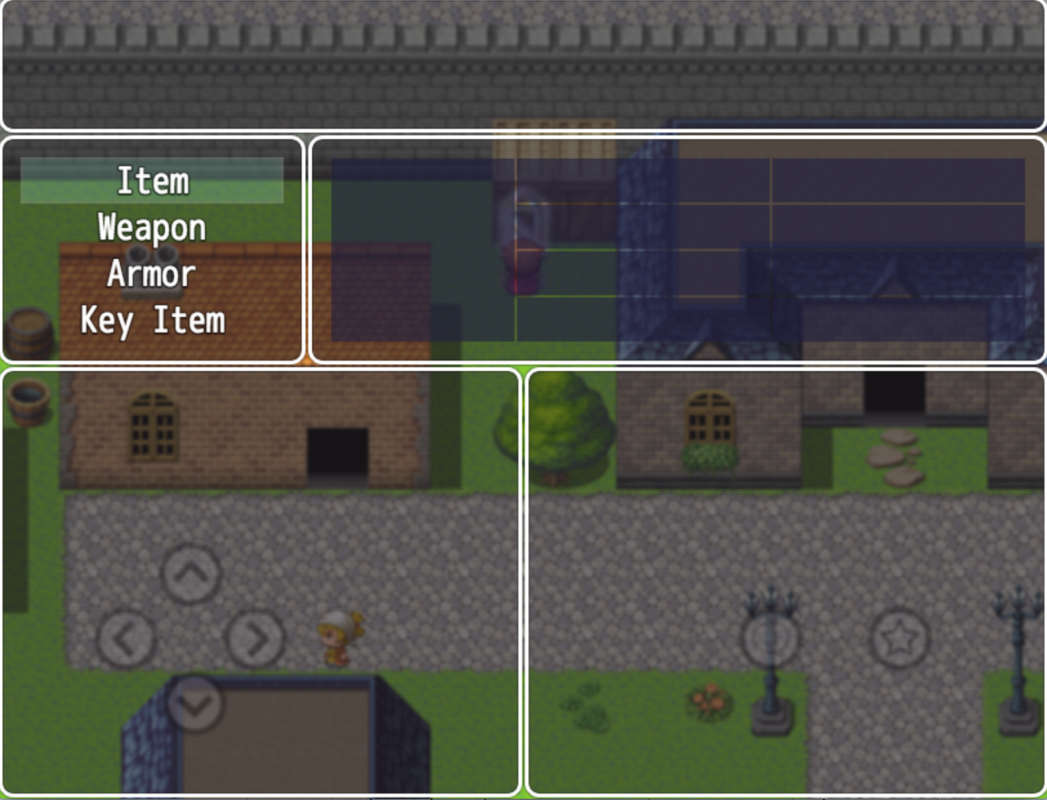
[SIZE=11pt]Using the Yanfly Menu Manager Plugin for RPGMaker MV, I would like to implement the same kind of 'Finish' command to the inside of the Item menu that's present by default in the Equip Menu and Class Menu. [/SIZE] [SIZE=11pt]Specifically, I would like to put that 'Finish' command in the Item menu so it allows me to select 'Finish', in addition to Item, Weapon, Armor, and Key Item. [/SIZE] [SIZE=11pt]Ideally, I want to add the same 'Finish' command to the Item Menu, the Save Menu, and Skill Menu just like how the...
Archived First Post
[SIZE=11pt]Specifically, I would like to put that 'Finish' command in the Item menu so it allows me to select 'Finish', in addition to Item, Weapon, Armor, and Key Item. [/SIZE]
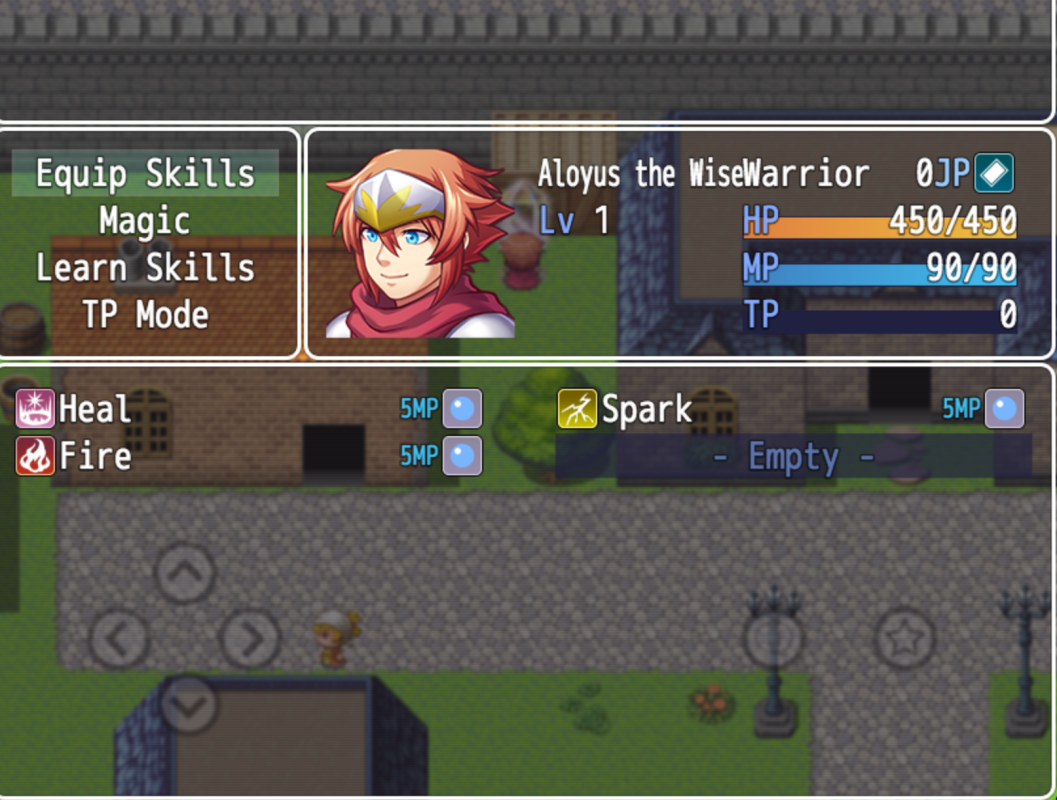
[SIZE=11pt]Ideally, I want to add the same 'Finish' command to the Item Menu, the Save Menu, and Skill Menu just like how the Equip Menu and Class Menu already have a 'Finish' option by default.[/SIZE]
[SIZE=11pt]Has anyone done this on those three menus or can anyone provide some technical info on how exactly I might achieve that?[/SIZE]
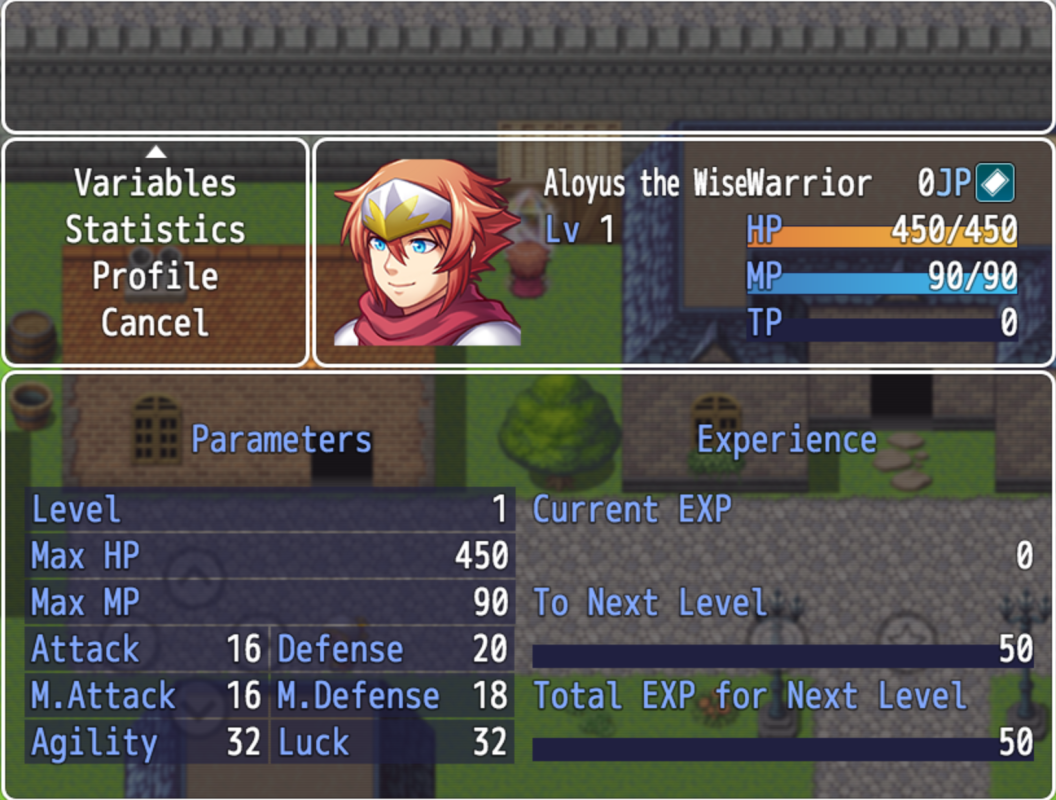
[SIZE=11pt]If you look at the third screen shot below, you will see there is a Cancel option in the status menu. [/SIZE]
[SIZE=11pt]I need to put the same type of cancel, finish, or close option [/SIZE]in the[SIZE=11pt] Item submenu, save submenu, and skill submenu. [/SIZE]
[SIZE=11pt]The link below shows the code required to add a Close Menu command to the main menu screen, but it doesn’t show how to add a similar sub-menu close or ‘Finish’ command to the Items, Save, or Skill sub-menu screens.[/SIZE]
http://steamcommunity.com/app/363890/discussions/0/483368526589845007/
[SIZE=11pt]Any help would be appreciated. [/SIZE]
Downloads / Referenced Files
RPG Maker Web attachments are mirrored locally when available. Other external links remain hosted by their original creator or third-party service.
- Local mirror: 23924-9cbe97f326876fe37fe1664224deb703.png
SHA-256:93f3e080d57104b259a7a2bad278ac311434a76bbe54bbc5364e7dfa078796ed
Original attachment URL: https://forums.rpgmakerweb.com/attachments/screen-shot-2016-06-09-at-8-52-03-pm-png.39976/ - Local mirror: 23925-1c86939d91eef714b74d5d60efe0ad5b.png
SHA-256:bcbd26a1176f9ef61415604c546120e8fd1aba2a45a3e6015c3f00d1706e2133
Original attachment URL: https://forums.rpgmakerweb.com/attachments/screen-shot-2016-06-09-at-8-52-15-pm-png.39977/ - Local mirror: 23926-71a25a75ff44acb9d3903c15560dddf1.png
SHA-256:7d5c4325eae536ba90065728f5abb813f5b17b3bc2b465d4b1bdcc50ea240823
Original attachment URL: https://forums.rpgmakerweb.com/attachments/screen-shot-2016-06-09-at-8-52-49-pm-png.39978/
Referenced Images / Attachments
Creator Claims / Removal
If you are the original creator and want this listing reassigned, edited, or removed, join BMMPlay and contact the moderators with proof that matches the original RPG Maker Web profile, linked GitHub, itch.io page, or another public creator identity.
Replies (0)
No replies yet.
Topic Summary
Loading summary...