

$gameInterpreter.wait() doesn't work?
BMM_Archive · July 15, 2026

Original Source
- Original title: $gameInterpreter.wait() doesn't work?
- Original author: Firgof
- Original date: March 20, 2016
- Source thread: https://forums.rpgmakerweb.com/threads/gameinterpreter-wait-doesnt-work.59049/
- Source forum path: Game Development Engines > RPG Maker Javascript Plugins > Javascript/Plugin Support
Summary
I've been referencing the 'script equivalent of command calls' list a lot lately ( link ) but the listing for the Wait command doesn't work. I can't locate $gameInterpreter in my console, firstly. I was able to find it being created (or at least where I think it's created, I'm an amateur with JS) in rpg_objects.js and, in fact, that Game_Interpreter function does have a wait method which takes a duration as its parameter. However, even so, calling it returns that $gameInterpreter is undefined. If I call Game_Interpreter instead it (of course)...
Archived First Post
I can't locate $gameInterpreter in my console, firstly. I was able to find it being created (or at least where I think it's created, I'm an amateur with JS) in rpg_objects.js and, in fact, that Game_Interpreter function does have a wait method which takes a duration as its parameter. However, even so, calling it returns that $gameInterpreter is undefined. If I call Game_Interpreter instead it (of course) returns that it doesn't have a Wait method.
So what is the proper way to call for a Wait inside a script execution event? This is what my event looks like at the moment:
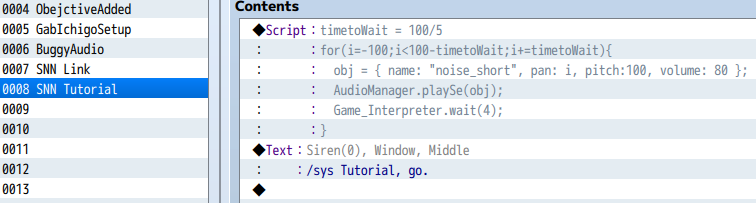
What I'm trying to achieve is a sweep of audio from the left-most pan to the right-most pan with a short delay between each played sound so it doesn't create overlapping tones and takes a little bit to go from left to right.
Downloads / Referenced Files
RPG Maker Web attachments are mirrored locally when available. Other external links remain hosted by their original creator or third-party service.
- Local mirror: 19896-07bd1e82fecd46f0c61ef408e1b83e2a.png
SHA-256:1b85f374c5e5d6390549c37b42dcb9998b762af742bfb4aae62281817309c524
Original attachment URL: https://forums.rpgmakerweb.com/attachments/capture4-png.33960/
Referenced Images / Attachments
Creator Claims / Removal
If you are the original creator and want this listing reassigned, edited, or removed, join BMMPlay and contact the moderators with proof that matches the original RPG Maker Web profile, linked GitHub, itch.io page, or another public creator identity.
Replies (0)
No replies yet.
Topic Summary
Loading summary...