

Actor name with Yanfly message core bug or something else?
BMM_Archive · July 15, 2026

Original Source
- Original title: Actor name with Yanfly message core bug or something else?
- Original author: signaltome
- Original date: January 30, 2016
- Source thread: https://forums.rpgmakerweb.com/threads/actor-name-with-yanfly-message-core-bug-or-something-else.56012/
- Source forum path: Game Development Engines > RPG Maker Javascript Plugins > Javascript/Plugin Support
Summary
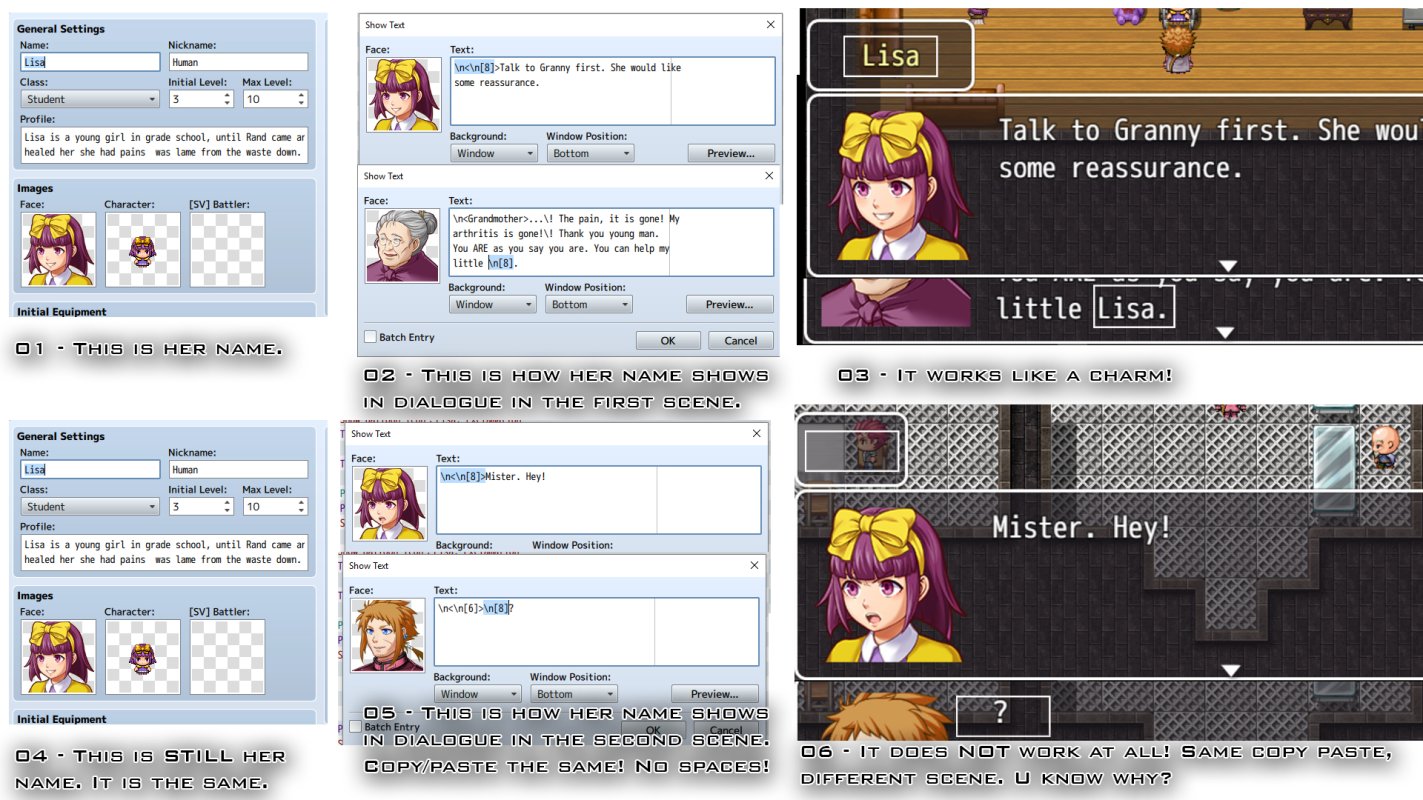
Oh boy, so where to begin! First, there is a pic below to show what happens but I will try and explain it anyway, so here we go. Everyone familiar with RPG Maker know you can use \n[x] to replace the Actor's name in text, dialogue and so on. (replacing x with the actors number in the Database obviously) With Yanfly's Message Core plugin one can, as well, use \n to make the Actor's name appear as a seperate name box on top of the message box. Up until now...
Archived First Post
Everyone familiar with RPG Maker know you can use \n[x] to replace the Actor's name in text, dialogue and so on. (replacing x with the actors number in the Database obviously)
With Yanfly's Message Core plugin one can, as well, use \n<\n[x]> to make the Actor's name appear as a seperate name box on top of the message box. Up until now this has worked fine, I have had no problem with this.
In one of the first scenes in my game I have a long cutscene with an NPC, one of them a semi-important character later on so though she is not a main-character per say I made her an actor in the Database and used the above method to display her name in all text and dialogue. In case I wanted to rename her or something later, then it would be a bother to go back and redo her name all over the place. This worked fine in this scen, from beginning to end. (see also first line in the attached picture)
Just yesterday the main party returned from captivity and were ready to meet her again. And I set up the reunion and started to set up a cutscene with dialogue and movement as usual, nothing complicated that I had not done before. But when I started the game to do a preliminary test of the scene, all places where her name and name-boxes were concerned were blank. And I had copy/pasted the Actor # just like I usually do. Now, she is #8 on the Actor tab, so for funsies I replaced her "8" with some other Actor " and lo and behold, it worked as usual! (just the number, nothing else, namely 8 to 7 and then 5, both worked)
So my fist thought would have been that there is something wrong with the #8 Actor slot, EXCEPT that it worked FINE in the first scene. And not in the second, unless I replace the number of the actor when it does. Anyone have any idea why, because I have worked on the problem all day and have not gotten anywhere with it.
Edited: Moving the event tab to another map represented the same error as above. The same when I created a new dialogue with the same Actor #ID. Then I copied the Actor to a fresh slot and that worked, so I will do that for now. I would still like an answer as to why a thing works once and then not again. BD
Downloads / Referenced Files
RPG Maker Web attachments are mirrored locally when available. Other external links remain hosted by their original creator or third-party service.
- Local mirror: 17539-613c0244f141fd88b35002e8717da8bf.jpg
SHA-256:be7b4df4d02ad723804faaf8c2a1d5a0d1d12f27b697ecbbc6187a54e58155fe
Original attachment URL: https://forums.rpgmakerweb.com/attachments/why-jpg.30455/
Referenced Images / Attachments
Creator Claims / Removal
If you are the original creator and want this listing reassigned, edited, or removed, join BMMPlay and contact the moderators with proof that matches the original RPG Maker Web profile, linked GitHub, itch.io page, or another public creator identity.
Replies (0)
No replies yet.
Topic Summary
Loading summary...