

How do you display different resources (eg,: hp, mp, tp) for different characters on the combat scre
BMM_Archive · July 15, 2026

Original Source
- Original title: How do you display different resources (eg,: hp, mp, tp) for different characters on the combat scre
- Original author: LordCullwch
- Original date: November 4, 2015
- Source thread: https://forums.rpgmakerweb.com/threads/how-do-you-display-different-resources-eg-hp-mp-tp-for-different-characters-on-the-combat-scre.49345/
- Source forum path: Game Development Engines > RPG Maker Javascript Plugins > Javascript/Plugin Support
Summary
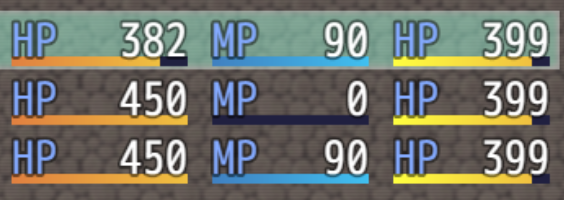
I have run into another problem. In my previous thread Shaz kindly helped me implement an alternative resource (Gorge, bloodPool - call it what you will. It's a resource which fills with draining health from enemies). Now that I have done that, my problem is displaying it correctly on the battle screen. I have managed to replace the TP resource with this new 'Gorge' mechanic on the battle screen, but it replaced TP for all characters. My desire is to replace the TP resource bar with Gorge for only 1...
Archived First Post
var _Draw_Gorge = Window_Base.prototype.drawActorGorge = function(actor, x, y, width) { width = width || 186; var color1 = this.crisisColor(); var color2 = this.hpGaugeColor2(); this.drawGauge(x, y, width, actor.gorgeRate(), color1, color2); this.changeTextColor(this.systemColor()); this.drawText(TextManager.hpA, x, y, 44); this.drawCurrentAndMax(Math.ceil(gorge), actor.mhp, x, y, width, this.hpColor(actor), this.normalColor());}; var _Battle_Gorge = Window_BattleStatus.prototype.drawGaugeAreaWithTp = function(rect, actor) { this.drawActorHp(actor, rect.x + 0, rect.y, 108); this.drawActorMp(actor, rect.x + 123, rect.y, 96); this.drawActorGorge(actor, rect.x + 234, rect.y, 96);}; var _Gorge_Rate = Game_BattlerBase.prototype.gorgeRate = function() { return gorge / this.mhp;}; var _Gooorge = gorge = 0;I have also included an image which demonstrates the current state of things. I realise that the Gorge bar still has HP written over it, but that's something I'm confident I can sort out without help further down the line.
[IMG]http://forums.rpgmakerweb.com/uploads/monthly_11_2015/post-73100-0-37518600-1446662427.png[/IMG]
Downloads / Referenced Files
RPG Maker Web attachments are mirrored locally when available. Other external links remain hosted by their original creator or third-party service.
- Local mirror: 14263-8d54ff438dfaba5d5efc709eee296d39.png
SHA-256:8995cf41ef39520539611bca07fce716048e0d054af9f15578d49cc7dcbb9168
Original attachment URL: https://forums.rpgmakerweb.com/attachments/gorge-png.25522/
Referenced Images / Attachments
Creator Claims / Removal
If you are the original creator and want this listing reassigned, edited, or removed, join BMMPlay and contact the moderators with proof that matches the original RPG Maker Web profile, linked GitHub, itch.io page, or another public creator identity.
Replies (0)
No replies yet.
Topic Summary
Loading summary...