Hi. First time posting in this section of the forums.. I think? Been here a long time, who knows. I saw the rule regarding scripts. However, the script involved is a very minor side note, so if that is a problem, I will gladly remove that section of the question. Anyway! I currently have an issue with how my save system works. Currently, each save spot only works once, unless you use a particular item to "recharge" it, so to speak. When you use this save spot, there is a...
Hi. First time posting in this section of the forums.. I think? Been here a long time, who knows. I saw the rule regarding scripts. However, the script involved is a very minor side note, so if that is a problem, I will gladly remove that section of the question.
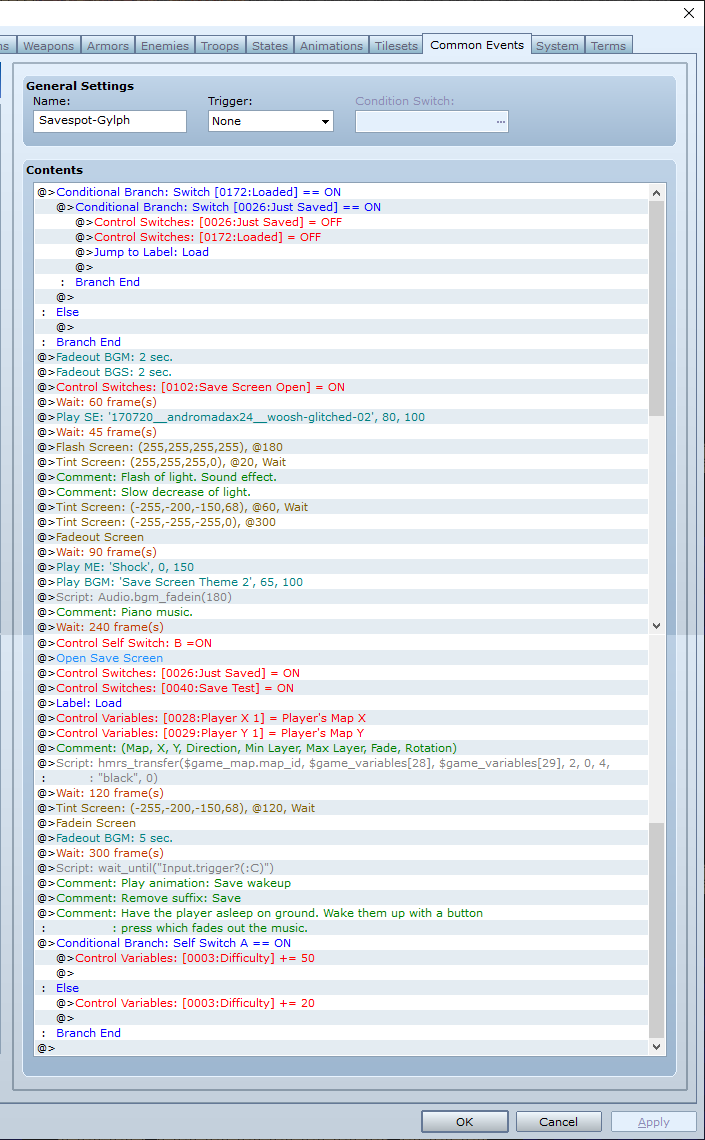
Anyway! I currently have an issue with how my save system works. Currently, each save spot only works once, unless you use a particular item to "recharge" it, so to speak. When you use this save spot, there is a flash of light, followed by everything fading to black. The music kicks in, and then the save screen appears. Very atmospheric and nice. The issue is, though, that you're saving *while* the fade-out command is in effect. Upon loading said save, everything is completely black, because it's still faded out. And, the rest of the save event that would handle the screen fading in and putting everything back to normal, is not activated, because events that are running mid-save do not appear to continue after loading that save.
Here's the common event:
Protected download
Is there a simple way to tell the game to run this common event or something upon loading a save, so the player isn't trapped in darkness? My current idea is to activate the "just saved" switch upon saving. When booting the save, en event checks for this switch and activates the common event for saving, then simply jumps labels to after the save screen part of the common event. However, this isn't working, because, it depends on a second switch called "loaded" to be on so it doesn't activate immediately. So, again, is there a way to do this? Even just making it so this switch is turned on when loading any save would work. Also there's no way to check if the player actually saved instead of just hitting Escape, so the switch can be on needlessly... Also also, the "just saved" switch uses a small script to stay on even though the switch is turned on after saving. It's
theLeech's Global Data script. Hope that's okay to mention. I'm unsure what to do about if the player saves- making "just saved" on, and then starts a new game. I could have the new game check if the switch is on and then turn it off, but then you'd be unable to properly load any saves... Hmm.
Sorry is this seems somewhat stupid, since I feel like there must be a cleaner solution to this, but I've been thinking about this for a long time and this is the only thing I have in mind.




 ANYPLUS USB C Docking Station Dual Monitor
Multiport USB-C dock for dual-monitor laptop desks and cleaner cable management.
View on Amazon
ANYPLUS USB C Docking Station Dual Monitor
Multiport USB-C dock for dual-monitor laptop desks and cleaner cable management.
View on Amazon