

MVUniversal Level System
BMM_Archive · July 15, 2026

BMM_Archive
Preserved forum archive. This topic stores the original first post and locally mirrored RPG Maker Web attachments when available. It is posted by the BMMPlay archive account, not by the original creator.
Original Source
- Original title: Universal Level System
- Original author: ShadowDragon
- Original date: October 13, 2020
- Source thread: https://forums.rpgmakerweb.com/threads/universal-level-system.128653/
- Source forum path: Game Development Engines > RPG Maker Javascript Plugins > JS Plugin Releases (RMMV)
Summary
PluginName: ShadowDragon_ULS (Universal Level System) Author: ShadowDragon TERMS OF USE: Credit ShadowDragon
Archived First Post
PluginName: ShadowDragon_ULS (Universal Level System)
Author: ShadowDragon
TERMS OF USE:
Credit ShadowDragon
You may break it, but I won't fix it!
Do not remove the header!
Some functions get improvements while I learn JS more.
Version: 0.4.0 (with dynamic ExpCurve) (click image to see it)
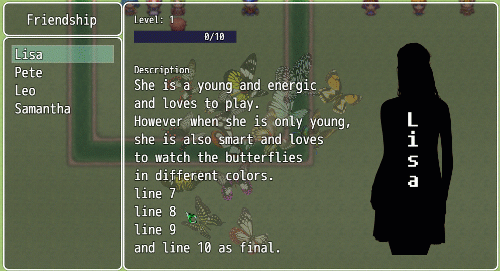
Most people know Moogle_X plugin or another one, they are good, no question doubt,
but also tons of features and settings to config, but why this one?
Most plugins of this kind requires "Actors" to be existed, this plugin is not independed
of "Actors" that exist in the databse, in fact, it can be ANY kind, just name it, and add
an image if you like, level them seperately, this gives you a bit more control.
it doesn't have notetags to setup, but gain exp during battle, you decide when and where
to gain experience, and how you set it up.
while the plugin is still in WIP, and is fully function, I still have a TODO list, that will be added
when I got time to implement it which is as follows for some customisation:
TODO List:
nothing more atm, but leave comments.
if you have other suggestions, leave them behind.
Read the helpfile for possibilties.
WHAT'S NEW:
09-01-2022
- added No Data command if no entree is added
- added Dynamic ExpCurve
- changes boolen for Static or Dynamic to options.
- adjusted the helpfile more usefriendly.
compabilities:
not that I know off, while the scene is entirely on it's own, it shouldn't give
any problems, but if it does, let me know.
WARNING: Gauge colors, width and height are fixed, as there will be paid
version with an additional explanation on how and where to edit the width
height, position of X and Y and colors of the gauge to fit your needs!
the DEMO dont have this version, but you can easely overwrite without errors.
in case there are some errors, let me know.
Download [here] it has the demo, and files, you can copy the
DataULS.json (from data folder) and JS from plugins folder.
recommended resolution (for center the window scene) 1200x864)[/CODE][/SPOILER]
Author: ShadowDragon
TERMS OF USE:
Credit ShadowDragon
YOU ARE NOT ALLOWED TO MODIFY, EXTEND, REDISTRIBUTE OR SELL IT.
NON-COMMERCIAL ONLY, COMMERCIAL REQUIRED PERMISSION.
CHANGING COLORS OF THE GAUGE OR WIDTH NOT CURRENTLY POSSIBLE,
PAID VERSION GET THE UN-ENCRYPTED VERSION AND HELPFILE ON HOW AND WHERE
TO CHANGE THE COLOR AND WIDTH TO DO SO, AND CANNOT BE REDISTRIBUTE OR BE SOLD.
ONCE PAID, REFUND IS NOT POSSIBLE, SO TEST THE PLUGIN FIRST BEFORE DOING SO!
ONCE PAID, COMMERCIAL USE IS ALLOWED WITHOUT PERMISSION!
NON-COMMERCIAL ONLY, COMMERCIAL REQUIRED PERMISSION.
CHANGING COLORS OF THE GAUGE OR WIDTH NOT CURRENTLY POSSIBLE,
PAID VERSION GET THE UN-ENCRYPTED VERSION AND HELPFILE ON HOW AND WHERE
TO CHANGE THE COLOR AND WIDTH TO DO SO, AND CANNOT BE REDISTRIBUTE OR BE SOLD.
ONCE PAID, REFUND IS NOT POSSIBLE, SO TEST THE PLUGIN FIRST BEFORE DOING SO!
ONCE PAID, COMMERCIAL USE IS ALLOWED WITHOUT PERMISSION!
You may break it, but I won't fix it!
Do not remove the header!
Some functions get improvements while I learn JS more.
Version: 0.4.0 (with dynamic ExpCurve) (click image to see it)
Most people know Moogle_X plugin or another one, they are good, no question doubt,
but also tons of features and settings to config, but why this one?
Most plugins of this kind requires "Actors" to be existed, this plugin is not independed
of "Actors" that exist in the databse, in fact, it can be ANY kind, just name it, and add
an image if you like, level them seperately, this gives you a bit more control.
it doesn't have notetags to setup, but gain exp during battle, you decide when and where
to gain experience, and how you set it up.
while the plugin is still in WIP, and is fully function, I still have a TODO list, that will be added
when I got time to implement it which is as follows for some customisation:
TODO List:
nothing more atm, but leave comments.
if you have other suggestions, leave them behind.
Read the helpfile for possibilties.
WHAT'S NEW:
09-01-2022
- added No Data command if no entree is added
- added Dynamic ExpCurve
- changes boolen for Static or Dynamic to options.
- adjusted the helpfile more usefriendly.
compabilities:
not that I know off, while the scene is entirely on it's own, it shouldn't give
any problems, but if it does, let me know.
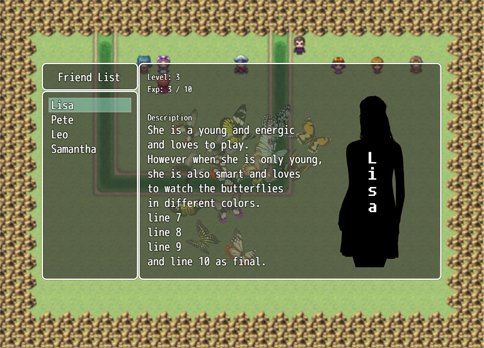
ULS Scene Window
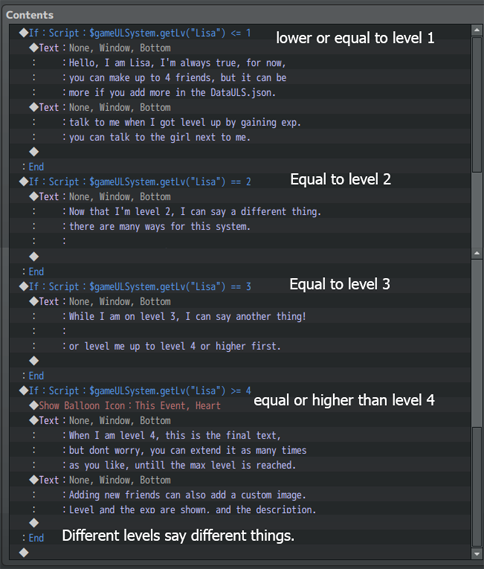
Event Setup (to let them say different things on the level)
DataULS.json setup
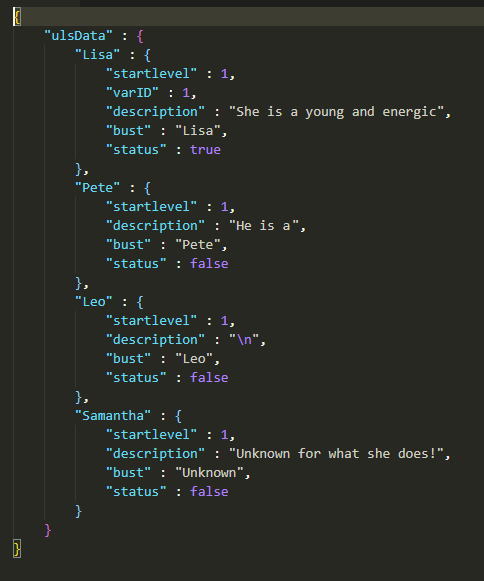
JSON Structure:
startlevel = optional, the starting level when a friend or faction is added.
DynExp = optional, give each friend or faction a different ExpCurve.
- Despite the option to choose, if set to Static, DynExp is ignored.
varID = optional, use a variableID to sync with friend/faction level.
description = add a description, use "\n" for a new line
bust = optional, add a bust or leave use "" or null (default size is 700 Width x 500 height)
status = optional, even it saver to add this one, and set it to true or false.
- true = visible, false = invisible.
Event Setup (to let them say different things on the level)
DataULS.json setup
JSON Structure:
startlevel = optional, the starting level when a friend or faction is added.
DynExp = optional, give each friend or faction a different ExpCurve.
- Despite the option to choose, if set to Static, DynExp is ignored.
varID = optional, use a variableID to sync with friend/faction level.
description = add a description, use "\n" for a new line
bust = optional, add a bust or leave use "" or null (default size is 700 Width x 500 height)
status = optional, even it saver to add this one, and set it to true or false.
- true = visible, false = invisible.
Use Scriptcalls to control rather they level or gain exp, this is the list of scriptcalls:
SCRIPTCALLS: only "getLv" can be used in a conditional branch
$gameULSystem.getLv(name)
example: $gameULSystem.getLv("Lisa") == 2 //check if Lisa is level 2
$gameULSystem.addLv(name)
example: $gameULSystem.addLv("Lisa") //this add 1 level to Lisa
$gameULSystem.addLv(name, amount)
example: $gameULSystem.addLv("Lisa", 2) //this adds 2 levels to Lisa
$gameULSystem.dropLv(name)
example: $gameULSystem.dropLv("Lisa") //this drop 1 level from Lisa
$gameULSystem.dropLv(name, amount)
example: $gameULSystem.dropLv("Lisa", 2) //this drops 2 levels from Lisa
$gameULSystem.gainExp(name, exp)
example: $gameULSystem.gainExp("Lisa", 3) //this gives Lisa 3 exp
$gameULSystem.setExpValue(name, value)
example: $gameULSystem.setExpValue("Lisa", 5) //set the exp value for Lisa to 5
$gameULSystem.setLv(name, level, exp)
example: $gameULSystem.setLv("Lisa", 2, 7) // set level of Lisa to 2 and Exp of Lisa to 7
$gameULSystem.setStatus(name, status)
example: $gameULSystem.setStatus("Lisa", true) // set status of Lisa to true if false
$gameULSystem.setStatus(name, status)
example: $gameULSystem.setStatus("Lisa", false) // set status of Lisa to false if true
Set a status to true will show the name in the list, while false will hide it.
SCRIPTCALLS: only "getLv" can be used in a conditional branch
$gameULSystem.getLv(name)
example: $gameULSystem.getLv("Lisa") == 2 //check if Lisa is level 2
$gameULSystem.addLv(name)
example: $gameULSystem.addLv("Lisa") //this add 1 level to Lisa
$gameULSystem.addLv(name, amount)
example: $gameULSystem.addLv("Lisa", 2) //this adds 2 levels to Lisa
$gameULSystem.dropLv(name)
example: $gameULSystem.dropLv("Lisa") //this drop 1 level from Lisa
$gameULSystem.dropLv(name, amount)
example: $gameULSystem.dropLv("Lisa", 2) //this drops 2 levels from Lisa
$gameULSystem.gainExp(name, exp)
example: $gameULSystem.gainExp("Lisa", 3) //this gives Lisa 3 exp
$gameULSystem.setExpValue(name, value)
example: $gameULSystem.setExpValue("Lisa", 5) //set the exp value for Lisa to 5
$gameULSystem.setLv(name, level, exp)
example: $gameULSystem.setLv("Lisa", 2, 7) // set level of Lisa to 2 and Exp of Lisa to 7
$gameULSystem.setStatus(name, status)
example: $gameULSystem.setStatus("Lisa", true) // set status of Lisa to true if false
$gameULSystem.setStatus(name, status)
example: $gameULSystem.setStatus("Lisa", false) // set status of Lisa to false if true
Set a status to true will show the name in the list, while false will hide it.
ULS Open
Example: ULS Open // open the ULS Scene
ULS Add NAME
Example: ULS Add Lisa // add Lisa to the list
ULS Remove NAME
Example: ULS Remove Lisa // removes Lisa from the list
ULS GainExp NAME EXPGAIN
Example: ULS GainExp Lisa 4 // give Lisa 4 exp points.
ULS addLv NAME AMOUNT
Example: ULS AddLv Lisa 3 // give Lisa 3 levels
(if amount is ommitted, it gives 1 level)
ULS dropLv NAME AMOUNT
Example: ULS dropLv Lisa 3 // drops Lisa level by 3
(if amount is ommitted, it drops 1 level)
Example: ULS Open // open the ULS Scene
ULS Add NAME
Example: ULS Add Lisa // add Lisa to the list
ULS Remove NAME
Example: ULS Remove Lisa // removes Lisa from the list
ULS GainExp NAME EXPGAIN
Example: ULS GainExp Lisa 4 // give Lisa 4 exp points.
ULS addLv NAME AMOUNT
Example: ULS AddLv Lisa 3 // give Lisa 3 levels
(if amount is ommitted, it gives 1 level)
ULS dropLv NAME AMOUNT
Example: ULS dropLv Lisa 3 // drops Lisa level by 3
(if amount is ommitted, it drops 1 level)
\ULS[name, startlevel] = get the starting level (name is not showed)
\ULS[name, level] = get the level (name is not showed)
\ULS[name, exp] = get current experience (name is not showed)
in order to show the name or status specific, use the following:
Example:
Lisa current status are:
Startlevel: \ULS[Lisa, startlevel],
Lv: \ULS[Lisa, level],
Exp: \ULS[Lisa, exp].
It will than show:
Lisa current status are:
Startlevel: 3,
Lv: 5,
Exp: 2.
start level: can vary per "name" you set up in the DataULS.json,
level: shows the "name" level he/she currently is (or faction)
exp: shows the amount of exp he/she currently have (or faction)
When you want to prompt the "Name" that level up automatically or by interaction
when gaining enough experience, you can set up a scriptcall if you want to use it.
var LvUp = $gameULSystem.gainExp(name, exp);
$gameSwitches.setValue(x, LvUp);
for example:
var LvUp = $gameULSystem.gainExp("Lisa", 4);
$gameSwitches.setValue(5, LvUp);
than use text message like: Lisa is now Lv \v[1] (depending if you add a varID in the datafile).
Turn of the switch(x) to OFF after it so it can be re-used again.
\ULS[name, level] = get the level (name is not showed)
\ULS[name, exp] = get current experience (name is not showed)
in order to show the name or status specific, use the following:
Example:
Lisa current status are:
Startlevel: \ULS[Lisa, startlevel],
Lv: \ULS[Lisa, level],
Exp: \ULS[Lisa, exp].
It will than show:
Lisa current status are:
Startlevel: 3,
Lv: 5,
Exp: 2.
start level: can vary per "name" you set up in the DataULS.json,
level: shows the "name" level he/she currently is (or faction)
exp: shows the amount of exp he/she currently have (or faction)
When you want to prompt the "Name" that level up automatically or by interaction
when gaining enough experience, you can set up a scriptcall if you want to use it.
var LvUp = $gameULSystem.gainExp(name, exp);
$gameSwitches.setValue(x, LvUp);
for example:
var LvUp = $gameULSystem.gainExp("Lisa", 4);
$gameSwitches.setValue(5, LvUp);
than use text message like: Lisa is now Lv \v[1] (depending if you add a varID in the datafile).
Turn of the switch(x) to OFF after it so it can be re-used again.
ULS Settings (base)
Max Lv per Name: set max level (currently static only)
Exp Per Level:
use single number to keep a static level up rate,
use [10,20,30,40,etc] (up to max level) for a static expCurve
Exp Curve keep repeating the last exp untill max level is reached.
Exp Choice: (options)
- Exp Curve (Static) : show Numbers as Exp gain in window
- Exp Gauge (Static) : Show a gauge of Exp gain in window
- Exp Curve (Dynamic): Show Dynamic Exp Curve (set in DataULS.json)
- Exp Gauge (Dynamic): Show Dynamic Exp Curve (set in DataULS.json)
Exp Gauge Number:
this is optional to show the gauge exp number, default is false.
when true, Exp Numbers are showed (this is ignored if no Gauge is chosen)
Menu Settings:
Show Menu Command : when true, it is showed in the menu, otherwise, it's not.
use an event or item to prompt the list.
Menu Command : Name how the command is showed on the menu or scene.
Window Settings
Adjust all windows and their position of the X, Y position and the Width and Heights.
Title = the window of the given name in Menu Command
List = the entry of the "names" in DataULS
Data = the information window.
Max Lv per Name: set max level (currently static only)
Exp Per Level:
use single number to keep a static level up rate,
use [10,20,30,40,etc] (up to max level) for a static expCurve
Exp Curve keep repeating the last exp untill max level is reached.
Exp Choice: (options)
- Exp Curve (Static) : show Numbers as Exp gain in window
- Exp Gauge (Static) : Show a gauge of Exp gain in window
- Exp Curve (Dynamic): Show Dynamic Exp Curve (set in DataULS.json)
- Exp Gauge (Dynamic): Show Dynamic Exp Curve (set in DataULS.json)
Exp Gauge Number:
this is optional to show the gauge exp number, default is false.
when true, Exp Numbers are showed (this is ignored if no Gauge is chosen)
Menu Settings:
Show Menu Command : when true, it is showed in the menu, otherwise, it's not.
use an event or item to prompt the list.
Menu Command : Name how the command is showed on the menu or scene.
Window Settings
Adjust all windows and their position of the X, Y position and the Width and Heights.
Title = the window of the given name in Menu Command
List = the entry of the "names" in DataULS
Data = the information window.
WARNING: Gauge colors, width and height are fixed, as there will be paid
version with an additional explanation on how and where to edit the width
height, position of X and Y and colors of the gauge to fit your needs!
the DEMO dont have this version, but you can easely overwrite without errors.
in case there are some errors, let me know.
Download [here] it has the demo, and files, you can copy the
DataULS.json (from data folder) and JS from plugins folder.
recommended resolution (for center the window scene) 1200x864)[/CODE][/SPOILER]
Downloads / Referenced Files
RPG Maker Web attachments are mirrored locally when available. Other external links remain hosted by their original creator or third-party service.
- Local mirror: 191320-d8b692f646070fce46eece0045ac3d49.gif
SHA-256:49f0da7da251d8b2aee09d641e973df242e9e45079225e856e14f1ad280212df
Original attachment URL: https://forums.rpgmakerweb.com/attachments/untitled-project-gif.212240/ - Local mirror: 163756-5e51da0df804982c150b27e37897107e.png
SHA-256:f315da5f145f857d31a2e795a319c0fa7af3dfd5cd39e8f756c8961f1e26bb89
Original attachment URL: https://forums.rpgmakerweb.com/attachments/uls_scene-png.184676/ - Local mirror: 163757-d439d24e4e36e2e4850ddf9d226f1b6b.png
SHA-256:698614cddb8e688b53ba4f7663321d29ba95be26d9e2ebc197941d7ea0545a71
Original attachment URL: https://forums.rpgmakerweb.com/attachments/uls_eventsetup-png.184677/ - Local mirror: 163758-381edc985a4fab2e0aa55f8b480657d2.png
SHA-256:b2e7c73663b62d2d3c33d19e8220725cf7ee02570baf3b7734ca1a4640692d64
Original attachment URL: https://forums.rpgmakerweb.com/attachments/datauls_settings-png.184678/ - Download: here
License / Terms Note
TERMS OF USE: Credit ShadowDragon Spoiler: TERMS OF USE YOU ARE NOT ALLOWED TO MODIFY, EXTEND, REDISTRIBUTE OR SELL IT.
Referenced Images / Attachments
Creator Claims / Removal
If you are the original creator and want this listing reassigned, edited, or removed, join BMMPlay and contact the moderators with proof that matches the original RPG Maker Web profile, linked GitHub, itch.io page, or another public creator identity.
Replies (0)
No replies yet.
0
replies
28
views
Topic Summary
Loading summary...