

MVWindow Message Font Colour [Updated - 1.1]
BMM_Archive · July 15, 2026

Original Source
- Original title: Window Message Font Colour [Updated - 1.1]
- Original author: GibzFGC
- Original date: October 25, 2015
- Source thread: https://forums.rpgmakerweb.com/threads/window-message-font-colour-updated-1-1.47120/
- Source forum path: Game Development Engines > RPG Maker Javascript Plugins > JS Plugin Releases (RMMV)
Summary
Window Message Font ColourVer. 1.1 - MechaGS Introduction: Adds an option to change the font size, colour, outline width and the outline colour of the message boxes in your game. Changing the font colour use's hex value. Example: #FFFFFF = white. Changing the outline colour requires an RGBA value. Example: rgba(0, 0, 0, 0.5) = black with a half opacity.
Archived First Post
- Adds an option to change the font size, colour, outline width and the outline colour of the message boxes in your game.
- Changing the font colour use's hex value. Example: #FFFFFF = white.
- Changing the outline colour requires an RGBA value. Example: rgba(0, 0, 0, 0.5) = black with a half opacity.
- There is now a command for changing the parameters in a a Plugin Command.
- You can directly change all of the values in the plugin manager.
- You can directly change all of the values via Plugin Command.
This was the most recommended feature below. It has now been added.
The command is: MechaGS_WMFC <font_size> <font_colour> <outline_colour> <outline_width>
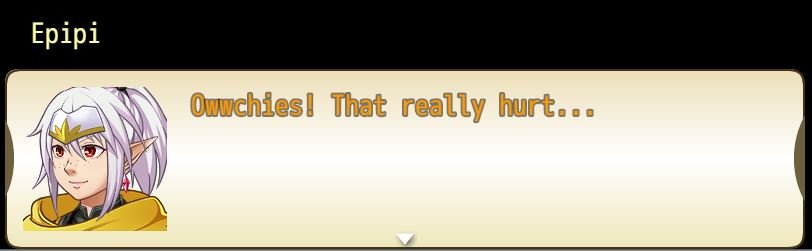
Example: MechaGS_WMFC 28 #FF9900 rgba(255,255,255,0.5) 4
Renders: font size 28, orange text, white outline, outline width of 4
Screenshot:
Download:1.1 - Download
Credit:
- Credit isn't necessary, a word or two below would be nice though!
- Free for non-commercial and commercial use.
- If you'd like, down the line I could always help test your game!
Issues:
- This doesn't work with Yanfly's MessageCore, they overwrite each other.
To Do:
- Aim to fix Yanfly Message Core compatibility.
Features Mentioned
- You can directly change all of the values in the plugin manager.
- You can directly change all of the values via Plugin Command.
- The Command:
- This was the most recommended feature below. It has now been added.
- The command is: MechaGS_WMFC
- Example: MechaGS_WMFC 28 #FF9900 rgba(255,255,255,0.5) 4
- Renders: font size 28, orange text, white outline, outline width of 4
- Screenshot:
- Spoiler
- "lightbox_close": "Close",
- "lightbox_next": "Next",
- "lightbox_previous": "Previous",
- "lightbox_error": "The requested content cannot be loaded. Please try again later.",
- "lightbox_start_slideshow": "Start slideshow",
- "lightbox_stop_slideshow": "Stop slideshow",
- "lightbox_full_screen": "Full screen",
- "lightbox_thumbnails": "Thumbnails",
- "lightbox_download": "Download",
Downloads / Referenced Files
RPG Maker Web attachments are mirrored locally when available. Other external links remain hosted by their original creator or third-party service.
- Local mirror: 13612-e862c24013d8776c75a9e3a7eea7b727.jpg
SHA-256:0dc410e7104b841712ff13e95c346222472b2431675da52624d399e044801c20
Original attachment URL: https://forums.rpgmakerweb.com/attachments/mechags_windowmessagefontcolour-jpg.24583/ - Source: Download
License / Terms Note
Credit: Credit isn't necessary, a word or two below would be nice though! Free for non-commercial and commercial use. If you'd like, down the line I could always help test your game!
Referenced Images / Attachments
Creator Claims / Removal
If you are the original creator and want this listing reassigned, edited, or removed, join BMMPlay and contact the moderators with proof that matches the original RPG Maker Web profile, linked GitHub, itch.io page, or another public creator identity.
Replies (0)
No replies yet.
Topic Summary
Loading summary...