

MVWait Extended - Use minutes, seconds, variables
BMM_Archive · July 15, 2026

Original Source
- Original title: Wait Extended - Use minutes, seconds, variables
- Original author: Galenmereth
- Original date: May 4, 2019
- Source thread: https://forums.rpgmakerweb.com/threads/wait-extended-use-minutes-seconds-variables.108654/
- Source forum path: Game Development Engines > RPG Maker Javascript Plugins > JS Plugin Releases (RMMV)
Summary
TDDP_WaitEx 1.0.1 Galenmereth Introduction This plugin allows you to call Wait events using minutes, seconds, variables, and more. Useful when you need to time waits to music, sound effects, or other units of time that make converting -- and reading -- frames inconvenient.
Archived First Post
Galenmereth
Introduction
This plugin allows you to call Wait events using minutes, seconds, variables, and more. Useful when you need to time waits to music, sound effects, or other units of time that make converting -- and reading -- frames inconvenient.
Using variables as wait duration also expands the possibilities of what you can do without the need for excessive conditional branches.
Features
- Very easy Plugin Command syntax. As simple as typing "Wait 2m 30s".
- Use variables with any time unit. For example: "Wait v1m v2s".
- Doesn't alter MV's internal wait functionality; simply converts any of the time units to frames and passes it on.
Not much to show in a screenshot, but have an example nonetheless:
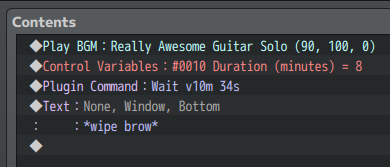
How to use
Plugin Command: Wait 2m 30sYou can combine any number of units in any order you want. So while impractical, you can do this:
Plugin Command: Wait 15s 1m 2m 10fThe default time unit is frames, so if you simply want to wait for a variable's value number of frames, you can simply write:
Plugin Command: Wait v1Variables
You can use variables as values. For example:
Plugin Command: Wait v1m v2s 30fThis would wait variable 1's value in minutes, variable 2's value in seconds, and 30 frames.
Verbosity
If you feel like the units are a little hard to read, you can use more verbose aliases. For example:
Plugin Command: Wait 3minutes 15seconds 20framesAll available units of time
------------------------------------------------------------------------------
Unit         | Valid keys       | Example usage
- - - - - - -|- - - - - - - - - | - - - - - - - - - - - - - - - - - - - - - -
Frames       | f, frames, blank | 5f, 5frames, 5
Minutes      | m, min, minutes  | 2m, 2min, 2minutes
Seconds      | s, sec, seconds  | 8s, 8sec, 8seconds
Milliseconds | ms, milliseconds | 300ms, 300millisecondsNote: Keep in mind that ~16 milliseconds will pass for each internal "tick" in MV's engine, so wait times that aren't multiples of 16 when using milliseconds will not be entirely precise.
Download
Grab the latest release here: TDDP_WaitEx.js
Changelog
------------------------------------------------------------------------------
Date       | Version | Description
- - - - - -|- - - - -|- - - - - - - - - - - - - - - - - - - - - - - - - - - -
04/05/2019 | 1.0.1   | Add support for no time unit, defaulting to frames
Credit
- Tor Damian Design / Galenmereth
License
Released under an MIT License (free for commercial use)
Features Mentioned
- Very easy Plugin Command syntax. As simple as typing "Wait 2m 30s".
- Use variables with any time unit. For example: "Wait v1m v2s".
- Doesn't alter MV's internal wait functionality; simply converts any of the time units to frames and passes it on.
Downloads / Referenced Files
RPG Maker Web attachments are mirrored locally when available. Other external links remain hosted by their original creator or third-party service.
- Download: TDDP_WaitEx.js
License / Terms Note
Credit - Tor Damian Design / Galenmereth License Released under an MIT License (free for commercial use)
Referenced Images / Attachments
Creator Claims / Removal
If you are the original creator and want this listing reassigned, edited, or removed, join BMMPlay and contact the moderators with proof that matches the original RPG Maker Web profile, linked GitHub, itch.io page, or another public creator identity.
Replies (0)
No replies yet.
Topic Summary
Loading summary...