

MVMV/MZ Title Reward Icons
BMM_Archive · July 15, 2026

Original Source
- Original title: MV/MZ Title Reward Icons
- Original author: ShadowDragon
- Original date: June 26, 2022
- Source thread: https://forums.rpgmakerweb.com/threads/title-reward-icons.148901/
- Source forum path: Game Development Engines > RPG Maker Javascript Plugins > JS Plugin Releases (RMMV)
Summary
PluginName: ShadowDragon_TRI (Title Reward Icons) Author: ShadowDragon TERMS OF USE: Credit ShadowDragon
Archived First Post
Author: ShadowDragon
TERMS OF USE:
Credit ShadowDragon
You are allowed to use it in Non-commercial and commercial games when credits are given.
You may edit the plugin, but NOT redistribute the plugin, but link back to this thread.
Do not remove the header!
The idea behind this plugin:
The idea come from MegaMan BattleNetwork where you get the reward on top
of your achievements.
I wanted to see if I could replicate the effect, as I dont know how persistent switches work,
I took Olivia's MetaControls for a test and it does work really nicely.
It can bring up some possibilities how you use it across the game.
HOW IT WORKS:
Reward player by achieving something specific, or open new path by
knowing them the game has been beaten, increased difficulty, and add
more as they beat the game from a NewGame+ mode.
It does NOT save any changes without persistent data plugin.
I would recommended "Olivia_MetaControls" plugin for it, and
use <global> for the switches to save across all saves.
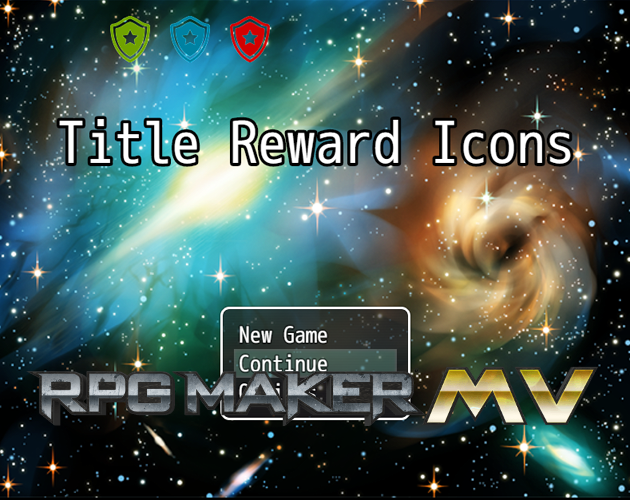
Free version is restricted by 2 icons.
NOTE:
if you want the persistent switches/variable be saved when the game is saved, you need
need to alter the code of the MetaControls plugin and your save plugin.
if you use TSR_Save, find this function:
Scene_Save.prototype.onSaveSuccess = function() {
    SoundManager.playSave();
    ConfigManager.save(); // <= added
    StorageManager.cleanBackup(this.savefileId());
    this.popScene();
};
in Olivia's MetaControls, scroll down where you see "ConfigManager.save()"
and rule them out with // before it, in both Variables and Switches.
the only issue left if GameEnd which I need to figure it out, F5 and Reboot game works.
For any Issues, let me know.
History:
26-6-2022 first public release
20-7-2023 Update + new features. (Compability for MZ users). (free and paid)
- Tooltip window to add your info how it is achieved on mouse over.
- set Tooltip Width and color for its frame, no color = black!
- Tooltip Info, leave blank for not showing.
Issues:
None
Downloads / Referenced Files
RPG Maker Web attachments are mirrored locally when available. Other external links remain hosted by their original creator or third-party service.
- Download: Olivia_MetaControls
- Local mirror: 209824-38cc8d7f235985ba4cbe9a01bcfe1580.png
SHA-256:f308e575568ebd0dd5a5dc700753b81dc3c29310b68d530f15d74ebd1dd02011
Original attachment URL: https://forums.rpgmakerweb.com/attachments/tricovimg-png.230744/ - Download: Download plugin here
License / Terms Note
TERMS OF USE: Credit ShadowDragon You are allowed to use it in Non-commercial and commercial games when credits are given. You may edit the plugin, but NOT redistribute the plugin, but link back to this thread.
Referenced Images / Attachments
Creator Claims / Removal
If you are the original creator and want this listing reassigned, edited, or removed, join BMMPlay and contact the moderators with proof that matches the original RPG Maker Web profile, linked GitHub, itch.io page, or another public creator identity.
Replies (0)
No replies yet.
Topic Summary
Loading summary...