

MVWeapon Sprites Enhanced
BMM_Archive · July 15, 2026

BMM_Archive
Preserved forum archive. This topic stores the original first post and locally mirrored RPG Maker Web attachments when available. It is posted by the BMMPlay archive account, not by the original creator.
Original Source
- Original title: Weapon Sprites Enhanced
- Original author: Rexal
- Original date: October 27, 2015
- Source thread: https://forums.rpgmakerweb.com/threads/weapon-sprites-enhanced.47689/
- Source forum path: Game Development Engines > RPG Maker Javascript Plugins > JS Plugin Releases (RMMV)
Summary
Weapon Sprites Enhanced - v1.14b Rexal Intro - Tired of the limitations MV puts on the images you use? Be tired no more!
Archived First Post
Weapon Sprites Enhanced - v1.14b
Rexal
Intro - Tired of the limitations MV puts on the images you use? Be tired no more!
Using Yanfly's plugins? Consider this instead.
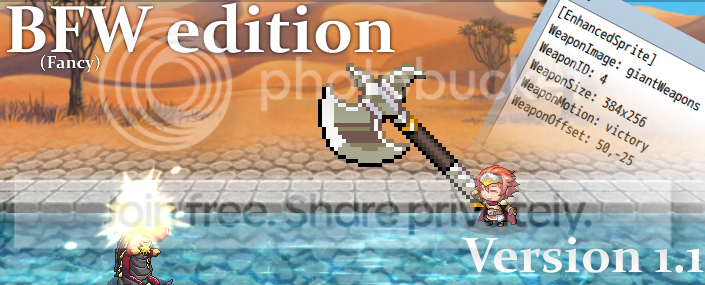
What's new:
- Enemies should respect their equipment and no longer only use a dagger.
- Added Weapon Index tag for enemies that lets you equip a weapon onto said enemy.
Download - Here
Demo(for all of my plugins) - Here
Features -
- set the file name for weapon sprites
- change the sprite's hue
- define how many frames of animation the weapon has
- set the sprite's index
- have the actor play a specified animation when attacking with the weapon
- have the weapon play a sound whenever you attack
- have the weapon's image be whatever size you want.
- have the weapon be positioned wherever you want.
Note Tags -
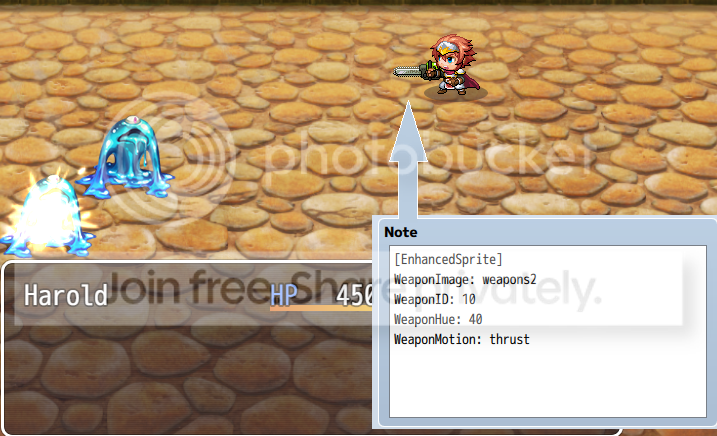
Spoiler
[Enemies]-----------------------------------------------------------------------------------------------------
Weapon Index: id
Equips the enemy with this weapon.
[Weapons]---------------------------------------------------------------------------------------------------
[Enhanced Sprite]
Enables the use of the Tags. Implemented to ensure compatibility with other scripts that modify Sprite_Weapon, and to allow you to also use regular weaponType sprite functionality.
Weapon Image: img
Sets the weapon's image.
Ex: WeaponImage: weapons1
Weapon Index: id
Sets the weapon ID. Do not use zero.
Ex: WeaponID: 1
Weapon Hue: hue
Shifts the weapon's hue.
Ex: WeaponHue: 46
Weapon Motion: motion
Plays the specified SV motion. This isn't limited to the basic attack motions in the System Database.
Ex: WeaponMotion: swing
Weapon Frames: frames
Sets the amount of frames the weapon image uses.
Ex: WeaponFrames: 3
Weapon Size: widthxheight
Defines how big the weapon image's frame is. does not scale the weapons themselves, you have to do that manually.
Ex: WeaponSize: 96x64
Weapon Sound: se, pan, pitch, volume
Plays a sound whenever the actor attacks.
Ex: WeaponSound: wind7, 0, 150, 100
Weapon Offset: x,y
Offsets the weapon position by the specified amount.
Ex: WeaponOffset: -30,200
Weapon Speed: frames
The amount of frames the weapon takes to move to the next animation frame. If this isn't used, it'll use 36/frames instead.
Ex: WeaponSpeed: 12
[Enemies]-----------------------------------------------------------------------------------------------------
Weapon Index: id
Equips the enemy with this weapon.
[Weapons]---------------------------------------------------------------------------------------------------
[Enhanced Sprite]
Enables the use of the Tags. Implemented to ensure compatibility with other scripts that modify Sprite_Weapon, and to allow you to also use regular weaponType sprite functionality.
Weapon Image: img
Sets the weapon's image.
Ex: WeaponImage: weapons1
Weapon Index: id
Sets the weapon ID. Do not use zero.
Ex: WeaponID: 1
Weapon Hue: hue
Shifts the weapon's hue.
Ex: WeaponHue: 46
Weapon Motion: motion
Plays the specified SV motion. This isn't limited to the basic attack motions in the System Database.
Ex: WeaponMotion: swing
Weapon Frames: frames
Sets the amount of frames the weapon image uses.
Ex: WeaponFrames: 3
Weapon Size: widthxheight
Defines how big the weapon image's frame is. does not scale the weapons themselves, you have to do that manually.
Ex: WeaponSize: 96x64
Weapon Sound: se, pan, pitch, volume
Plays a sound whenever the actor attacks.
Ex: WeaponSound: wind7, 0, 150, 100
Weapon Offset: x,y
Offsets the weapon position by the specified amount.
Ex: WeaponOffset: -30,200
Weapon Speed: frames
The amount of frames the weapon takes to move to the next animation frame. If this isn't used, it'll use 36/frames instead.
Ex: WeaponSpeed: 12
Terms of Use - Free for commercial and non-commercial use.
Future Plans -
- Allow states to change weapon image...or allow weapons to change their image depending on the state.
- Let you set the weapon to be in front of the actor instead of behind them.
Change Log -
Spoiler
v1 -
Initial Release
v1.01 -
-Fixed error when using barehanded.
-Fixed the weapon not showing an animation when its Weapon Type's SV motion is undefined.
-Removed the Sprite_Weapon.prototype.initMembers overwrite function as there was no point to it
and it made certain plugins incompatible.
-WeaponSize is integrated but most likely not in working condition.
Use at your discretion.
v1.1 -
- Added WeaponSound. It'll have the weapon play a sound whenever the actor attacks.
- Added WeaponOffset. This allows you to set the position of the weapon.
- WeaponSize actually works as it's supposed to now.
- cleaned up the script a bit to make it easier to read.
- Had no choice but to Overwrite Sprite_Weapon.prototype.update. Fingers crossed that didn't actually do anything negative.
v1.11 hotfix -
- Fixed the weapon position.
v1.12 -
- Changed the frame speed of the weapons so they match the default ones.
- Added WeaponSpeed so you can define your own speed.
v1.13 -
- Made the weapons stay put when you set the offset.
v1.14a -
-Works with animated enemies now.
-Rewrote the tags. Legacy spelling still works.
v1.14b-
- Works with anything that equips weapons to enemies now.
v1 -
Initial Release
v1.01 -
-Fixed error when using barehanded.
-Fixed the weapon not showing an animation when its Weapon Type's SV motion is undefined.
-Removed the Sprite_Weapon.prototype.initMembers overwrite function as there was no point to it
and it made certain plugins incompatible.
-WeaponSize is integrated but most likely not in working condition.
Use at your discretion.
v1.1 -
- Added WeaponSound. It'll have the weapon play a sound whenever the actor attacks.
- Added WeaponOffset. This allows you to set the position of the weapon.
- WeaponSize actually works as it's supposed to now.
- cleaned up the script a bit to make it easier to read.
- Had no choice but to Overwrite Sprite_Weapon.prototype.update. Fingers crossed that didn't actually do anything negative.
v1.11 hotfix -
- Fixed the weapon position.
v1.12 -
- Changed the frame speed of the weapons so they match the default ones.
- Added WeaponSpeed so you can define your own speed.
v1.13 -
- Made the weapons stay put when you set the offset.
v1.14a -
-Works with animated enemies now.
-Rewrote the tags. Legacy spelling still works.
v1.14b-
- Works with anything that equips weapons to enemies now.
Features Mentioned
- set the file name for weapon sprites
- change the sprite's hue
- define how many frames of animation the weapon has
- set the sprite's index
- have the actor play a specified animation when attacking with the weapon
- have the weapon play a sound whenever you attack
- have the weapon's image be whatever size you want.
- have the weapon be positioned wherever you want.
- Note Tags
- Spoiler
- [Enemies]
- Weapon Index: id
- Equips the enemy with this weapon.
- [Weapons]
- [Enhanced Sprite]
- Enables the use of the Tags. Implemented to ensure compatibility with other scripts that modify Sprite_Weapon, and to allow you to also use regular weaponType sprite functionality.
- Weapon Image: img
Downloads / Referenced Files
RPG Maker Web attachments are mirrored locally when available. Other external links remain hosted by their original creator or third-party service.
- Source: Here
License / Terms Note
Terms of Use - Free for commercial and non-commercial use. Future Plans -
Referenced Images / Attachments
Creator Claims / Removal
If you are the original creator and want this listing reassigned, edited, or removed, join BMMPlay and contact the moderators with proof that matches the original RPG Maker Web profile, linked GitHub, itch.io page, or another public creator identity.
Replies (0)
No replies yet.
0
replies
18
views
Topic Summary
Loading summary...