

MVCustom Loot Pools
BMM_Archive · July 15, 2026

Original Source
- Original title: Custom Loot Pools
- Original author: ThreeSixNine
- Original date: April 24, 2023
- Source thread: https://forums.rpgmakerweb.com/threads/custom-loot-pools.156962/
- Source forum path: Game Development Engines > RPG Maker Javascript Plugins > JS Plugin Releases (RMMV)
Summary
Custom Loot PoolsIntroduction This RPG Maker MV plugin allows for the creation of custom loot pools for your items, weapons and armor*, through the use of custom notetags. You can then award the player a random element from a given pool. You can also award multiple random elements from a given pool. The loot pools can also be added as enemy drops, enhancing the loot distribution process even further. *From this point on, any reference made to 'item/s' also refers to weapons and armors, unless otherwise stated. Note: This plugin...
Archived First Post
Custom Loot Pools
Introduction
This RPG Maker MV plugin allows for the creation of custom loot pools for your items, weapons and armor*, through the use of custom notetags. You can then award the player a random element from a given pool. You can also award multiple random elements from a given pool. The loot pools can also be added as enemy drops, enhancing the loot distribution process even further.
*From this point on, any reference made to 'item/s' also refers to weapons and armors, unless otherwise stated.
Note: This plugin changes the way drops are displayed after battle. It probably won't be compatible with any plugin that does the same.
This plugin is free for commercial use.
Plugin Parameters
This plugin has no plugin parameters, it is entirely set up through notetags.
What are Loot Pools?
A loot pool is a collection of items that share a common custom notetag. These notetags allow the developer to award a random item from the pool using a script call or by adding the loot pools to an enemy's drops.Add an item to a loot pool using the following notetag format:
<Loot Pools>
lootPool
</Loot Pools>
Let's take a look at an example notetag to see how this works:
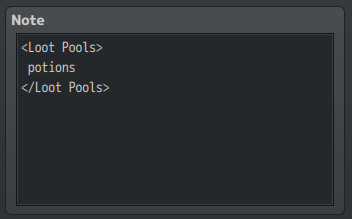
This notetag adds the item to a custom loot pool name 'potions'
This is all that is necessary to create a custom loot pool.
You can then use the following script call to award a random element from your newly created pool:
ThreeSixNine.CLP.gainRandomLoot('lootPool', X);- Replace "lootPool" with the name of the loot pool you wish to draw from.
- Quotation marks ARE required around the loot pool name.
- Replace "X" with the quantity of that item to drop.
- A default quantity of 1 will be used if no quantity is provided.
ThreeSixNine.CLP.gainRandomLoot('potions');It would award the player with an item from the potions loot pool. Since there is only one item in the loot pool, it would award that item everytime you used this script call, until you add mre items to the pool.
If we repeat the same process of adding our custom notetag to the next item in the database, we begin to see what this plugin is capable of.
If we then us the same script call:
ThreeSixNine.CLP.gainRandomLoot('potions');We again award the player a random item from the potions loot pool, but this time, it could be either item with the potions loot pool notetag.
You can alternatively use the script call:
ThreeSixNine.CLP.gainRandomLootMulti('lootPool', X);Replace X with the number of random items from the given loot pool to the player.
If no quantity in provided, the default quantity of 2 will be used. This allows you to award multiple random items from a given loot pool with one script call. Use it when you want more than one random reward at a time.
A few notes about creating the Loot Pool notetags:
- Loot pool names will be converted entirely to lowercase format. This means that variations in capitalization only will be treated as the same loot pool.
And
Would add the item to the same pool, named 'potions'. This is to help minimize errors when setting up the notetags.
- You CAN use spaces, numbers and special characters when creating loot pools.
- You CAN add more than one loot pool to an item
Enemy Drops
You can add loot pools to enemy drops. When added to enemy drops, the loot pools work similarly to the script call. Upon defeat an enemy with a loot pool attached as a drop, will have a chance to drop a random item from the attached loot pool.Add a loot pool to an enemy drop using the following notetag format in the enemy's note box:
<Loot Drops>
potions: 100%
</Loot Drops>
- Replace lootPool with the name of a custom loot pool attached to your items.
- Replace X% with the percent chance to call the random drop upon defeating the enemy.
A few notes about creating the Loot Drop notetags:
- The percent chance must be provided, there is no default chance provided.
- You can add multiple instances of the same pool
- Each instance will be treated as it's own possible drop.
- You can bypass the editor limit on drops this way
Loot Drop Notetags:
Enemy vs Drop Reference:
Downloads / Referenced Files
RPG Maker Web attachments are mirrored locally when available. Other external links remain hosted by their original creator or third-party service.
- Download: Download Plugin Here
- Local mirror: 238976-01290a3a447093716e9ed805ddd5c569.png
SHA-256:bfccc21abb6d527cca5fa29f10065226f551a3237bc23b00f6084e45a0d7a79b
Original attachment URL: https://forums.rpgmakerweb.com/attachments/clp_lootpoolsexample-png.259896/
License / Terms Note
This plugin is free for commercial use.Plugin ParametersThis plugin has no plugin parameters, it is entirely set up through notetags. What are Loot Pools?A loot pool is a collection of items that share a common custom notetag. These notetags allow the developer to award a random item from the pool using a script call or by adding the loot pools to an enemy's drops. Add an item to a loot pool using the following notetag format: lootPool
Referenced Images / Attachments
Creator Claims / Removal
If you are the original creator and want this listing reassigned, edited, or removed, join BMMPlay and contact the moderators with proof that matches the original RPG Maker Web profile, linked GitHub, itch.io page, or another public creator identity.
Replies (0)
No replies yet.
Topic Summary
Loading summary...