

Graphical Artifact sometimes
BMM_Archive · July 15, 2026

Original Source
- Original title: Graphical Artifact sometimes
- Original author: Jazeeri
- Original date: March 26, 2016
- Source thread: https://forums.rpgmakerweb.com/threads/graphical-artifact-sometimes.59391/
- Source forum path: Game Development Engines > Legacy Engine Support > RPG Maker MV Support
Summary
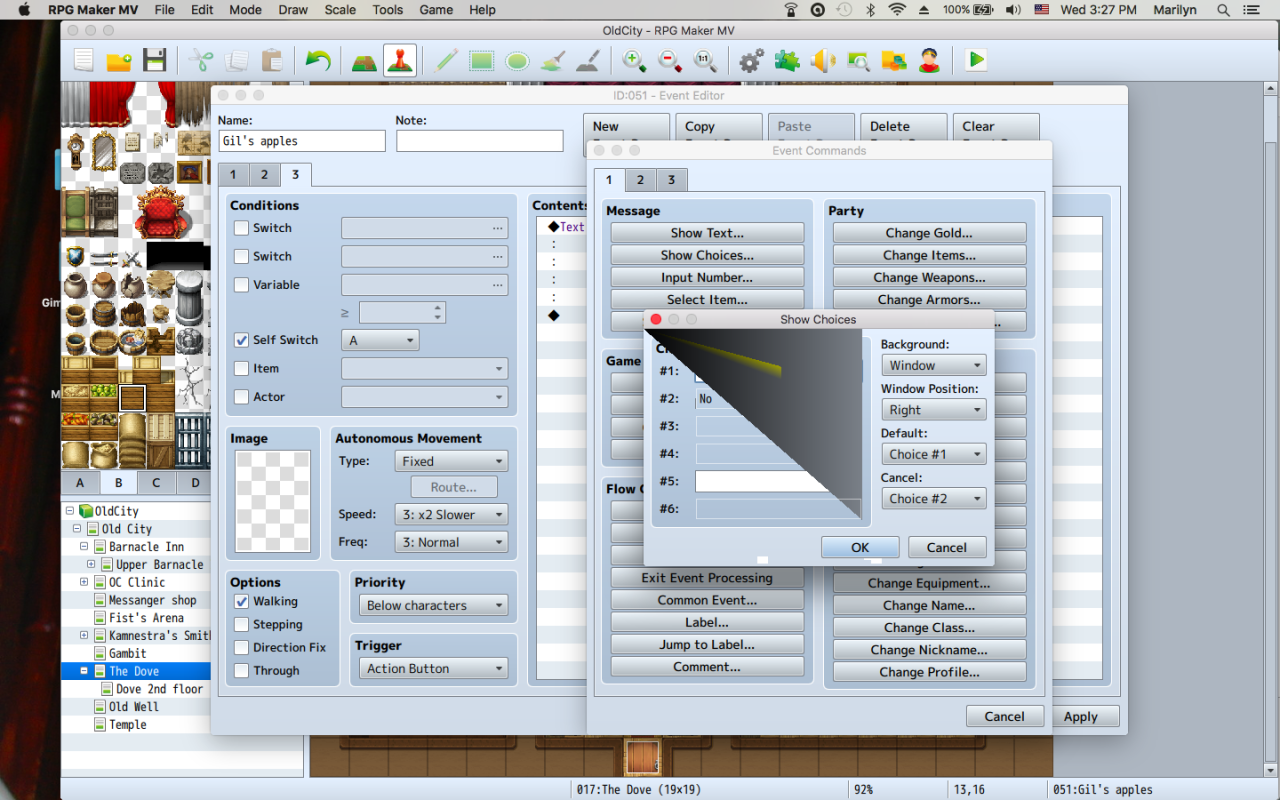
So, it doesn't happen all the time and has only started recently ( in the past 2 weeks) Generally, but not always, after I have been working more 4 hours on the project. I use a Mac airbook with Intel HD Graphics 4000 1536 MB and it only happens when event 'show choices' is open. It will sometimes lose the words in the buttons (such as window would not display it or change the color of the lettering in the buttons to magenta) and sometimes flashes in sync with the...
Archived First Post
All my drivers are up to date and I use it through Steam. It happens if other programs are open and it happens if all are closed. It's work aroundable, as just closing rpgmaker and restarting it tends to fix any issues. I think it happens most when I been working for long enough to have done a lot of eventing on that map. A couple times rpgmaker
crashed after I ignored the issue and just kept going . I always save, and restart now when I see that happening!
Has anyone else seen anything like this? And is it me or the application? Anyone? Thanks!
Downloads / Referenced Files
RPG Maker Web attachments are mirrored locally when available. Other external links remain hosted by their original creator or third-party service.
- Local mirror: 20275-f88ed5569dee1eddee083897368be917.png
SHA-256:e00614f612f81a4c6f10b9cf27e351f2d1257d6abdba2fb8aea0c94e71549337
Original attachment URL: https://forums.rpgmakerweb.com/attachments/screen-shot-2016-03-23-at-3-27-18-pm-png.34589/
Referenced Images / Attachments
Creator Claims / Removal
If you are the original creator and want this listing reassigned, edited, or removed, join BMMPlay and contact the moderators with proof that matches the original RPG Maker Web profile, linked GitHub, itch.io page, or another public creator identity.
Replies (0)
No replies yet.
Topic Summary
Loading summary...