


Character sprite animation help
BMM_Archive · July 15, 2026

Original Source
- Original title: Character sprite animation help
- Original author: spiritquazus
- Original date: October 4, 2015
- Source thread: https://forums.rpgmakerweb.com/threads/character-sprite-animation-help.45476/
- Source forum path: Game Development Engines > Legacy Engine Support > RPG Maker VXAce Support
Summary
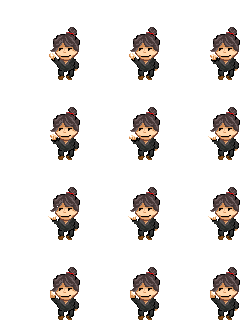
So I decided to dabble in spritemaking recently since I kind of wanted my very own characters in my game, I began with something light, a simple animation of a smug-looking ronin snapping his fingers to the rythm of the music. He displays great in-game though a bit tall compared to other Ace characters, but the problem comes in with the actual animation. I didn't really think it through and just arranged the animation frames in the classic order. Left to right and Up to down. Now when I tried...
Archived First Post
He displays great in-game though a bit tall compared to other Ace characters, but the problem comes in with the actual animation.
I didn't really think it through and just arranged the animation frames in the classic order. Left to right and Up to down. Now when I tried to animate him ingame using custom Moveset, I just can't seem to get it right as his animation either jumps over certain frames or straight out "rewinds" on a previous frame.
I heard of a way to select each frames you want to show in the order of your choice, instead of forcing a "walking cycle then turn in a direction" but nobody actually posted a link to the scripts or any guide related to that.
Could you guys help me out with this? Also feel free to use the sprite in any of your project if it interests you, no credits needed.
EDIT: You can't see it with the white background, but his snapping animation produces a small white flicker that stretches and fades out.
Protected download
Downloads / Referenced Files
Log in, then follow the RPG Maker Developers Group to see these download links.
Log in to downloadLicense / Terms Note
Could you guys help me out with this? Also feel free to use the sprite in any of your project if it interests you, no credits needed. EDIT: You can't see it with the white background, but his snapping animation produces a small white flicker that stretches and fades out. { "lightbox_close": "Close",
Referenced Images / Attachments
Creator Claims / Removal
If you are the original creator and want this listing reassigned, edited, or removed, join BMMPlay and contact the moderators with proof that matches the original RPG Maker Web profile, linked GitHub, itch.io page, or another public creator identity.
Replies (0)
No replies yet.
Topic Summary
Loading summary...

