

Comic Bubble Dialogue Text
BMM_Archive · July 15, 2026

BMM_Archive
Preserved forum archive. This topic stores the original first post and locally mirrored RPG Maker Web attachments when available. It is posted by the BMMPlay archive account, not by the original creator.
Original Source
- Original title: Comic Bubble Dialogue Text
- Original author: Merryjest
- Original date: October 26, 2015
- Source thread: https://forums.rpgmakerweb.com/threads/comic-bubble-dialogue-text.47501/
- Source forum path: Game Development Engines > RPG Maker Javascript Plugins > JS Plugin Requests
Summary
My request isn't terribly complicated: I would like a plugin that modifies message windows, similar to a script that existed for Ace: -Aesthetically, it would make message windows look like the dialogue bubbles from a comic book: { "lightbox_close": "Close",
Archived First Post
My request isn't terribly complicated: I would like a plugin that modifies message windows, similar to a script that existed for Ace:
-Aesthetically, it would make message windows look like the dialogue bubbles from a comic book:
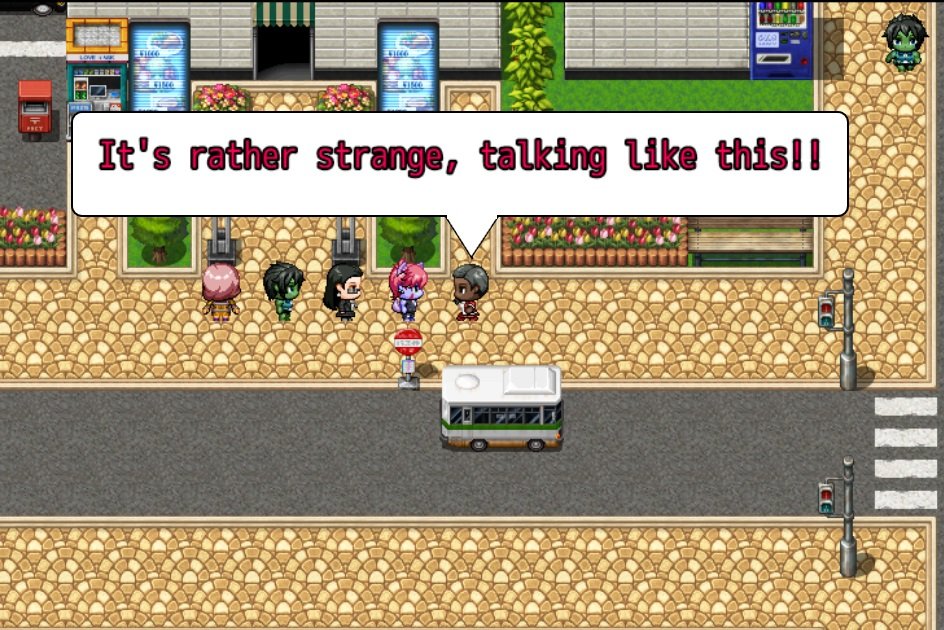
-I would like for the script to be activated by a command in the text field, as the previous script did, which indicated that you wanted to use a dialogue bubble, specified the event number from which the message bubble would emerge (I can't rememberr well, but it was something similar to c[event number] or something like that)
-It isn't a default override for all message windows, it would have to be activated as I described it above.
I believe that the system I was thinking of was Yami's Pop Message. That particular script in question is https://yamiworld.wordpress.com/yami-engine/text-display/pop-message/
If someone can make an MV adaptation of this, I would be incredibly grateful, especially if they could intensify the comic book speech bubble look.
The ability to have the portrait or to leave it out would be nice as well!
-Aesthetically, it would make message windows look like the dialogue bubbles from a comic book:
-I would like for the script to be activated by a command in the text field, as the previous script did, which indicated that you wanted to use a dialogue bubble, specified the event number from which the message bubble would emerge (I can't rememberr well, but it was something similar to c[event number] or something like that)
-It isn't a default override for all message windows, it would have to be activated as I described it above.
I believe that the system I was thinking of was Yami's Pop Message. That particular script in question is https://yamiworld.wordpress.com/yami-engine/text-display/pop-message/
If someone can make an MV adaptation of this, I would be incredibly grateful, especially if they could intensify the comic book speech bubble look.
The ability to have the portrait or to leave it out would be nice as well!
Downloads / Referenced Files
RPG Maker Web attachments are mirrored locally when available. Other external links remain hosted by their original creator or third-party service.
- Local mirror: 13737-af908af18faf4f0d01c09093500cb332.jpg
SHA-256:6823d868748d396e5bd5134f8f4363981c38950e0e348cc048143e85226b92b6
Original attachment URL: https://forums.rpgmakerweb.com/attachments/bubbletalk-jpg.24745/
Referenced Images / Attachments
Creator Claims / Removal
If you are the original creator and want this listing reassigned, edited, or removed, join BMMPlay and contact the moderators with proof that matches the original RPG Maker Web profile, linked GitHub, itch.io page, or another public creator identity.
Replies (0)
No replies yet.
0
replies
12
views
Topic Summary
Loading summary...