

Custom Dialogue Balloon
BMM_Archive · July 15, 2026

Original Source
- Original title: Custom Dialogue Balloon
- Original author: iVale
- Original date: March 10, 2018
- Source thread: https://forums.rpgmakerweb.com/threads/custom-dialogue-balloon.92453/
- Source forum path: Game Development Engines > RPG Maker Javascript Plugins > JS Plugin Requests
Summary
Bear with me here as I try to describe this best i can. How difficult would it be... to create a plugin command to display an animated looping sprite above the player or event with an animate in animation and an animate out with an x and a y offset (Because my characters are various heights)? For example plugin command : super_dialoguebox start [eventid] [xpoffset] [yoffset] the second command could be : super_dialoguebox clear [eventid] { "lightbox_close": "Close",
Archived First Post
the second command could be : super_dialoguebox clear [eventid]
To achieve this effect. Where the first 3 or 4 frames animate in, loops the center frames, then animates the last 3 or 4 frames when cleared with a second command.
I know what you're thinking. Hey, doesn't a plugin like this already exist? Not that I've been able to find. I've been running headlong into this for a few days now. Alternatively I attempted using Shaz's loop animation script with moderate success, being able to display the box, just without the looping '...' (I even tried modifying the code, the issue I hit was it finishes the loop before it clears overlaping the animate out). The other downside is everytime I need an offset, I need to create 3 more database entries of animation.
How i'm currently doing this effect is using qsprite and having the balloon hard animated into my sprite sheets.
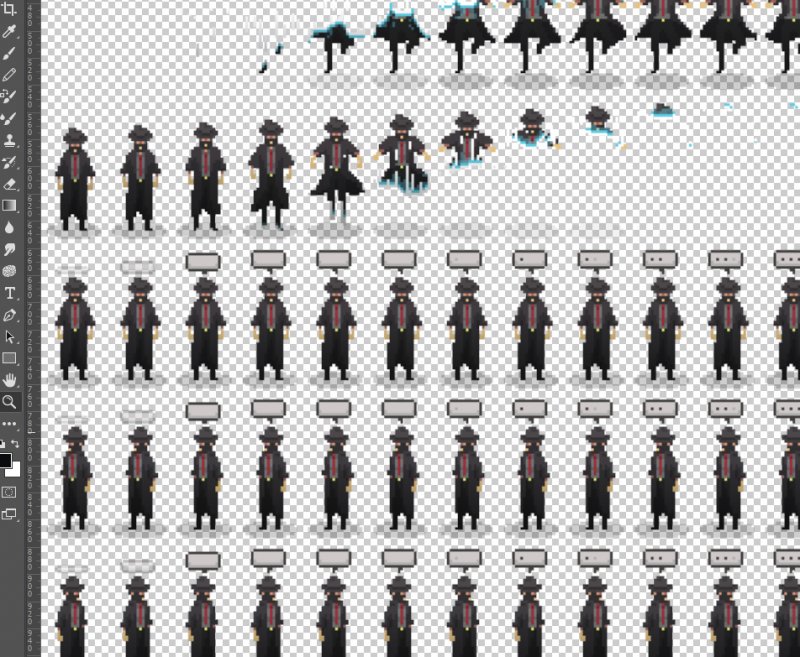
dropping in 3 plugin commands for animatein, loop, and end.
The downside here is, I can't mix animations, so if I want to have a small emote like crossing his arms, or walking, I can't do it. Also, If I need to make modifications to the balloon, well.. that's every sprite sheet I need to change.
It'd really help streamline my workflow, I'd really appreciate an assist, or a point in the right direction.
Thanks!
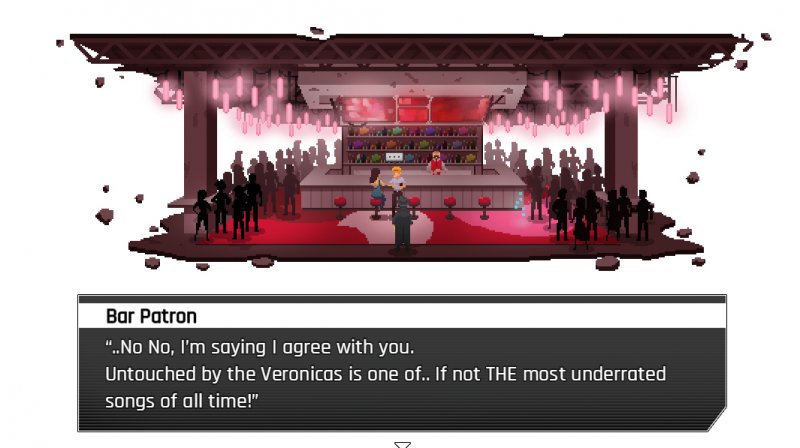
(an example in action)
Downloads / Referenced Files
RPG Maker Web attachments are mirrored locally when available. Other external links remain hosted by their original creator or third-party service.
- Local mirror: 63109-1d55f2747345e91a34b541c3a04c1b46.jpg
SHA-256:0cfe8ba5106d3d9c7d044449d72926f6c73c7d6535907531c58ff68e7e5bc290
Original attachment URL: https://forums.rpgmakerweb.com/attachments/example-jpg.84611/ - Local mirror: 63115-009afcb43bea5c551910949f5d3f549a.jpg
SHA-256:d343223b1bfe6cf8d6c9060ceb5877f0061fbebcd7a5fabd3d66869a49e93f4e
Original attachment URL: https://forums.rpgmakerweb.com/attachments/screen02-jpg.84617/
Referenced Images / Attachments
Creator Claims / Removal
If you are the original creator and want this listing reassigned, edited, or removed, join BMMPlay and contact the moderators with proof that matches the original RPG Maker Web profile, linked GitHub, itch.io page, or another public creator identity.
Replies (0)
No replies yet.
Topic Summary
Loading summary...