

Darkness Bug
BMM_Archive · July 15, 2026

Original Source
- Original title: Darkness Bug
- Original author: ShyferLoreweaver
- Original date: September 3, 2013
- Source thread: https://forums.rpgmakerweb.com/threads/darkness-bug.17726/
- Source forum path: Game Development Engines > Legacy Engine Support > RPG Maker VXAce Support
Summary
Hello Everyone! I would like to officially announce my joining of the RPG Maker Community. I hope to not only take advantage of the resources available to me, but I would like to in time also give back to the community through whatever talent I can offer. (Not much. Yet.) To Business! So I am trying to use eventing (parallel process) to create darkness in an outside environment. If you have ever played Pokemon, then you will know what I am talking about when I say that it is exactly...
Archived First Post
To Business!
So I am trying to use eventing (parallel process) to create darkness in an outside environment. If you have ever played Pokemon, then you will know what I am talking about when I say that it is exactly the same as Flash.
Point is: It is supposed to be dark, and only a small area is visible to the player. It currently works perfectly fine, the darkness follows the player. Everything is fine.
Except.
Problem is: I have the darkness, it follows the player, HOWEVER, when I have the main character interact with another event (such as reading a note), the picture that I use to create the darkness circle starts drifting off to the top left.
So here is the Parallel Process event in all it's complicated glory. (Let me know if there is an official way to format posting these into the forums for easy reading)
--------------------------------------
Control Variable: [0016: X-Axis] = Player's Map X
Control Variable: [0017: Y-Axis] = Player's Map Y
Show Picture: 1, 'Darkness2', Center (272,208), (100%, 100%), 200, Normal
Move Picture: 1, Center (Variable [0015][00016]), (100%, 100%), 200, Normal, @ 600
--------------------------------------
If anyone knows how to prevent the image from wandering when I interact with other events, please let me know. It would be greatly appreciated.
Just in case you need some visual aid on what is happening, I have attached a couple images to help.
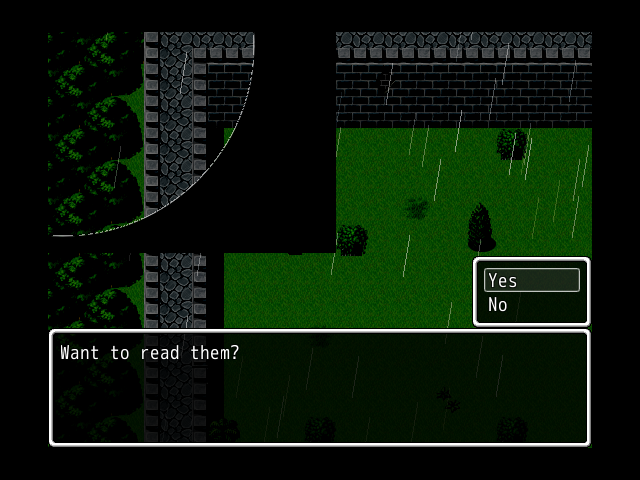
This is what happens when I try to read some notes on the ground.
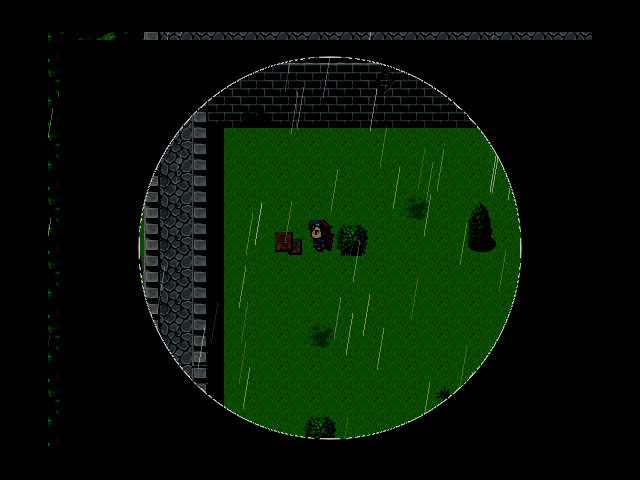
This is approximately where the image should be. Don't worry if it looks off, I am using an image where I was having other problems I've since fixed.
I've noticed that it is slightly off even without interacting with events, and it may just be a weird load issue. Also could be that I need to increase the size of the image a few pixels. Beyond the 544 x 416 suggestion I've seen on other threads.
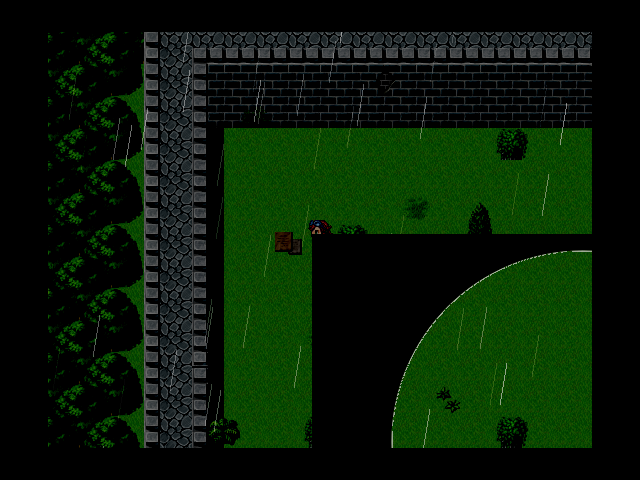
Downloads / Referenced Files
RPG Maker Web attachments are mirrored locally when available. Other external links remain hosted by their original creator or third-party service.
- Local mirror: 2066-4138808229467d124bd0239b0515693b.png
SHA-256:12a9e2c40fac6b2ed995c559d903c12aad34be0f3095fee34c803b82609473ba
Original attachment URL: https://forums.rpgmakerweb.com/attachments/darknessissue2a-png.8027/ - Local mirror: 2065-a427441c67c08147f15db9ddba12f6f9.png
SHA-256:1da866fb894de8f720d70e5b1f72d982fe1815daebc64813fff43afd975787a0
Original attachment URL: https://forums.rpgmakerweb.com/attachments/darknessissue1a-png.8026/ - Local mirror: 2064-dcca357b023dfb9132103158864df978.png
SHA-256:81efc53af9f32196416959f15573b94583c2094db5f2311e130a289cbb3b17a2
Original attachment URL: https://forums.rpgmakerweb.com/attachments/darknessissue1b-png.8025/
Referenced Images / Attachments
Creator Claims / Removal
If you are the original creator and want this listing reassigned, edited, or removed, join BMMPlay and contact the moderators with proof that matches the original RPG Maker Web profile, linked GitHub, itch.io page, or another public creator identity.
Replies (0)
No replies yet.
Topic Summary
Loading summary...