

Tile Set Problem
BMM_Archive · July 15, 2026

Original Source
- Original title: Tile Set Problem
- Original author: Voracious
- Original date: September 2, 2013
- Source thread: https://forums.rpgmakerweb.com/threads/tile-set-problem.17694/
- Source forum path: Game Development Engines > Legacy Engine Support > RPG Maker VXAce Support
Summary
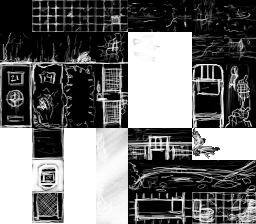
I created a tile set in Photoshop CS6 for my first level in my game. In the set, I put in things that were laid over transparent squares such as showers, debris, etc. I intended the transparent tiles to overlay the tiles behind it. Instead, it replaces the entire tile completely, leaving one giant gaping square with a lonely little drawing in the middle. I did everything I could in the database, but I just cant for whatever reason to overlay the tiles. Any tips? Tiles below. {
Archived First Post
Any tips?
Tiles below.
Downloads / Referenced Files
RPG Maker Web attachments are mirrored locally when available. Other external links remain hosted by their original creator or third-party service.
- Local mirror: 2054-0b2e6f7f6c32eb64f1768bf94dc6dbe5.png
SHA-256:41e4a3ee9d206f937f400209d485697d11d91bf4129c5d1ebd7498253c392c59
Original attachment URL: https://forums.rpgmakerweb.com/attachments/pitchblacktileset-png.8008/
Referenced Images / Attachments
Creator Claims / Removal
If you are the original creator and want this listing reassigned, edited, or removed, join BMMPlay and contact the moderators with proof that matches the original RPG Maker Web profile, linked GitHub, itch.io page, or another public creator identity.
Replies (0)
No replies yet.
Topic Summary
Loading summary...