

Choice Window to the right of "Galv's Message Styles" window
BMM_Archive · July 15, 2026

Original Source
- Original title: Choice Window to the right of "Galv's Message Styles" window
- Original author: wariolandgoldpiramid
- Original date: November 4, 2017
- Source thread: https://forums.rpgmakerweb.com/threads/choice-window-to-the-right-of-galvs-message-styles-window.86667/
- Source forum path: Game Development Engines > RPG Maker Javascript Plugins > JS Plugin Requests
Summary
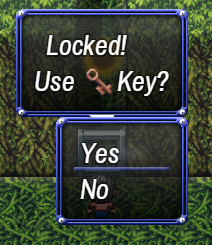
So, I am planning to be using "Galv's Message Styles" to display dialog in my game. There's just one little problem with that plugin - when displaying a "Show Text" and "Show Choises" at the same time, the choices window is set to appear below the message window. I would like a way to have it appear to the side (left or right) of the message window. Here's how I have it currently set up, with Yanfly's Message system:
Archived First Post
There's just one little problem with that plugin - when displaying a "Show Text" and "Show Choises" at the same time, the choices window is set to appear below the message window.
I would like a way to have it appear to the side (left or right) of the message window.
Here's how I have it currently set up, with Yanfly's Message system:
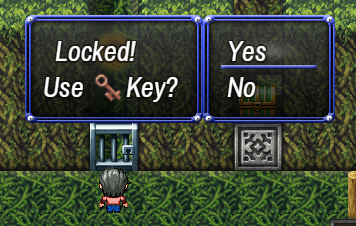
I would like to have a similar effect with Galv's System, but unfortunatly, the choice window gets displayed below, instead of to the right.
Downloads / Referenced Files
RPG Maker Web attachments are mirrored locally when available. Other external links remain hosted by their original creator or third-party service.
- Local mirror: 54062-53fdcc9c0f30d9e69a20046c7f481ea2.png
SHA-256:df3f30993ab7829f0eb982344c9436779c5d34edae6afa092682cdcbcc4cd89c
Original attachment URL: https://forums.rpgmakerweb.com/attachments/1-png.75564/ - Local mirror: 54063-8e42609aa502aebbf607040379e47fe7.png
SHA-256:d7231e4c5369257795e2159665dd29bff8da4e6f40617400e01b68c879d01492
Original attachment URL: https://forums.rpgmakerweb.com/attachments/2-png.75565/
Referenced Images / Attachments
Creator Claims / Removal
If you are the original creator and want this listing reassigned, edited, or removed, join BMMPlay and contact the moderators with proof that matches the original RPG Maker Web profile, linked GitHub, itch.io page, or another public creator identity.
Replies (0)
No replies yet.
Topic Summary
Loading summary...