public

Rpg Maker Developers Group

Simple enough for a child, powerful enough for a developer

2 Followers

Place Enemies lower in Troops Window

BMM Archive · July 15, 2026

Preserved forum archive. This topic stores the original first post and locally mirrored RPG Maker Web attachments when available. It is posted by the BMMPlay archive account, not by the original creator.

Original Source

  • Original title: Place Enemies lower in Troops Window
  • Original author: UgyBoogie
  • Original date: May 20, 2017
  • Source thread: https://forums.rpgmakerweb.com/threads/place-enemies-lower-in-troops-window.78868/
  • Source forum path: Game Development Engines > RPG Maker Javascript Plugins > JS Plugin Requests

Summary

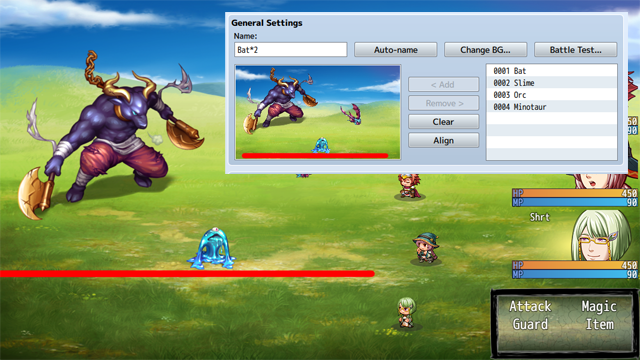
Hello Community I've encountered an issue today, where the troops menu doesn't allow me to place enemies lower than a certain point. This wouldn't be a problem with a default Battle HUD, but since I've customized mine I have a lot of empty, unused space. { "lightbox_close": "Close",

Archived First Post

Hello Community
I've encountered an issue today, where the troops menu doesn't allow me to place enemies lower than a certain point. This wouldn't be a problem with a default Battle HUD, but since I've customized mine I have a lot of empty, unused space.
Protected download
As you can see it's not possible to go below the red line.
A plugin would be great where I could use notetags on enemies to set their Y coordinate lower by a custom amount.
For example: <Y_Location: 30> ; And this would place the sprite of the enemy 30 pixel lower.

I'd really appreciate anyone's help! Or maybe even tips on how to work around my problem! Thank you

Downloads / Referenced Files

Log in to download

Log in, then follow the RPG Maker Developers Group to see these download links.

Log in to download

Referenced Images / Attachments

pic1.png
pic1.png
Creator Claims / Removal

If you are the original creator and want this listing reassigned, edited, or removed, join BMMPlay and contact the moderators with proof that matches the original RPG Maker Web profile, linked GitHub, itch.io page, or another public creator identity.

#039#rpg-maker-archive#js-requests

Replies (0)

No replies yet.

0 replies 1 view

Log in to reply.

User Avatar


