

Issues regarding Yami Overlay mapping & Events
BMM_Archive · July 15, 2026

Original Source
- Original title: Issues regarding Yami Overlay mapping & Events
- Original author: sdmf508
- Original date: August 11, 2013
- Source thread: https://forums.rpgmakerweb.com/threads/issues-regarding-yami-overlay-mapping-events.16811/
- Source forum path: Game Development Engines > Legacy Engine Support > RPG Maker VXAce Support
Summary
Hello good people of the RPGM community. I have tried searching high & low to solve this problem of mine but to no avail & I'm sorry if this may have been asked somewhere else but I couldn't find it. The problem: So far I've only used 3 custom scripts. Yami's basic module, Yami's Overlay mapping & a Parallax lock script. I've completed the map that I plan on using & all the overlays the ground pieces are all working fine. When I come to making events though, is when...
Archived First Post
The problem:
So far I've only used 3 custom scripts. Yami's basic module, Yami's Overlay mapping & a Parallax lock script. I've completed the map that I plan on using & all the overlays the ground pieces are all working fine. When I come to making events though, is when the problem occurs. I was trying to make a basic quest of finding an item for a NPC, using basic commands line like "text, choices & control switch". When I finished writing out all the dialouge & what not - I go into the game and when I try to talk to the NPC it jumps straight to the second event page, completely skipping the whole dialouge and choices of the first event page. I've deleted each of the custom scripts and narrowed it down to Yami's Overlay mapping script to be the culprit, because when I delete that the event will play out properly.. but I won't have my overlay parallax. So my question is: Is there a way around this that anybody knows of? Or is it something super simple that I'm missing? There must be some way to be able to use the Overlay mapping with normal functioning events! Any help will be greatly appreciated. I'll attach pics of the event pages so you all can have a look yourselves.
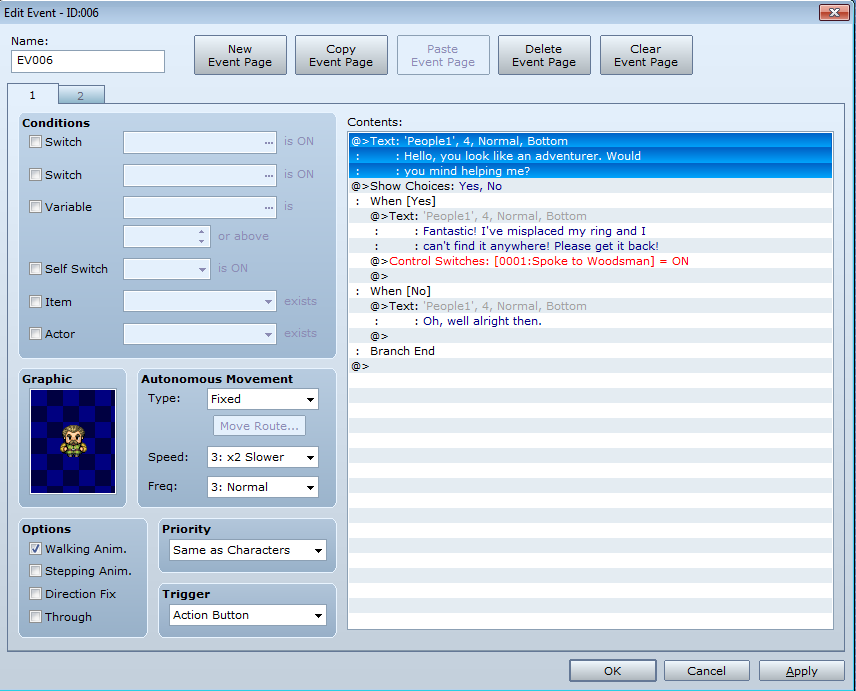
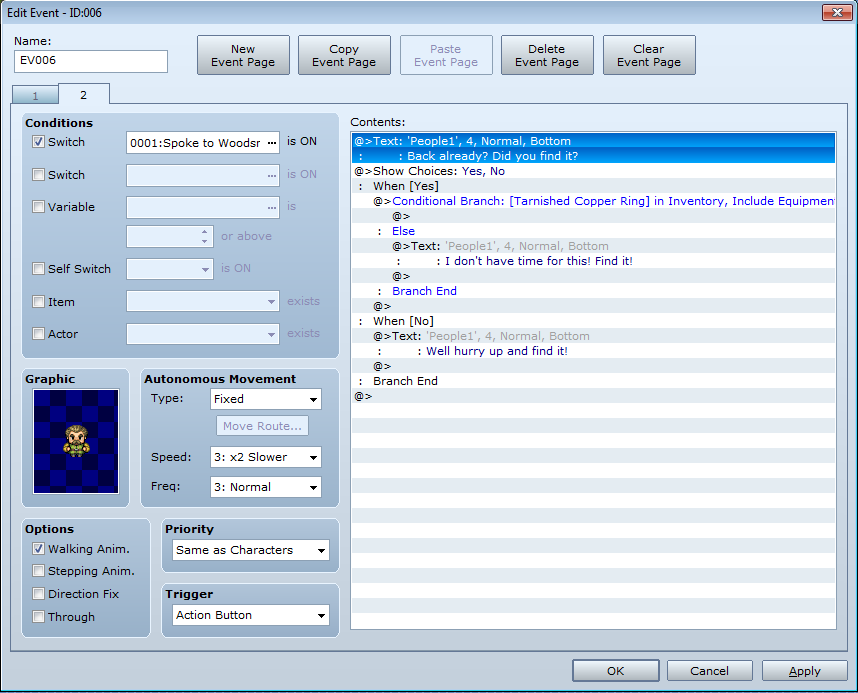
Downloads / Referenced Files
RPG Maker Web attachments are mirrored locally when available. Other external links remain hosted by their original creator or third-party service.
- Local mirror: 1781-85a71d096ecacd00e9f67534adf336d8.png
SHA-256:90fca7dede6361b8e50fb92da71f44ac784aea9c6b73e213f4a9016659c2ad94
Original attachment URL: https://forums.rpgmakerweb.com/attachments/issue-pic-1-png.7587/ - Local mirror: 1782-65cfb589352f9f0ec465cf61f8ec6aaf.png
SHA-256:0634c9a1450022b348660e470e0eae831000701400786bb24ec2a765310556f6
Original attachment URL: https://forums.rpgmakerweb.com/attachments/issue-pic-2-png.7588/
Referenced Images / Attachments
Creator Claims / Removal
If you are the original creator and want this listing reassigned, edited, or removed, join BMMPlay and contact the moderators with proof that matches the original RPG Maker Web profile, linked GitHub, itch.io page, or another public creator identity.
Replies (0)
No replies yet.
Topic Summary
Loading summary...