Preserved forum archive. This topic stores the original first post and locally mirrored RPG Maker Web attachments when available. It is posted by the BMMPlay archive account, not by the original creator.
Original Source
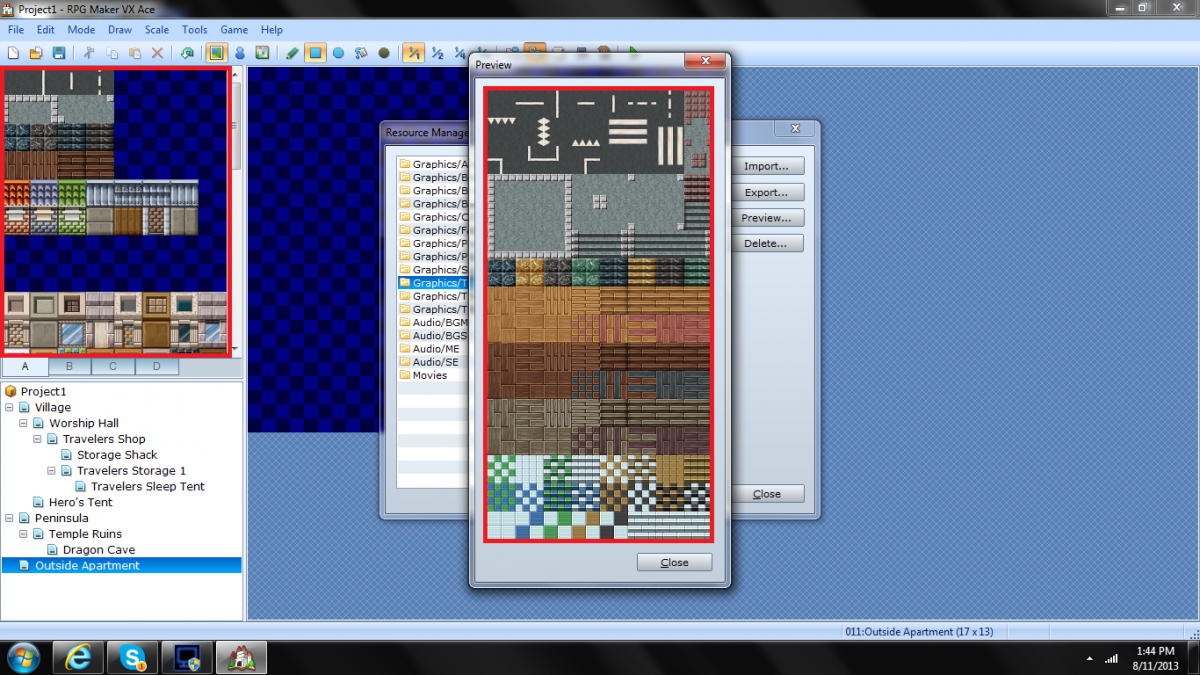
Original title: Tileset not fully showing up and getting cut off.
Source forum path: Game Development Engines > Legacy Engine Support > RPG Maker VXAce Support
Summary
When I import a tileset it looks okay in the resource manager but after when I am in the map editing mode the tiles are cut off and some don't even show up. Thanks in advance { "lightbox_close": "Close", "lightbox_next": "Next",
Archived First Post
When I import a tileset it looks okay in the resource manager but after when I am in the map editing mode the tiles are cut off and some don't even show up. Thanks in advance <3
Downloads / Referenced Files
RPG Maker Web attachments are mirrored locally when available. Other external links remain hosted by their original creator or third-party service.
Local mirror:1779-8da50d88fb9ea67ce013e6cd3eb746c2.png SHA-256: 364ec0559c19148bf270cb9514fa8d133a155efda3ebe76fa4ff425f57bf6238 Original attachment URL: https://forums.rpgmakerweb.com/attachments/bridges-are-for-crossing-png.7585/
Referenced Images / Attachments
Bridges are for crossing.png
Creator Claims / Removal
If you are the original creator and want this listing reassigned, edited, or removed, join BMMPlay and contact the moderators with proof that matches the original RPG Maker Web profile, linked GitHub, itch.io page, or another public creator identity.