

Screen Buttons
BMM_Archive · July 15, 2026

BMM_Archive
Preserved forum archive. This topic stores the original first post and locally mirrored RPG Maker Web attachments when available. It is posted by the BMMPlay archive account, not by the original creator.
Original Source
- Original title: Screen Buttons
- Original author: thalesgal
- Original date: March 1, 2017
- Source thread: https://forums.rpgmakerweb.com/threads/screen-buttons.75467/
- Source forum path: Game Development Engines > RPG Maker Javascript Plugins > JS Plugin Requests
Summary
Hello! I would like to request a little change in a already done plugin. This is the release plugin created by Galv: Galv's RPG Maker Scripts & Plugins
Archived First Post
Hello!
I would like to request a little change in a already done plugin.
This is the release plugin created by Galv:
https://galvs-scripts.com/
Galv's RPG Maker Scripts & Plugins
https://galvs-scripts.com/2016/11/29/mv-screen-buttons/
As you can see, there are two buttons in the screen, red and green.
RED: Dash (shift)
GREEN: Ok
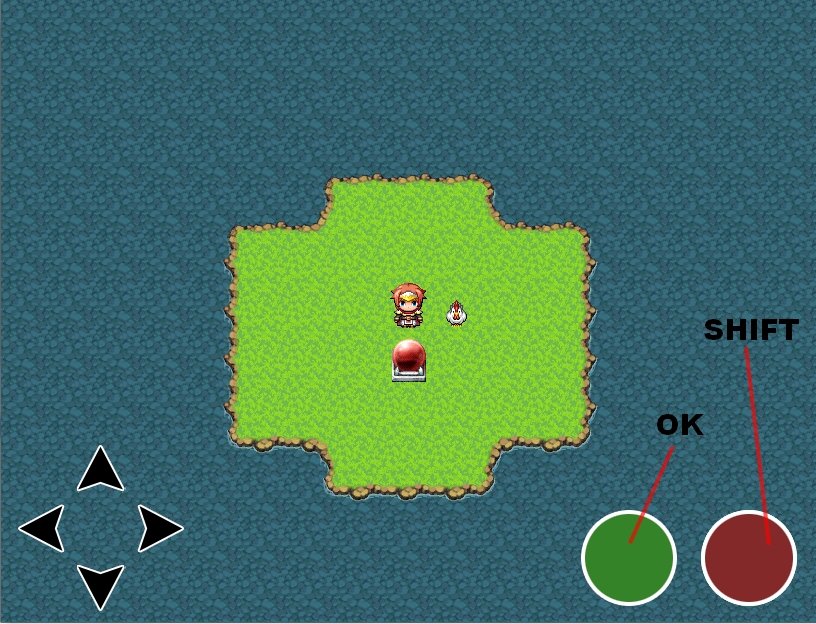
I would like to change it to that:
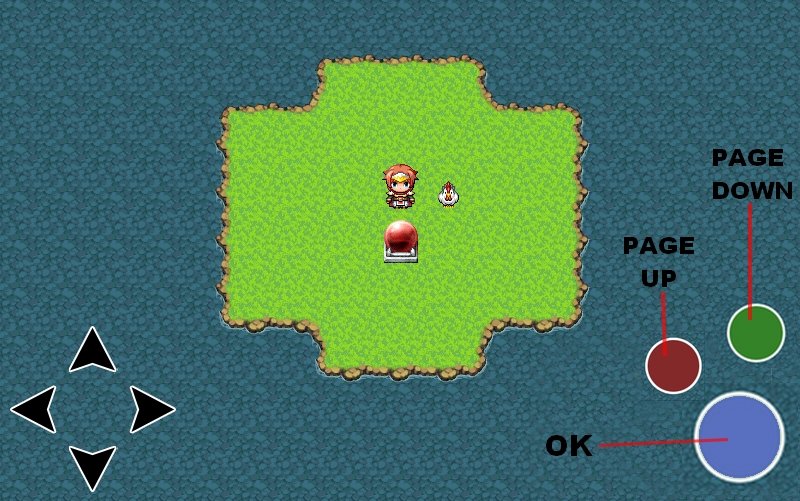
BLUE: Ok
RED: PageUp
Green: PageDown
I have attached the Blue button image to use as "Ok". The green and red buttons already have in the plugin download:
Screen Buttons MV\img\system
That's it. Thank very much in advance!!
Sorry for english mistakes!
I would like to request a little change in a already done plugin.
This is the release plugin created by Galv:
https://galvs-scripts.com/
Galv's RPG Maker Scripts & Plugins
https://galvs-scripts.com/2016/11/29/mv-screen-buttons/
As you can see, there are two buttons in the screen, red and green.
RED: Dash (shift)
GREEN: Ok
I would like to change it to that:
BLUE: Ok
RED: PageUp
Green: PageDown
I have attached the Blue button image to use as "Ok". The green and red buttons already have in the plugin download:
Screen Buttons MV\img\system
That's it. Thank very much in advance!!
Sorry for english mistakes!
Downloads / Referenced Files
RPG Maker Web attachments are mirrored locally when available. Other external links remain hosted by their original creator or third-party service.
- Local mirror: 37586-55cea093f0495ebf12071c515f8f09dd.jpg
SHA-256:e9ce7291b1b7d487adcd6bd8b69213b1eeb49c1a024847b4d11edcd7ba932733
Original attachment URL: https://forums.rpgmakerweb.com/attachments/galvs-jpg.59088/ - Local mirror: 37585-f7eedeba3d45fb877960cb71c54d0419.jpg
SHA-256:6f785d1595efe863b1d7cf61412aa9562b9e05e6e6b10c4e4419bc6110f49403
Original attachment URL: https://forums.rpgmakerweb.com/attachments/galvs-2-jpg.59087/
Referenced Images / Attachments
Creator Claims / Removal
If you are the original creator and want this listing reassigned, edited, or removed, join BMMPlay and contact the moderators with proof that matches the original RPG Maker Web profile, linked GitHub, itch.io page, or another public creator identity.
Replies (0)
No replies yet.
0
replies
26
views
Topic Summary
Loading summary...