

Xparams in default equip system
BMM_Archive · July 15, 2026

Original Source
- Original title: Xparams in default equip system
- Original author: Swish
- Original date: January 22, 2017
- Source thread: https://forums.rpgmakerweb.com/threads/xparams-in-default-equip-system.74004/
- Source forum path: Game Development Engines > RPG Maker Javascript Plugins > JS Plugin Requests
Summary
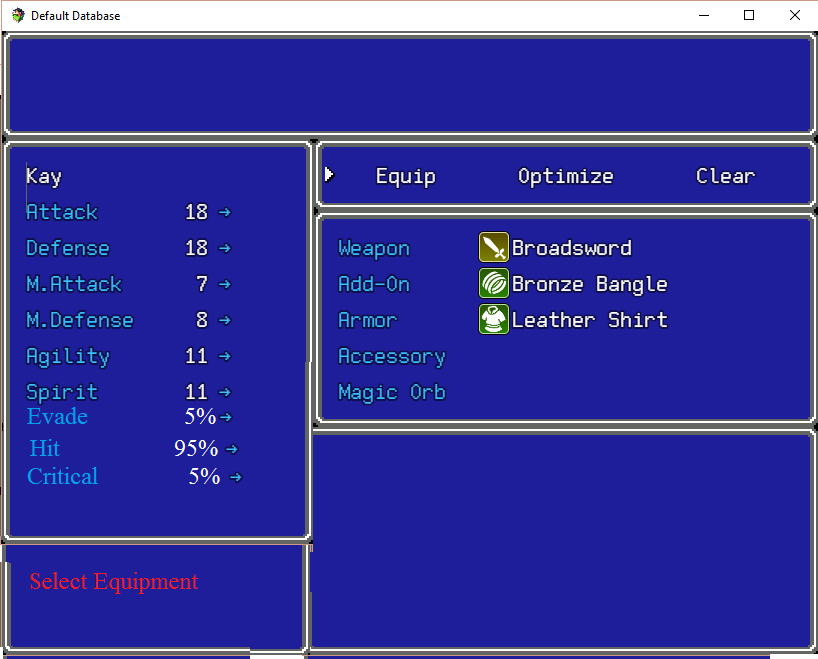
Hi before starting, I would like to tell that I know about DreamX_ShowParam plugin. However that one plugin only changes Yep_EquipCore. What I am looking for is plugin that will change Default Equip Scene. This is, because I am using MoogleX_EquipmentLearnSystem, which for some case isn't compatibile with Yanfly. But coming to the point, I would like plugin which would change default equip screen to something like in my image. Important things: -I would like to have changeable paramaters in Plugin Configuration -I would like to see every stat (in 9 lines), when changing Equipment
Archived First Post
Important things:
-I would like to have changeable paramaters in Plugin Configuration
-I would like to see every stat (in 9 lines), when changing Equipment
-Last point would be achievable by stretching Select Equipment window to 2 lines with scrolling system
I hope someone can make this request possible and with that I believe more people can get plugin like that im use
Downloads / Referenced Files
RPG Maker Web attachments are mirrored locally when available. Other external links remain hosted by their original creator or third-party service.
- Local mirror: 35559-c41dba59d9dd2a8dbf5a288c41176907.png
SHA-256:08be76c3ea2010bc5ffc785d38e4726cf5667550576513bc77bdc11b5d460066
Original attachment URL: https://forums.rpgmakerweb.com/attachments/screen-png.56849/
Referenced Images / Attachments
Creator Claims / Removal
If you are the original creator and want this listing reassigned, edited, or removed, join BMMPlay and contact the moderators with proof that matches the original RPG Maker Web profile, linked GitHub, itch.io page, or another public creator identity.
Replies (0)
No replies yet.
Topic Summary
Loading summary...