

RMMV: "Block" (w/Equipped Shield Icon) [[SOLVED]]
BMM_Archive · July 15, 2026

Original Source
- Original title: RMMV: "Block" (w/Equipped Shield Icon) [[SOLVED]]
- Original author: M.I.A.
- Original date: March 29, 2016
- Source thread: https://forums.rpgmakerweb.com/threads/rmmv-block-w-equipped-shield-icon-solved.59590/
- Source forum path: Game Development Engines > RPG Maker Javascript Plugins > JS Plugin Requests
Summary
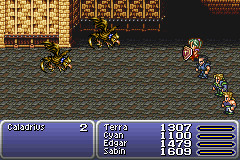
Hello Everybody!! I have seen lots of plugin's for evasion, countering, absorbing, and shields/HPshields/ShadowCopies.. but I can't recall seeing one with a "Block" What I mean, in reference to Final Fantasy 6, when an attack was Blocked, no damage would be dealt or displayed (not even as a 0) and an Icon representation of the Shield/Cloak/Dog that was Blocking the attack would be displayed briefly in front of the character [See Image as Reference]. What I am requesting is a Block Plugin that can operate similar to this function, whereas...
Archived First Post
I have seen lots of plugin's for evasion, countering, absorbing, and shields/HPshields/ShadowCopies.. but I can't recall seeing one with a "Block"
What I mean, in reference to Final Fantasy 6, when an attack was Blocked, no damage would be dealt or displayed (not even as a 0) and an Icon representation of the Shield/Cloak/Dog that was Blocking the attack would be displayed briefly in front of the character [See Image as Reference].
What I am requesting is a Block Plugin that can operate similar to this function, whereas the string would be assigned in the Actor/Class/Armor (or any other special places that seem to fit into the Plugin) and behave as the following [Note Tags just suggestions].
Actor/Class/Weapon/Armor/Enemy/State Tags:
<BlockPhys: X%, Y> Blocks Physical Flagged Attacks X% = Integer that is the chance of success to Blocked, Y = Icon that will display as the Blocking object.
<BlockMag: X%, Y> Blocks Magical Flagged Attacks X% = Integer that is the chance of success to Blocked, Y = Icon that will display as the Blocking object.
<BlockCertain: X%, Y> Blocks Certain Hit Flagged Attacks X% = Integer that is the chance of success to Blocked, Y = Icon that will display as the Blocking object.
<BlockAbsorbHP: X>
<BlockAbsorbHP: X, X, X> If a Block is successful, the damage that would have been dealt by X (element) is returned as restored HP to the Target.
<BlockAbsorbMP: X>
<BlockAbsorbMP: X, X, X> If a Block is successful, the damage that would have been dealt by X (element) is returned as restored HP to the Target.
<BlockAbsorbTP: X>
<BlockAbsorbTP: X, X, X> If a Block is successful, the damage that would have been dealt by X (element) is returned as restored TP to the Target.
<BlockReact: X>
<BlockReact: X, X, X> If a Block is successful, then X = State(s) will be applied to the target that successfully Blocked.
Skills/Items Tags:
<CannotBlock> This Skill or Item Cannot be Blocked.
Final Fantasy 6 Battle: "Blocks" @ 00:13 (BlockAbsorb), 00:56 (Block), 1:21 (Block from Applied State).. Etc
((Link video for reference))
Any skilled plugin Wizards want to tackle this one? Please feel free to ask any questions!!
-Mia
Downloads / Referenced Files
RPG Maker Web attachments are mirrored locally when available. Other external links remain hosted by their original creator or third-party service.
- Local mirror: 20486-46d65e51845646e199bcb14c7175f274.png
SHA-256:f799b335923357685b741ab24850e81edfbc1502eb8b1b2dc57eb5f7a33f3e0b
Original attachment URL: https://forums.rpgmakerweb.com/attachments/shield_block-png.34891/
Referenced Images / Attachments
Creator Claims / Removal
If you are the original creator and want this listing reassigned, edited, or removed, join BMMPlay and contact the moderators with proof that matches the original RPG Maker Web profile, linked GitHub, itch.io page, or another public creator identity.
Replies (0)
No replies yet.
Topic Summary
Loading summary...