Preserved forum archive. This topic stores the original first post and locally mirrored RPG Maker Web attachments when available. It is posted by the BMMPlay archive account, not by the original creator.
Original Source
Original title: Importing tilesets--offcenter in selection menu
Source forum path: Game Development Engines > Legacy Engine Support > RPG Maker VXAce Support
Summary
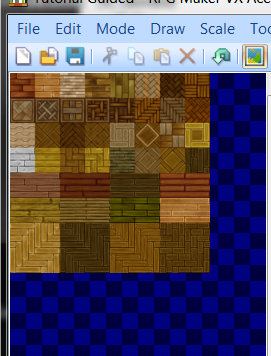
Hey folks--I'm super new to RPG Maker and I've just started having some trouble with importing tilesets. For some reason when I imported several fan-made sets today, they're sitting off-center on the grid--poking over and taking up another half a square. So when I try to use the tile, there's an odd empty space that can't be resolved because of the extra half-square. Something in settings, perhaps? { "lightbox_close": "Close", "lightbox_next": "Next",
Archived First Post
Hey folks--I'm super new to RPG Maker and I've just started having some trouble with importing tilesets. For some reason when I imported several fan-made sets today, they're sitting off-center on the grid--poking over and taking up another half a square. So when I try to use the tile, there's an odd empty space that can't be resolved because of the extra half-square. Something in settings, perhaps?
Thanks.
Downloads / Referenced Files
RPG Maker Web attachments are mirrored locally when available. Other external links remain hosted by their original creator or third-party service.
Local mirror:1377-ef2176602f04e45af0293a62ce2dec63.png SHA-256: 3b39674536001d2557cba22d16d6726acc3f2913adabfd5adf340e95886767f7 Original attachment URL: https://forums.rpgmakerweb.com/attachments/capture-png.6964/
Referenced Images / Attachments
Capture.PNG
Creator Claims / Removal
If you are the original creator and want this listing reassigned, edited, or removed, join BMMPlay and contact the moderators with proof that matches the original RPG Maker Web profile, linked GitHub, itch.io page, or another public creator identity.