


Many questions regarding VX Ace
BMM_Archive · July 15, 2026

Original Source
- Original title: Many questions regarding VX Ace
- Original author: Hatsuki
- Original date: July 16, 2013
- Source thread: https://forums.rpgmakerweb.com/threads/many-questions-regarding-vx-ace.15402/
- Source forum path: Game Development Engines > Legacy Engine Support > RPG Maker VXAce Support
Summary
Hello, I've been working with VX Ace for awhile, but for the most part, I've always tried to solve problems and learn how to do things on my own. However, now I realize that was silly, and it only left me at wits end, so I've decided to give in and ask for help from people who clearly know what they're doing better, and then I'll know how to do it too, so yeah... Anyways. First and foremost, name windows. Simple enough, found a couple of scripts that made it...
Archived First Post
[IMG]http://i.imgur.com/5kcO7.jpg[/IMG]
This is the kind of result I was expecting. Yes, I learned how to make busts, and align the text properly when making the bust on my own, but what I haven't figured out is two things.
1. Is this specific window style and name window from Princess Princess released? I have been unable to find it anywhere.
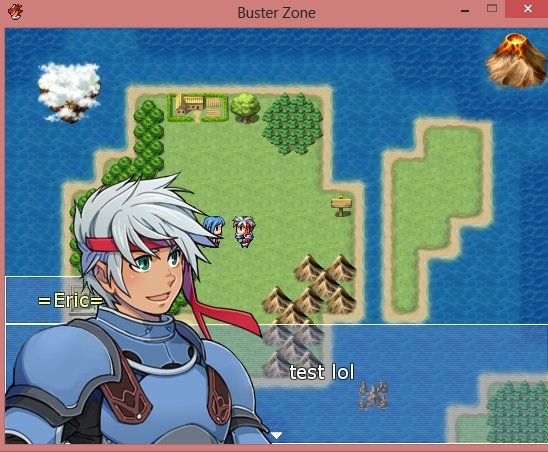
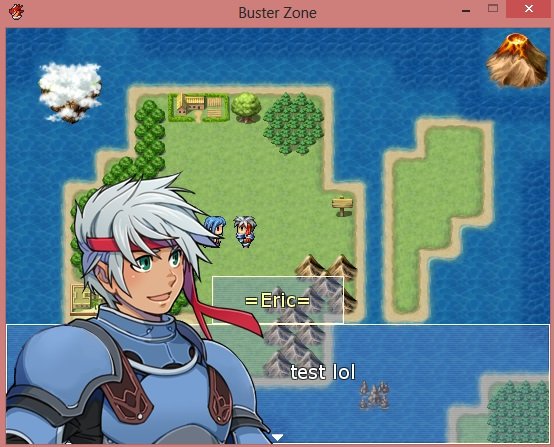
2. If it's not released, that's fine, I can always make my own windows, but more importantly, how did they get the name window to stretch like that? When I do my name window, it aligns to the left, and the bust blocks it. It has options to put it to the middle and right side, but not only are those tedious, they don't stretch out from the side like it does in Princess Princess, it just stays as a single lone box in the center.
I attached what it looks like when I put it to the left, and center. If the center one's name window stretched to the left side, behind the bust, I would be satisfied with that alone, but I don't know how to do that for the life of me. I can only hope I've explained this all clearly enough. One final question though, pertaining towards my first project I worked on while learning how to use VX Ace...
[IMG]http://i.imgur.com/UN3KT4O.png[/IMG]
Look at the highlighted areas. Let me give a quick explanation. Basically, in this scene, Eric is walking down an endless snow path automatically, like a cutscene, and he is supposed to fall on his back and faint, as the screen fades out to black. That was my idea... But it did not execute like that at all. Rather than fall on his back, which he clearly has the sprite for, he kneels down, as shown in the by the red highlighted sprite. I guess, if I had to put this as simple as possible, how do I manually choose which version of the damaged character sprite that I want? I want him to look like the one where he's on his back, not the one where he's kneeling down. This is also imporant, not just for that one scene, but for making corpses or etc in general, and I have no idea how to do it.
Also I lied, I have one final question, how do you make a custom icon for your game? By default, any game you make has a "Dragon" icon by default, but Princess Princess has a fairy looking icon, so I know it's possible to change the icon for your game... Just wondering how.
Those are all my questions for now, thank you for your time in advanced. Sorry if the screencaps I uploaded are too big or something.
Protected download
Protected download
Downloads / Referenced Files
Log in, then follow the RPG Maker Developers Group to see these download links.
Log in to downloadReferenced Images / Attachments
Creator Claims / Removal
If you are the original creator and want this listing reassigned, edited, or removed, join BMMPlay and contact the moderators with proof that matches the original RPG Maker Web profile, linked GitHub, itch.io page, or another public creator identity.
Replies (0)
No replies yet.
Topic Summary
Loading summary...

