

Line Break Issues
BMM_Archive · July 15, 2026

BMM_Archive
Preserved forum archive. This topic stores the original first post and locally mirrored RPG Maker Web attachments when available. It is posted by the BMMPlay archive account, not by the original creator.
Original Source
- Original title: Line Break Issues
- Original author: GibiusMaximus
- Original date: July 31, 2012
- Source thread: https://forums.rpgmakerweb.com/threads/line-break-issues.3656/
- Source forum path: Game Development Engines > Legacy Engine Support > RPG Maker VXAce Support
Summary
Recently, I started working on a project and began experimenting with different fonts etc. I've already applied the suggested fix, and it worked a treat for during Dialogue & Menu Screens but my problem lies with Enemy Names. I was recommended this from a friend; Code: class Window_Base
Archived First Post
Recently, I started working on a project and began experimenting with different fonts etc. I've already applied the suggested fix, and it worked a treat for during Dialogue & Menu Screens but my problem lies with Enemy Names.
I was recommended this from a friend;
But even with the code above, I still get the nasty ugly little Square at the end of most names - not all - but most and it's really doing my head in. Anyone got any solutions to my problem?
An example of what happens is for instance say
Enemy Name = Crawler
Troop Name = Crawler * 2
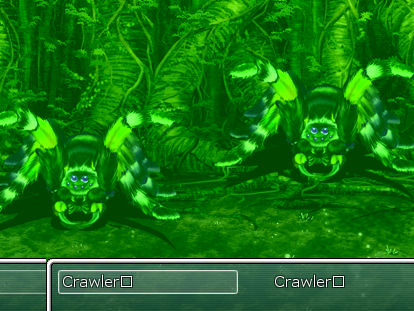
But when in battle, after selecting which technique/spell to use, the following appears as the Target Selection "Crawler[]" & "Crawler[]". Occasionally, there are a few monsters that will pop up without this nasty little symbol beside the name but I've been trying for quite a while to find a solution to fix it within the actual Battle Scene.
I was recommended this from a friend;
Code:
class Window_Base
  alias :process_normal_character_vxa :process_normal_character
  def process_normal_character(c, pos)
	    return unless c >= ' '
	    process_normal_character_vxa(c, pos)
  end
endAn example of what happens is for instance say
Enemy Name = Crawler
Troop Name = Crawler * 2
But when in battle, after selecting which technique/spell to use, the following appears as the Target Selection "Crawler[]" & "Crawler[]". Occasionally, there are a few monsters that will pop up without this nasty little symbol beside the name but I've been trying for quite a while to find a solution to fix it within the actual Battle Scene.
Downloads / Referenced Files
RPG Maker Web attachments are mirrored locally when available. Other external links remain hosted by their original creator or third-party service.
- Local mirror: 367-0b464929ffad940ca9a173c98f23728a.png
SHA-256:3ec9712f69880e8e0f74d128b9bbbebd4530cd53bf51d1f2e676d50506e30d02
Original attachment URL: https://forums.rpgmakerweb.com/attachments/example-png.857/
Referenced Images / Attachments
Creator Claims / Removal
If you are the original creator and want this listing reassigned, edited, or removed, join BMMPlay and contact the moderators with proof that matches the original RPG Maker Web profile, linked GitHub, itch.io page, or another public creator identity.
Replies (0)
No replies yet.
0
replies
18
views
Topic Summary
Loading summary...