Preserved forum archive. This topic stores the original first post and locally mirrored RPG Maker Web attachments when available. It is posted by the BMMPlay archive account, not by the original creator.
Original Source
Original title: Full screen pictures with Yanflys Engine Ace
Source forum path: Game Development Engines > Legacy Engine Support > RPG Maker VXAce Support
Summary
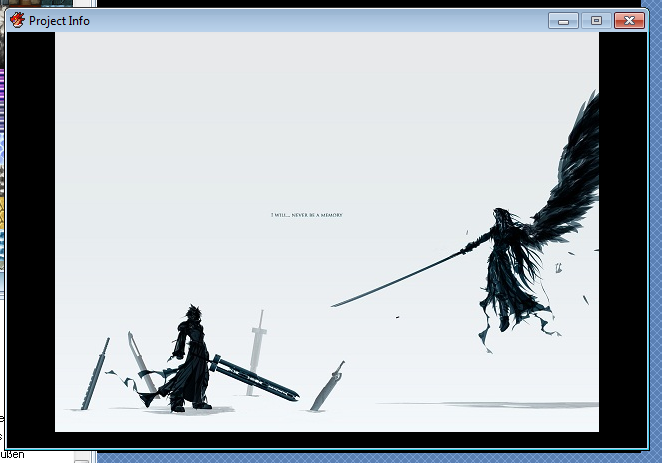
Im currently using Yanflys Engine Ace for my new project. I've set the screen resolution to 640x416 and my images aren't using the whole space, but are missing a part on the left and right side of the screen, even though they have the right resolution. Is there a way to solve that issue? { "lightbox_close": "Close", "lightbox_next": "Next",
Archived First Post
Im currently using Yanflys Engine Ace for my new project. I've set the screen resolution to 640x416 and my images aren't using the whole space, but are missing a part on the left and right side of the screen, even though they have the right resolution. Is there a way to solve that issue?
Downloads / Referenced Files
RPG Maker Web attachments are mirrored locally when available. Other external links remain hosted by their original creator or third-party service.
Local mirror:301-f352bbe0fba9fd137eb287a13da3322e.png SHA-256: ab109db0ed286b4c325d50771d4ffff0b93619071d9b4708ac427fc65d0d908d Original attachment URL: https://forums.rpgmakerweb.com/attachments/pic1-png.751/
Referenced Images / Attachments
pic1.png
Creator Claims / Removal
If you are the original creator and want this listing reassigned, edited, or removed, join BMMPlay and contact the moderators with proof that matches the original RPG Maker Web profile, linked GitHub, itch.io page, or another public creator identity.