

State Details Window in Battle Scene
BMM_Archive · July 15, 2026

Original Source
- Original title: State Details Window in Battle Scene
- Original author: hadecynn
- Original date: April 24, 2016
- Source thread: https://forums.rpgmakerweb.com/threads/state-details-window-in-battle-scene.60877/
- Source forum path: Game Development Engines > RPG Maker Javascript Plugins > JS Plugin Requests
Summary
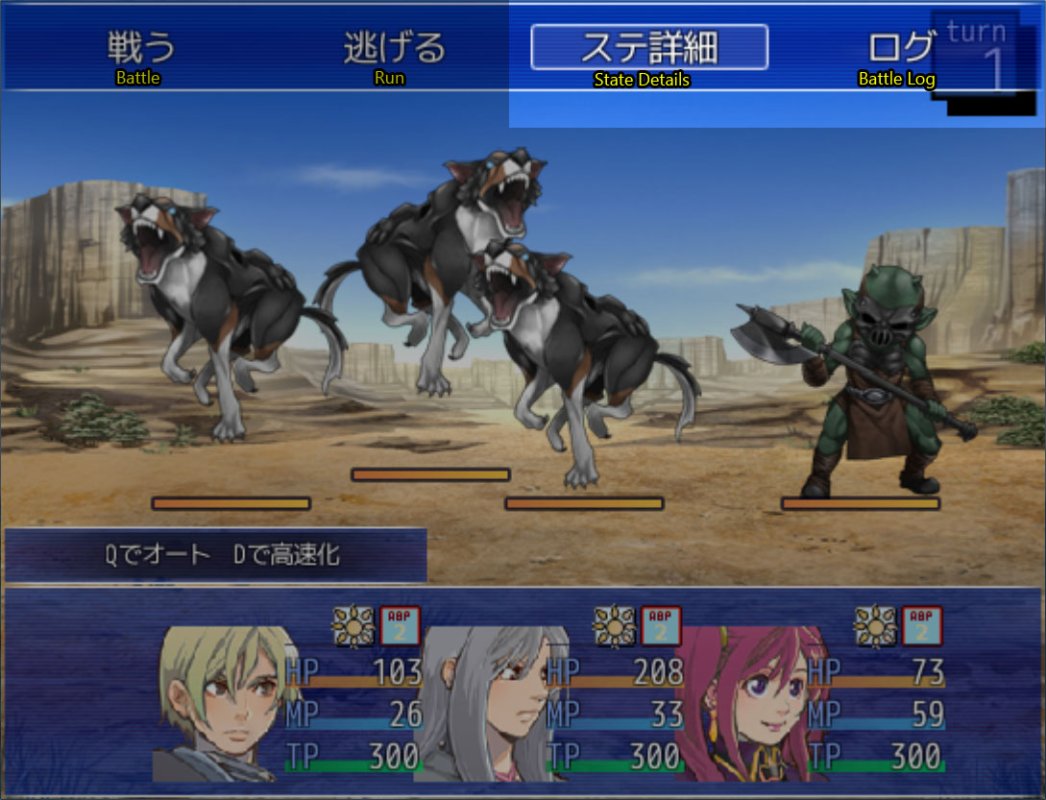
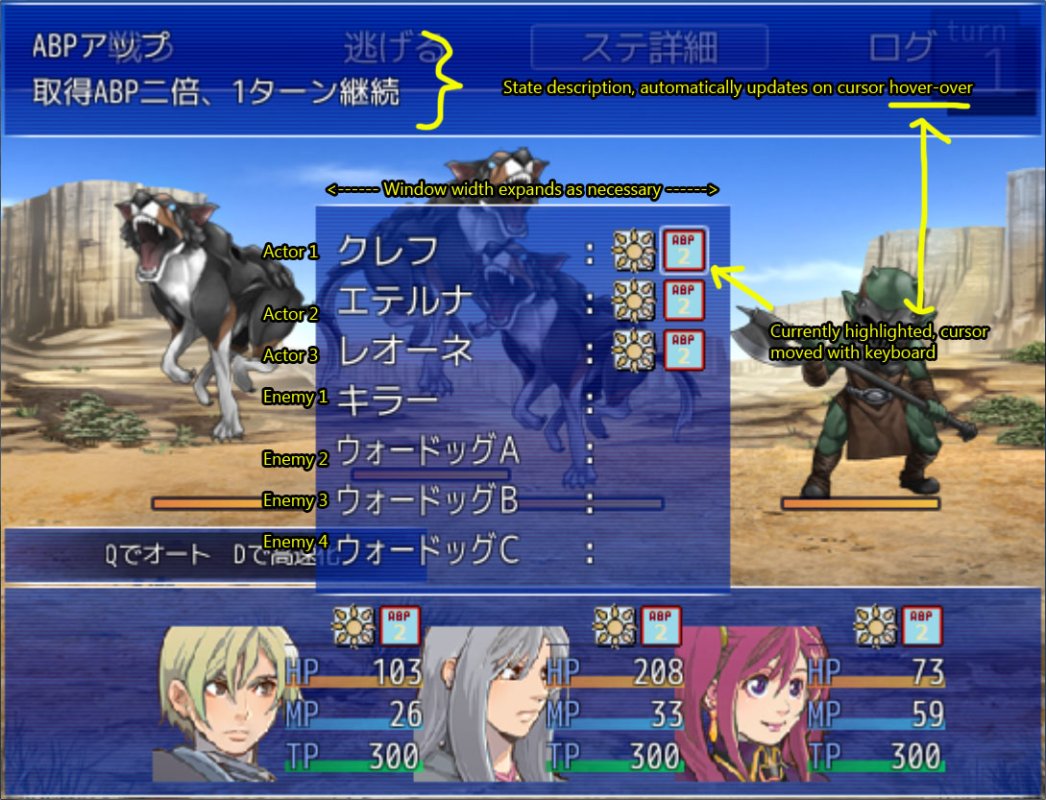
I've been trying out a lot of Japanese RM games lately to get a feel for the features/ideas that they are using, and I really liked this particular idea that I saw in a game called Lapis Lapse made in VX Ace. I think these 2 screenshots tell a good story by themselves, so let me start with them: Screenshot 1. { "lightbox_close": "Close",
Archived First Post
Screenshot 1.
Screenshot 2.
=============================
Screenshot 1 shows a modified party command menu that has two new commands added alongside "Battle" and "Run". The "State Details" is what I want to talk about, but for those curious, "Battle Log" opens up a large, scroll-able window that allows players to view all the battle log messages that have been hidden during regular play. Note that by default the game skips the party menu command and goes straight to the character commands list, so in order to access these two features, players need to hit "ESC" first (this can already be done in MV with Yanfly's plugin).
Screenshot 2 is what you see after confirming "State Details". As you can see, an information window pops up at the top, pulling content from what I would imagine to be Notetags written for each State entry in the database. The player uses the keyboard to control the cursor in the new center window that popped up (currently highlighting the upper-right ABP 2 icon), and the description for each State is updated on cursor hover. The width and height of this center window automatically adjusts vertically based on the number of Actors/Enemies in the encounter, and adjusts horizontally based on the number of States there are. The order that States are displayed in are presumably determined by their Priority number, so they should be the same as wherever else State icons are displayed (eg. the character status window and the target selection window)
==============================
For games that are using non-traditional States (ie. Poison, Blind, Silence, etc.) that most RPG veterans are familiar with, I think this is a really good way to present original and new State information to players compared to other methods because:
1. States are explained on a need-to-know basis (players don't need to know about all the States in the game from the get-go)
2. Explanations are readily accessible in battle, where it matters (instead of having it told through an NPC or an instruction manual-like help window only accessible outside of battle)
3. Doesn't interfere with other aspects of the battle scene or the overall flow/pacing of battle (the player needs to first ESC from the Actor command list in order to get to the Party command list, which makes sense because this ISN'T something that players need to open up every battle; at the same time, its within 3 clicks whenever the player does want to see it, so its easily accessible when you need it, but otherwise invisible)
Are there any master programmers out there interested in making a plugin with these features for MV?
Thanks for your interest and reading!
Downloads / Referenced Files
RPG Maker Web attachments are mirrored locally when available. Other external links remain hosted by their original creator or third-party service.
- Local mirror: 21931-69d13c9a789c4c71c651b3b09d1d4502.jpg
SHA-256:9ecd9d2ed21b3c192888f6c53dfa8835fb27f036de62d21921c0270f46412fab
Original attachment URL: https://forums.rpgmakerweb.com/attachments/ss1-jpg.37033/ - Local mirror: 21932-268b4c0d793c46060ea652f566070872.jpg
SHA-256:1900590797ded618894317c74f8bae182ccfb05e3e7d1db32b5682396be83916
Original attachment URL: https://forums.rpgmakerweb.com/attachments/ss2-jpg.37034/
Referenced Images / Attachments
Creator Claims / Removal
If you are the original creator and want this listing reassigned, edited, or removed, join BMMPlay and contact the moderators with proof that matches the original RPG Maker Web profile, linked GitHub, itch.io page, or another public creator identity.
Replies (0)
No replies yet.
Topic Summary
Loading summary...