

Questions about using Input.keyMapper
BMM_Archive · July 15, 2026

BMM_Archive
Preserved forum archive. This topic stores the original first post and locally mirrored RPG Maker Web attachments when available. It is posted by the BMMPlay archive account, not by the original creator.
Original Source
- Original title: Questions about using Input.keyMapper
- Original author: ZombieKidzRule
- Original date: December 29, 2024
- Source thread: https://forums.rpgmakerweb.com/threads/questions-about-using-input-keymapper.174276/
- Source forum path: Game Development Engines > RPG Maker MZ Support
Summary
I was experimenting with using these 2 Parallel Map Event Pages to map the "i" key to open the background for an Inventory menu. { "lightbox_close": "Close", "lightbox_next": "Next",
Archived First Post
I was experimenting with using these 2 Parallel Map Event Pages to map the "i" key to open the background for an Inventory menu.
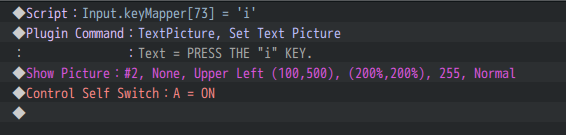
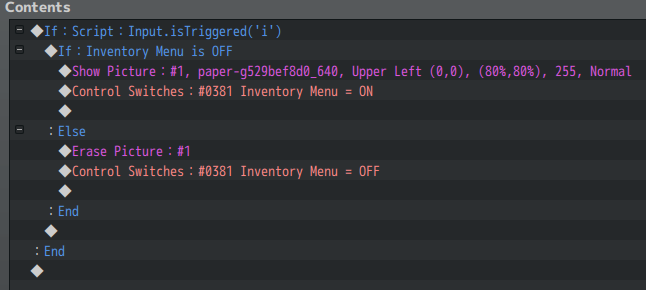
This works fine. When you press "i" the image is either Shown or Erased.
But I have a couple of questions.
If I map a bunch of keys this way at the beginning of my game, will they persist? Meaning I will always be able to run a parallel event to see if they are being triggered?
Or is this specific to the map that the Event is on? Or is this only until the game is reloaded like after a save? Or is there some other limitation?
Essentially I would like to know if manually mapping these keys will remain valid in the game or if they really need to be added by a plugin.
Second question. Assuming the above method of mapping keys persists in the game, are there any problems with doing this? Or having a Parallel Event running to constantly check for those keys to be triggered and then do something? Like call Common Events.
Thanks for any clarification that you can provide!
This works fine. When you press "i" the image is either Shown or Erased.
But I have a couple of questions.
If I map a bunch of keys this way at the beginning of my game, will they persist? Meaning I will always be able to run a parallel event to see if they are being triggered?
Or is this specific to the map that the Event is on? Or is this only until the game is reloaded like after a save? Or is there some other limitation?
Essentially I would like to know if manually mapping these keys will remain valid in the game or if they really need to be added by a plugin.
Second question. Assuming the above method of mapping keys persists in the game, are there any problems with doing this? Or having a Parallel Event running to constantly check for those keys to be triggered and then do something? Like call Common Events.
Thanks for any clarification that you can provide!
Downloads / Referenced Files
RPG Maker Web attachments are mirrored locally when available. Other external links remain hosted by their original creator or third-party service.
- Local mirror: 306420-bf4a511c0293b95893b79c7c0db63ea3.png
SHA-256:21c0a9380c32083bb7793d3348ef4db774a4066bce983832f9cfbe91983c3674
Original attachment URL: https://forums.rpgmakerweb.com/attachments/inventory-1-png.327340/ - Local mirror: 306421-e356b85dc091c0cb236dbd2ba50ae245.png
SHA-256:d33d3de35a9770d98ed785d577501f3e6c149b156a01934d74fc6a7e9d0c8099
Original attachment URL: https://forums.rpgmakerweb.com/attachments/inventory-2-png.327341/
Referenced Images / Attachments
Creator Claims / Removal
If you are the original creator and want this listing reassigned, edited, or removed, join BMMPlay and contact the moderators with proof that matches the original RPG Maker Web profile, linked GitHub, itch.io page, or another public creator identity.
Replies (0)
No replies yet.
0
replies
16
views
Topic Summary
Loading summary...