#===============================================================
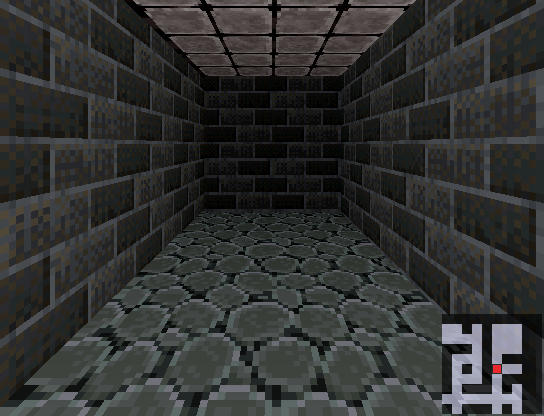
# ● [VX Ace] ◦ MiniMap ◦ □
# * Plug N Play Minimap (Don't need image~) *
#--------------------------------------------------------------
# ◦ by Woratana [woratana@hotmail.com]
# ◦ Thaiware RPG Maker Community
# ◦ Released on: 09/06/2008
# ◦ Version: 1.0
#--------------------------------------------------------------
# ◦ Credit: KGC for XP MiniMap Script,
# this script can't be done without his MiniMap.
#--------------------------------------------------------------
# ◦ Ported to VX Ace by Kal on 2011/12/17
#--------------------------------------------------------------

module MiniMap
  #==========================================================================

  # [START] MINIMAP SCRIPT SETUP PART
  #---------------------------------------------------------------------------
  SWITCH_NO_MINIMAP = 8 # Turn ON this switch to NOT SHOW minimap

  MAP_RECT = [435, 250, 100, 100] # Minimap size and position
  # [X, Y, Width, Height]
  # You can change it in game, by call script:
  # $game_system.minimap = [X, Y, Width, Height]

  MAP_Z = 0 # Minimap's Z-coordinate
  # Increase this number if there is problem that minimap show below some objects.

  GRID_SIZE = 10 # Minimap's grid size. Recommend to use more than 3.

  MINIMAP_BORDER_COLOR = Color.new(0, 0, 0, 0) # Minimap's border color
  # Color.new(Red, Green, Blue, Opacity)
  MINIMAP_BORDER_SIZE = 2 # Minimap's border size

  FOREGROUND_COLOR = Color.new(224, 224, 255, 160) # Passable tile color
  BACKGROUND_COLOR = Color.new(0, 0, 0, 160) # Unpassable tile color

  USE_OUTLINE_PLAYER = true # Draw outline around player in minimap?
  PLAYER_OUTLINE_COLOR = Color.new(0, 0, 0, 192) # Player Outline color
  USE_OUTLINE_EVENT = true # Draw outline around events in minimap?
  EVENT_OUTLINE_COLOR = Color.new(255, 255, 255, 192) # Player Outline color

  PLAYER_COLOR = Color.new(255, 0, 0, 192) # Player color
  #---------------------------------------------------------------------------

  OBJECT_COLOR = {} # Don't change or delete this line!
  #===============================================================
  # * SETUP EVENT KEYWORD & COLOR
  #---------------------------------------------------------------
  # ** Template:
  # OBJECT_COLOR['keyword'] = Color.new(Red, Green, Blue, Opacity)
  #-------------------------------------------------------------
  # * 'keyword': Word you want to put in event's comment to show this color
  # ** Note: 'keyword' is CASE SENSITIVE!
  # * Color.new(...): Color you want
  # You can put between 0 - 255 in each argument (Red, Green, Blue, Opacity)
  #-------------------------------------------------------------
  OBJECT_COLOR['npc'] = Color.new(30,144,255,160)
  OBJECT_COLOR['treasure'] = Color.new(0,255,255,160)
  OBJECT_COLOR['enemy'] = Color.new(139,35,35,160)
  OBJECT_COLOR['merchant'] = Color.new(255,255,0,160)

  #==========================================================================

  # * [OPTIONAL] TAGS:
  #---------------------------------------------------------------------------
  # Change keyword for disable minimap & keyword for show event on minimap~
  #-----------------------------------------------------------------------
  TAG_NO_MINIMAP = '[NOMAP]' # Tag for disable minimap
  TAG_EVENT = 'MMEV' # Tag for show event on minimap
  #---------------------------------------------------------------------------

  #---------------------------------------------------------------------------
  # [END] MINIMAP SCRIPT SETUP PART
  #==========================================================================


  def self.refresh
    if SceneManager.scene.is_a?(Scene_Map)
      SceneManager.scene.spriteset.minimap.refresh
    end
  end

  def self.update_object
    if SceneManager.scene.is_a?(Scene_Map)
      SceneManager.scene.spriteset.minimap.update_object_list
    end
  end
end

#==============================================================================
# �  RPG::MapInfo
#==============================================================================
class RPG::MapInfo
  def name
    return @name.gsub(/\[.*\]/) { }
  end

  def original_name
    return @name
  end

  def show_minimap?
    return !@name.include?(MiniMap::TAG_NO_MINIMAP)
  end
end
#==============================================================================
# �  Game_System
#==============================================================================
class Game_System
  attr_accessor :minimap
  alias wora_minimap_gamsys_ini initialize

  def initialize
    wora_minimap_gamsys_ini
    @minimap = MiniMap::MAP_RECT
  end

  def show_minimap
    return !$game_switches[MiniMap::SWITCH_NO_MINIMAP]
  end
end
#==============================================================================
# �  Game_Map
#==============================================================================
class Game_Map
  alias wora_minimap_gammap_setup setup
  def setup(map_id)
    wora_minimap_gammap_setup(map_id)
    @db_info = load_data('Data/MapInfos.rvdata2') if @db_info.nil?
    @map_info = @db_info[map_id]
  end

  def show_minimap?
    return @map_info.show_minimap?
  end
end
#==============================================================================
# �  Game_Event
#==============================================================================
class Game_Event < Game_Character
  def mm_comment?(comment, return_comment = false )
    if !@list.nil?
      for i in 0...@list.size - 1
        next if @list[i].code != 108
        if @list[i].parameters[0].include?(comment)
          return @list[i].parameters[0] if return_comment
          return true
        end
      end
    end
    return '' if return_comment
    return false
  end
end
#==============================================================================
# �  Game_MiniMap
#------------------------------------------------------------------------------
class Game_MiniMap
  def initialize(tilemap)
    @tilemap = tilemap
    refresh
  end

  def dispose
    @border.bitmap.dispose
    @border.dispose
    @map_sprite.bitmap.dispose
    @map_sprite.dispose
    @object_sprite.bitmap.dispose
    @object_sprite.dispose
    @position_sprite.bitmap.dispose
    @position_sprite.dispose
  end

  def visible
    return @map_sprite.visible
  end

  def visible=(value)
    @map_sprite.visible = value
    @object_sprite.visible = value
    @position_sprite.visible = value
    @border.visible = value
  end

  def refresh
    @mmr = $game_system.minimap
    map_rect = Rect.new(@mmr[0], @mmr[1], @mmr[2], @mmr[3])
    grid_size = [MiniMap::GRID_SIZE, 1].max

    @x = 0
    @y = 0
    @size = [map_rect.width / grid_size, map_rect.height / grid_size]

    @border = Sprite.new
    @border.x = map_rect.x - MiniMap::MINIMAP_BORDER_SIZE
    @border.y = map_rect.y - MiniMap::MINIMAP_BORDER_SIZE
    b_width = map_rect.width + (MiniMap::MINIMAP_BORDER_SIZE * 2)
    b_height = map_rect.height + (MiniMap::MINIMAP_BORDER_SIZE * 2)
    @border.bitmap = Bitmap.new(b_width, b_height)
    @border.bitmap.fill_rect(@border.bitmap.rect, MiniMap::MINIMAP_BORDER_COLOR)
    @border.bitmap.clear_rect(MiniMap::MINIMAP_BORDER_SIZE, MiniMap::MINIMAP_BORDER_SIZE,
    @border.bitmap.width - (MiniMap::MINIMAP_BORDER_SIZE * 2),
    @border.bitmap.height - (MiniMap::MINIMAP_BORDER_SIZE * 2))

    @map_sprite = Sprite.new
    @map_sprite.x = map_rect.x
    @map_sprite.y = map_rect.y
    @map_sprite.z = MiniMap::MAP_Z
    bitmap_width = $game_map.width * grid_size + map_rect.width
    bitmap_height = $game_map.height * grid_size + map_rect.height
    @map_sprite.bitmap = Bitmap.new(bitmap_width, bitmap_height)
    @map_sprite.src_rect = map_rect

    @object_sprite = Sprite.new
    @object_sprite.x = map_rect.x
    @object_sprite.y = map_rect.y
    @object_sprite.z = MiniMap::MAP_Z + 1
    @object_sprite.bitmap = Bitmap.new(bitmap_width, bitmap_height)
    @object_sprite.src_rect = map_rect

    @position_sprite = Sprite_Base.new
    @position_sprite.x = map_rect.x + @size[0] / 2 * grid_size
    @position_sprite.y = map_rect.y + @size[1] / 2 * grid_size
    @position_sprite.z = MiniMap::MAP_Z + 2

    bitmap = Bitmap.new(grid_size, grid_size)
    # Player's Outline
    if MiniMap::USE_OUTLINE_PLAYER and MiniMap::GRID_SIZE >= 3
      bitmap.fill_rect(bitmap.rect, MiniMap::PLAYER_OUTLINE_COLOR)
      brect = Rect.new(bitmap.rect.x + 1, bitmap.rect.y + 1, bitmap.rect.width - 2,
        bitmap.rect.height - 2)
      bitmap.clear_rect(brect)
    else
      brect = bitmap.rect
    end

    bitmap.fill_rect(brect, MiniMap::PLAYER_COLOR)
    @position_sprite.bitmap = bitmap

    draw_map
    update_object_list
    draw_object
    update_position
  end

  def draw_map
    bitmap = @map_sprite.bitmap
    bitmap.fill_rect(bitmap.rect, MiniMap::BACKGROUND_COLOR)
    map_rect = Rect.new(@mmr[0], @mmr[1], @mmr[2], @mmr[3])
    grid_size = [MiniMap::GRID_SIZE, 1].max

    $game_map.width.times do |i|
      $game_map.height.times do |j|
        if !$game_map.passable?(i, j, 4) #KAL: d = number of direcitons passable?
          next
        end
        rect = Rect.new(map_rect.width / 2 + grid_size * i,
          map_rect.height / 2 + grid_size * j,
          grid_size, grid_size)
        if grid_size >= 3
          if !$game_map.passable?(i, j, 4) #KAL: d = number of direcitons passable?
            rect.height -= 1
            rect.x += 1
            rect.width -= 1
            rect.width -= 1
            rect.y += 1
            rect.height -= 1
          end
        end
        bitmap.fill_rect(rect, MiniMap::FOREGROUND_COLOR)
      end
    end
  end

  def update_object_list
    @object_list = {}
    $game_map.events.values.each do |e|
      comment = e.mm_comment?(MiniMap::TAG_EVENT, true)
      if comment != ''
        type = comment.gsub(/#{MiniMap::TAG_EVENT}/){}.gsub(/\s+/){}
        @object_list[type] = [] if @object_list[type].nil?
        @object_list[type] << e
      end
    end
  end

  def draw_object
    bitmap = @object_sprite.bitmap
    bitmap.clear
    map_rect = Rect.new(@mmr[0], @mmr[1], @mmr[2], @mmr[3])
    grid_size = [MiniMap::GRID_SIZE, 1].max
    rect = Rect.new(0, 0, grid_size, grid_size)
    mw = map_rect.width / 2
    mh = map_rect.height / 2

    @object_list.each do |key, events|
      color = MiniMap::OBJECT_COLOR[key]
      next if events.nil? or color.nil?
      events.each do |obj|
        if !obj.character_name.empty?
          rect.x = mw + obj.real_x * grid_size / 256
          rect.y = mh + obj.real_y * grid_size / 256
          # Event's Outline
          if MiniMap::USE_OUTLINE_EVENT and MiniMap::GRID_SIZE >= 3
            bitmap.fill_rect(rect, MiniMap::EVENT_OUTLINE_COLOR)
            brect = Rect.new(rect.x + 1, rect.y + 1, rect.width - 2,
            rect.height - 2)
            bitmap.clear_rect(brect)
          else
            brect = bitmap.rect
          end
          bitmap.fill_rect(brect, color)
        end
      end
    end
  end

  def update
    if @mmr != $game_system.minimap
      dispose
      refresh
    end
    draw_object
    update_position
    if @map_sprite.visible
      @map_sprite.update
      @object_sprite.update
      @position_sprite.update
    end
  end

  def update_position
    map_rect = Rect.new(@mmr[0], @mmr[1], @mmr[2], @mmr[3])
    grid_size = [MiniMap::GRID_SIZE, 1].max
    sx = $game_player.real_x * grid_size
    sy = $game_player.real_y * grid_size
    @map_sprite.src_rect.x = sx
    @map_sprite.src_rect.y = sy
    @object_sprite.src_rect.x = sx
    @object_sprite.src_rect.y = sy
  end
end
#==============================================================================
# �  Spriteset_Map
#------------------------------------------------------------------------------
class Spriteset_Map
  attr_reader :minimap
  alias wora_minimap_sprsetmap_ini initialize
  alias wora_minimap_sprsetmap_dis dispose
  alias wora_minimap_sprsetmap_upd update

  def initialize
    wora_minimap_sprsetmap_ini
    if $game_map.show_minimap?
      @minimap = Game_MiniMap.new(@tilemap)
      $game_system.show_minimap = true if $game_system.show_minimap.nil?
      @minimap.visible = $game_system.show_minimap
    end
  end

  def dispose
    @minimap.dispose if !@minimap.nil?
    wora_minimap_sprsetmap_dis
  end

  def update
    if !@minimap.nil?
      if $game_system.show_minimap
        @minimap.visible = true
        @minimap.update
      else
        @minimap.visible = false
      end
    end
    wora_minimap_sprsetmap_upd
  end
end
#==============================================================================
# �  Scene_Map
#------------------------------------------------------------------------------
class Scene_Map < Scene_Base
  attr_reader :spriteset
end




 SANUS Advanced Full-Motion TV Wall Mount
Full-motion TV mount for flexible viewing angles and a cleaner entertainment wall.
View on Amazon
SANUS Advanced Full-Motion TV Wall Mount
Full-motion TV mount for flexible viewing angles and a cleaner entertainment wall.
View on Amazon

