=begin
===============================================================================
 ProgressBar by efeberk
 Version: RGSS3
===============================================================================
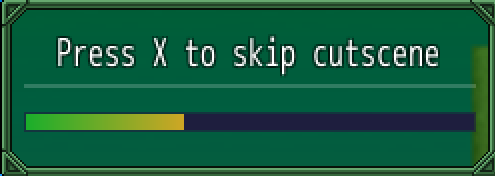
 This script will allow player waits while progress bar fills up.

--------------------------------------------------------------------------------

Call:

progressbar(x, y, text, frames)

x : window x coordinate
y : window y coordinate
text = Message
frames = how long time costs to fill up progressbar

=end
#==============================================================================

module EFE

  BAR_COLOR1 = Color.new(27, 174, 42, 255)
  BAR_COLOR2 = Color.new(206, 166, 36, 255)

end

#==============================================================================

class Window_ProgressBar < Window_Base

  def initialize(x, y, text, frames)
    @frame = 0
    @frame2 = frames
    super(x, y, 250, 90)
    refresh(text)
  end

  def line_color
    color = normal_color
    color.alpha = 48
    color
  end

  def draw_horz_line(y)
    line_y = y + line_height / 2 - 1
    contents.fill_rect(0, line_y, contents_width, 2, line_color)
  end

  def refresh(text)
    contents.clear
    draw_horz_line(20)
    draw_text(0, 0, contents.width, 32, text, 1)
    @frame += 1.0 / @frame2.to_f
    draw_gauge(0, 32, contents.width, @frame, EFE::BAR_COLOR1, EFE::BAR_COLOR2)
  end

end

#==============================================================================

class Scene_ProgressBar < Scene_Base

  def start
    super
    create_window
    create_background
  end

  def prepare(x, y, text, frames)
    @window_x = x
    @window_y = y
    @text = text
    @frames = frames
  end

  def update
    super
    @frames -= 1
    @progressbar.refresh(@text)
    SceneManager.return if @frames == 1
  end

  def create_window
    @progressbar = Window_ProgressBar.new(@window_x, @window_y, @text, @frames)
  end

  def create_background
    @background_sprite = Sprite.new
    @background_sprite.bitmap = SceneManager.background_bitmap
  end

end

#==============================================================================
# ■ Scene Progressbar
#==============================================================================
class Scene_Progressbar

  #--------------------------------------------------------------------------
  # ● Dispose
  #--------------------------------------------------------------------------
  def dispose
      Graphics.freeze
      dispose_background
      dispose_progressbar

  end

  #--------------------------------------------------------------------------
  # ● Dispose Background
  #--------------------------------------------------------------------------
  def dispose_background
      @background_sprite.dispose
      @background.dispose
  end

  #--------------------------------------------------------------------------
  # ● Dispose Layout
  #--------------------------------------------------------------------------
  def dispose_progressbar
      @Window_ProgressBar.bitmap.dispose
      @Window_ProgressBar.dispose
      @progressbar.bitmap.dispose
      @progressbar.dispose
  end

end

#---------------------------------------------------------------------------

class Game_Interpreter
  def progressbar(x, y, text, frames)
    SceneManager.call(Scene_ProgressBar)
    SceneManager.scene.prepare(x, y, text, frames)
    Fiber.yield while SceneManager.scene_is?(Scene_ProgressBar)
  end
end




 Kingston IronKey Locker+ 50 G2 256GB Encrypted USB Drive
Encrypted USB storage for secure files, travel documents, and work backups.
View on Amazon
Kingston IronKey Locker+ 50 G2 256GB Encrypted USB Drive
Encrypted USB storage for secure files, travel documents, and work backups.
View on Amazon
