


Yanfly Battle/Moghunter Battler animation problem
BMM_Archive · July 15, 2026

Original Source
- Original title: Yanfly Battle/Moghunter Battler animation problem
- Original author: shieldings
- Original date: March 24, 2017
- Source thread: https://forums.rpgmakerweb.com/threads/yanfly-battle-moghunter-battler-animation-problem.76341/
- Source forum path: Game Development Engines > Ruby Game System (RGSS) Scripts > RGSSx Script Support
Summary
RESOLVED as of April 5th, 2017. Found a similar battler motion script from Soulpour. A little annoying since you need to index every enemy with an animation, but it works perfectly other than that! I don't even have to change my HUD I am weeping with joy I've been playing around with the moghunter battler motions, and they're pretty neat (although my battlers look kind of ugly in the screenshots). However, they seem to somehow be interfering with how Yanfly's enemy attacks are positioned. As you can see in the...
Archived First Post
I've been playing around with the moghunter battler motions, and they're pretty neat (although my battlers look kind of ugly in the screenshots). However, they seem to somehow be interfering with how Yanfly's enemy attacks are positioned.
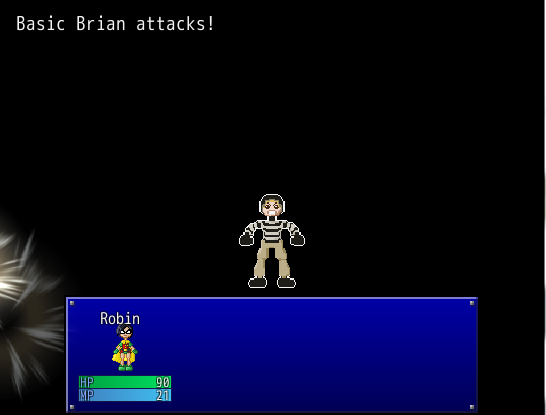
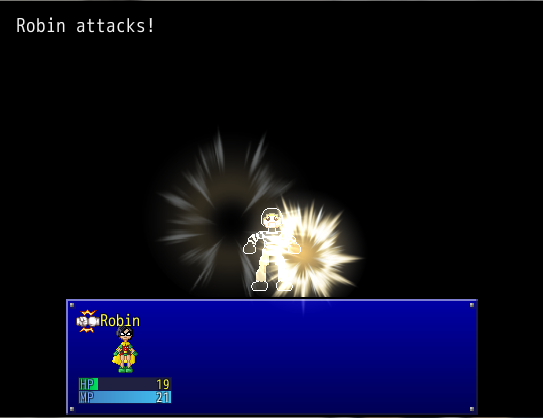
As you can see in the pictures, when the enemy is the target it isn't a problem.
However, when the actor is the target, the animation shows up in the upper-left corner. It is in the same spot no matter what position the actor is in (I tried it in battles with multiple actors). I honestly have no idea what to do about it.
The scripts are YEA Battle Engine, and Moghunter Battler Motions. All my other battle scripts are Yanfly add-ons, except for Neonblack's scan function.
# overwrite method: use_sprite?
#--------------------------------------------------------------------------
def use_sprite?; return true; end
#--------------------------------------------------------------------------
# new method: screen_x
#--------------------------------------------------------------------------
def screen_x
return 0 unless SceneManager.scene_is?(Scene_Battle)
status_window = SceneManager.scene.status_window
return 0 if status_window.nil?
item_rect_width = (status_window.width-24) / $game_party.max_battle_members
ext = SceneManager.scene.info_viewport.ox
rect = SceneManager.scene.status_window.item_rect(self.index)
constant = 128 + 12
return constant + rect.x + item_rect_width / 2 - ext
end
#--------------------------------------------------------------------------
# new method: screen_y
#--------------------------------------------------------------------------
def screen_y
return Graphics.height - 120 unless SceneManager.scene_is?(Scene_Battle)
return Graphics.height - 120 if SceneManager.scene.status_window.nil?
return Graphics.height - (SceneManager.scene.status_window.height * 2/8)
end
If you have any advice, thank you very much!
Protected download Protected download
Downloads / Referenced Files
Log in, then follow the RPG Maker Developers Group to see these download links.
Log in to downloadReferenced Images / Attachments
Creator Claims / Removal
If you are the original creator and want this listing reassigned, edited, or removed, join BMMPlay and contact the moderators with proof that matches the original RPG Maker Web profile, linked GitHub, itch.io page, or another public creator identity.


Replies (0)
No replies yet.
Topic Summary
Loading summary...
