What I wanted to achieve? Maximum actor in a battle is set to 4 actors. Some classes (i.e. warlock, hunter, etc) has summoning skill. Warlock can summon demons, hunter can summon animal companion. The pet and summons are actually actors that have been set aside and only exist for summoning.
What I wanted to achieve?
Maximum actor in a battle is set to 4 actors.
Some classes (i.e. warlock, hunter, etc) has summoning skill. Warlock can summon demons, hunter can summon animal companion.
The pet and summons are actually actors that have been set aside and only exist for summoning.
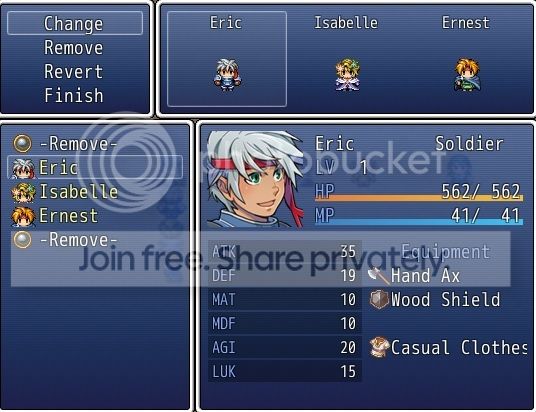
Formation is disabled from the menu, so player needs to visit an NPC in order to switch in/out their active battler
What scripts am I using to try and achieve my goal?
Yanfly Party System (
https://yanflychannel.wordpress.com/rmvxa/core-scripts/party-system/)
Yanfly Menu System (to disable formation from menu + adding custom scripts such as quest log, beastiary, etc.)
(
https://yanflychannel.wordpress.com/rmvxa/menu-scripts/ace-menu-engine/)
Yanfly Visual Battler (
https://yanflychannel.wordpress.com/rmvxa/battle-scripts/visual-battlers/)
VMoDT Pet and summon (
http://daimonioustails.weebly.com/pets-and-summons.html)
VMoDT Pet and summon patch to make it compatible with Yanfly scripts
class Game_Party def pets pet = [] self.pets_battle_members.each do |actor| pet += actor.pets end pet.compact end def temp_replace_actor(actor, array) if SUMMON_MESSAGES[array[0]] SceneManager.scene.log_window.add_text(SUMMON_MESSAGES[array[0]]) SceneManager.scene.log_window.wait SceneManager.scene.status_window.refresh end $game_actors.set_pet(array[0],Game_Pet.new(array[0],array[1],actor.level + array[2],actor.actor_id)) @battle_members_array[actor.index] = array[0] SceneManager.scene.reset_actor_sprites end def restore_actor(pet, actor_id) @battle_members_array[pet.index] = actor_id SceneManager.scene.reset_actor_sprites end def temp_replace_party(actor, arrays) @actors_sideline = @battle_members_array.clone @battle_members_array = [0]*max_battle_members arrays.each do |array| $game_actors.set_pet(array[0],Game_Pet.new(array[0],array[1],actor.level + array[2],actor.actor_id)) add_actor(array[0]) end SceneManager.scene.reset_actor_sprites end def restore_party return false unless @actors_sideline @battle_members_array = @actors_sideline.clone @actors_sideline = nil SceneManager.scene.reset_actor_sprites return true end def on_battle_end restore_party super endend
What problem I need help with?
Assume that the MAX_BATTLE_MEMBERS = 3
The summoning skill is fine as long as you have at most 3 party members.
If you managed to add more members to your party, you will still have 3 active battler, but when you try to use the summoning skill again, you get this error: undefined method 'battler=' for nil:NilClass
The issue is related to sprite drawing during battle
total = $game_party.max_battle_members@actor_sprites = Array.new(total) { Sprite_Battler.new(@viewport1) }The total number of sprites allocated is equal to the max number of members, so if we have more members than that, it indexes into a nil element in the array.
Tsukihime came up with the following to be added to Yanfly's visual battler script ("lazy loading as needed")
@actor_sprites[actor.index] ||= Sprite_Battler.new(@viewport1) ##
Code:
def create_actors total = $game_party.max_battle_members @current_party = $game_party.battle_members.clone @actor_sprites = Array.new(total) { Sprite_Battler.new(@viewport1) } for actor in $game_party.battle_members @actor_sprites[actor.index] ||= Sprite_Battler.new(@viewport1) ## << over here @actor_sprites[actor.index].battler = actor create_actor_sprite(actor) end end
Now I have no problem using the summoning skill when I have more than MAX_BATTLE_MEMBERS number of actors in the party, but when I use the summoning skill, the reserve party member (reserve party member = not part of the active battler member) gets placed in the battle as well.
If you want to get your hands dirty and dive right into the coding, I have a demo setup just to do that. All you have to do is to play around with the MAX_BATTLE_MEMBERS value and talk to the NPC in the map to add more party members.
https://www.mediafire.com/?tbx5xt632kedmd3
What type of solution I hope to find?
Well, I am going to try to be as flexible as I can.
I created a backup solution that limits the number of actors in your party, and you can "deposit"/"withdraw" them through an NPC.
The problem with this solution is that it is not visually appealing. It will display the members I can "withdraw" or "deposit" as text choices.
Here's a demo map that I set up to specifically demonstrate my solution:
https://www.mediafire.com/?bs04n6xjr51ook6
I am hoping to be able to be able to use the script call
call_party_menuthrough an NPC to open the formation window and swap active battler with a reserve party member and vise versa. Instead of going through the trouble to deposit/withdraw battler through an NPC event.
OR
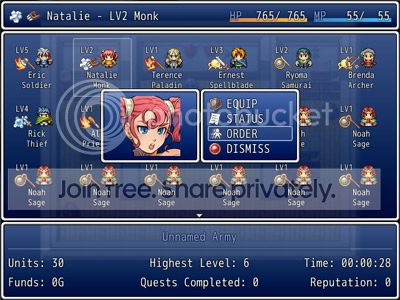
Create a window (some sort of user interface) to show the actor I am able to place in my party with the feature to remove / add actor from / to my active battler party.
I set it up so that whenever we unlock new actor that we can use as battler member, a switch will be turned on and the actor will show up in the list of battler that I can withdraw through the NPC to be added to my active battler party.
The window does not have to be complicated, all I would really love to see is the:
- visual of the actor
- the actor level
- the option to add/remove them from our party
The window does not have to appear using the call_party_menu script call. It can be something else.
Something like this would be more than awesome
Thank you for your time.
I am sorry that I am not experienced enough with RPGmaker to be able to find a better solution on my own.





 SANUS Advanced Full-Motion TV Wall Mount
Full-motion TV mount for flexible viewing angles and a cleaner entertainment wall.
View on Amazon
SANUS Advanced Full-Motion TV Wall Mount
Full-motion TV mount for flexible viewing angles and a cleaner entertainment wall.
View on Amazon

