public

Rpg Maker Developers Group

Simple enough for a child, powerful enough for a developer

2 Followers

Tankentai/Journey question(s) [Part 3: Making a new Skill]

BMM Archive · July 15, 2026

Preserved forum archive. This topic stores the original first post and locally mirrored RPG Maker Web attachments when available. It is posted by the BMMPlay archive account, not by the original creator.

Original Source

  • Original title: Tankentai/Journey question(s) [Part 3: Making a new Skill]
  • Original author: Zacyia
  • Original date: May 6, 2015
  • Source thread: https://forums.rpgmakerweb.com/threads/tankentai-journey-question-s-part-3-making-a-new-skill.39705/
  • Source forum path: Game Development Engines > Ruby Game System (RGSS) Scripts > RGSSx Script Support

Summary

Now that I am able to read the instructions in the script, I some how find myself even more confused... I understand the basic concept of putting the skill together, its the action keys themselves that confuse me. Is there a guide or manual to see all the action keys and what each one does? (I may just eventually make one if no such thing exists). On a side note, I can't seem to find where the setting for Actor positioning is. Mine seem way to close to the enemy.

Archived First Post

Now that I am able to read the instructions in the script, I some how find myself even more confused...

I understand the basic concept of putting the skill together, its the action keys themselves that confuse me.

Is there a guide or manual to see all the action keys and what each one does? (I may just eventually make one if no such thing exists).

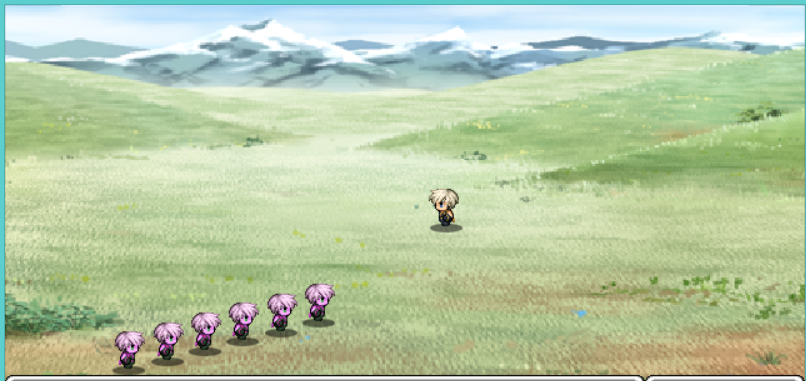
On a side note, I can't seem to find where the setting for Actor positioning is. Mine seem way to close to the enemy.

-Update-  @Miss Nile

I have already read that, but unfortunately that is for the Japanese version. And it does not show you how to properly put in skills nor does it tell you what each action key does. There is a specific section for making skills, the one in Passive Lions guide is incorrect.

This is where Passive Lion's guide says to put ALL skill related actions, This is incorrect:

#===============================================================================
# ● Action keys: Projectiles.
#===============================================================================
#
#===============================================================================
# Type ► Always 'm_a', do not change this.
#
# ID ►  Toggles the visibility of the weapon. {first number is throwing, second number is hitting}
#    ►  [0 = hides the animation  [1 = shows the animation
#
# Start ► The location of where the animation will start. {first number is throwing, second number is hitting}
#       ► [0=self] [1=target] [2=All enemy's] [3=All ally's] [4=everyone]
#       ► [5=Random Target] [6=Screen]
#
# End   ► The location of where the animation will end. Has the same target options
#       ► as above.
#
# S.adjust ► Adjusts the start coordinates. [X-axis, Y-axis] Enemy's movement is automatically inverted
#
# E.adjust ► Adjusts the end coordinates. [X-axis, Y-axis] Enemy's movement is automatically inverted
#
# Speed ► Speed or travel time of the projectiles.
#
# Type ► What should happen at the end of the animation.
#       [0=dissapears(dissapears automatically if it misses)
#       [1=penetrate] [2=Fade away(dissapears when the attack fails)
#
# track ► The path that the projectile needs to follow.
#
# Z-axis ► Toggles whether you want the projectile to be in front or behind the target.
#
# Wait: ► Toggles whether the system should wait for the animations to end before moving
#       ► to the next 'Action Key'. First is for moving, second is for hitting.
#
# Damage ► Toggles whether you want the animation to deal damage or not.
#
# Homing ► Toggles whether you want the animation to follow the target or not.
#
# Camera ► Toggles whether you want the animation to scale according to the camera.
#
# Loop ► Toggles whether you want the animation to loop or not.
#
# No reversal ► Toggles whether you want the animation to be reversed or not.
#
# Sub-Key ► allows the usage of 'Basic attacks - Movement keys'.       
#===============================================================================
 
#► Projectile keys     Type     ID     start     end     S.adjust   E.adjust    Speed   dispose    track    Z-axis       wait      Damage  Homing Camera      Loop  Reverse      sub-Key
  "FIRE_ARROW_FIX"       => ["m_a",[ 0,-1], 0, 1, [ 0, 0], [ 0, 0], 10,  2, [-3,-3], true, [ true, true],  true,  true,  true, false, false,  "ARROW"],
  "FIRE_ARROW"         => ["m_a",[ 0,-1], 0, 1, [ 0, 0], [ 0, 0], 10,  2, [-3,-3], true, [false,false],  true,  true,  true, false, false,  "ARROW"],
  "WATER_GUN_FIRE"     => ["m_a",[69,69], 0, 1, [ 0, 0], [ 0, 0], 10,  0, [ 0, 0], true, [ true, true],  true,  true,  true,  true, false,  ""],
  "START_THROW"   => ["m_a",[ 0,-1], 0, 1, [ 4,-6], [ 0, 0], 10,  2, [-3,-3], true, [ true,false],  true,  true,  true, false, false,  "ROTATION"],
  "END_THROW"   => ["m_a",[ 0, 0], 1, 0, [ 0, 0], [ 4,-6], 10,  0, [ 3, 3], true, [ true,false], false,  true,  true, false, false,  "ROTATION"],


This next section tells you how to put together a skill and where it goes. This is correct:

#===============================================================================
# ● Full action sequences. [skill and Movement creation]
#===============================================================================
# ►What is an action sequence◄
#  An action sequence is just as the name suggests: A sequence of configured
#  'action keys', that are chained together to create a complete action and/or
#  movement.
#
# ►How does it work◄
#  An action sequence performs all included 'action keys' one right after the
#  other, from left to right. They consist out of the 'Action Sequence Name',
#  followed by the 'action keys' that you have included within the
#  corrosponding array. An example 'action sequence' would look like this:
#  ACTION_SEQUENCE_NAME    =>       ["ACTION_KEY1","40","ACTION_KEY2"],
#         ▲               ▲         ▲                    ▲            ▲
#     The name           needed    open-array          key example   closing array and comma
#
# ►How to use this in skills◄
#  You can use these 'action sequences' by setting them up in the          
#  'Journey Configuration'.
#===============================================================================
  FULLACTION = {
 
#► Standby sequences
  "NORMAL_STANDBY"        => ["WAIT"],
  "NORMAL_STANDBY_FIX"    => ["STANDBY_FIX"],
  "PINCH_STANDBY"      => ["BALL_PINCH","TINT_PITCH","WAIT","WAIT"],
  "GUARD_STANDBY"        => ["STANDBY_FIX"],
  "POISON_STANDBY"          => ["BALL_BAD_STATE","TINT_POISON","WAIT","WAIT","ENEMY_ONLY","80"],
  "SLEEP_STANDBY"        => ["BALL_SLEEP","ENEMY_ONLY","40","ENEMY_CANCEL","KO","KO"],
  "BADSTATE_STANDBY"=> ["BALL_BAD_STATE","TINT_BAD_STATE","WAIT","WAIT","ENEMY_ONLY","80"],
  "OBSERVE_STANDBY"          => ["WAIT","60"],
  "DEATH"        => ["KO"],
 
#► System Sequences
  "ENTER_ACTOR"    => ["ENTER_ALLY","delay(4)","CO_RESET_LEFT"],
  "FLEE"        => ["EXIT"],
  "ESCAPE_ALLY"            => ["ANIME_TARGET","CAM_RESET","delay(4)","EXIT"],
  "ESCAPE_ENEMY"          => ["ANIME_TARGET","OPA_ESCAPE","EXIT"],
  "ESCAPE_FAILED"        => ["CAM_RESET","delay(4)","ESCAPE_ALLY","STEP_FORWARD2","CO_RESET_LEFT"],
  "COMMAND_INPUT"    => ["ANIME_OFF","MOVE_COM_INPUT"],
  "COMMAND_END"=> ["EARLY_RESET"],
  "COMMAND_GUARD"  => ["STANDBY_FIX"],
  "COMMAND_MAGIC"  => ["STANDBY","MAGIC_WAIT"],
  "COMMAND_SKILL"  => ["STANDBY","SKILL_WAIT"],
  "GUARD"            => ["ANIME_TARGET","STANDBY_FIX"],
  "EVADE"            => ["ACTOR_ONLY","ROTATE_RIGHT","JUMP_FORWARD2","10","CO_RESET_LEFT"],
  "GUARD_SHIELD"        => ["se('Evasion2')","SHIELD_GUARD","60"],
  "SUB_START"    => ["MOVE_TARGET_FAST","CHANGE_POS"],
  "SUB_END"    => ["SET_POS","CO_RESET_LEFT"],
  "TARGET_SUB_START"  => ["STEP_FORWARD2","STEP_FORWARD2","STANDBY_FIX"],
  "TARGET_SUB_END"  => ["CO_RESET_LEFT"],
  "VICTORY_SWING"  => ["ANIME_OFF","VICTORY_JUMP_WPN","VICTORY_LAND","120"],
  "VICTORY_FLIP"=> ["ANIME_OFF","ROTATE_RIGHT","VICTORY_JUMP","FIST_ONLY","FIST_THRUST","FIST_EXCLUDE","SWING_R","120"],
  "FLASH"            => ["anime_me(119)","20"],
 
#► Damage
  "DAMAGE"      => ["DAMAGE_TAKE","CO_RESET_LEFT"],
  "DAMAGE_LARGE"    => ["SHAKE_MILD","LDAMAGE_TAKE","CO_RESET_LEFT"],
  "PITCH"          => ["PINCH01","PINCH02","PINCH01","PINCH02","PINCH01","PINCH02"],
 
#► Shortcut Skills
  "SLASH"            => ["SWING_R","ANIME_WPN","10"],
  "SWORD"              => ["FIST_THRUST","ANIME_WPN","10"],
  "BOW"              => ["Bow1","FIRE_BOW","FIRE_ARROW","9"],
  "ATTACK"            => ["FIST_ONLY","FIST_THRUST","BOW_ONLY","BOW","FIST/BOW_EXCLUDE","SLASH"],
  "BEGIN_ATTACK"    => ["MOVE_TARGET","INDIV_START","DUAL_WPN_ONLY","DOUBLE_LEFT_SWING"],
  "END_ATTACK"  => ["IF_KO","ANIME_WPN_FIX","INDIV_END","NEXT_BATTLER","CURVE_RESET"],
  "DOUBLE_LEFT_SWING"          => ["SWING_L","ANIME_WPN_LFIX"],
  "SKILL_ACTIVATE"        => ["STEP_FORWARD","WPN_RAISED","SKILL_ACTIVE"],
  "MAGIC_ACTIVATE"        => ["STEP_FORWARD","WPN_RAISED","MAGIC_ACTIVE"],
  "CUT_IN"      => ["CUT_BG_START","CUT_IN_BRANCH","70","CUT_END","CUT_BG_END","20"],
  "CUT_IN_BRANCH"  => ["ACTOR1_ONLY","CUT_A1","ACTOR2_ONLY","CUT_A2","ACTOR6_ONLY","CUT_A3","ACTOR7_ONLY","CUT_A4"],
  "MOVIE_SAMPLE"  => ["FADEIN_WHITE","50","SAMPLE_MOVIE","FADEOUT_WHITE","50"],
  "ENTER_SPACE"    => ["ZOOM_OUT","se('Blind',70)","TINT_DIM_BG","EXCLUDE_SELF","FORCE_ACTION2","FADE","FADE","40","CHANGE_BG_SPACE","TINT_START"],
  "LEAVE_SPACE"    => ["CAM_RESET","TINT_DIM_BG","target2('FADE_IN_FIX')","FADE_IN","40","REVERT_BG_SPACE","TINT_START"],
  "SQUARE_START"      => ["se('Blind',70)","GRAPHICS_FREEZE","SQUARE_ON","CIRCLE"],
  "SQUARE_END"      => ["40","GRAPHICS_FREEZE","SQUARE_OFF","CIRCLE"],
 
#► Basic Attacks
  "SURPRISE_ATTACK"        => ["BEGIN_ATTACK","STANDBY","END_ATTACK"],
  "SWORD_ATTACK"        => ["BEGIN_ATTACK","SWING_R","END_ATTACK"],
  "FIST_ATTACK"          => ["BEGIN_ATTACK","FIST_THRUST","END_ATTACK"],
  "THRUST_ATTACK"        => ["BEGIN_ATTACK","WPN_THRUST","END_ATTACK"],
  "BOW_ATTACK"          => ["STEP_FORWARD","NO_COLLAPSE","INDIV_START","Bow1","FIRE_BOW",
                        "FIRE_ARROW_FIX","INDIV_END","COLLAPSE","CO_RESET"],
 
#► Special Skills
  "NORMAL_SKILLS"      => ["SKILL_ACTIVATE","SWING_R","DAMAGE_ANIME","CO_RESET"],
  "NORMAL_MAGIC"        => ["MAGIC_ACTIVATE","SWING_R","DAMAGE_ANIME","CO_RESET"],
  "WATER_GUN"          => ["SKILL_ACTIVATE","SWING_R","WATER_GUN_FIRE","CO_RESET"],
  "THROW_WEAPON"        => ["SKILL_ACTIVATE","Bow1","SWING_R","6","STANDBY","START_THROW","END_THROW","CO_RESET"],
  "CUT_IN_SKILL"  => ["SKILL_ACTIVATE","CUT_IN","ATTACK","CO_RESET"],
  "MOVIE_SKILL"    => ["SKILL_ACTIVATE","STANDBY","MOVIE_SAMPLE","BEGIN_ATTACK","SWING_R","END_ATTACK"],
  "WOLF_TRANSFORM"    => ["SKILL_ACTIVATE","anime(110,false)","TRANSFORM_WOLF","STANDBY","120","CO_RESET"],
  "5TIME_RUSH"         => ["SKILL_ACTIVATE","NO_COLLAPSE","BOW_EXCLUDE","MOVE_TARGET","ATTACK","ATTACK","ATTACK","ATTACK","ATTACK","COLLAPSE","CO_RESET"],
  "SKILL_LINK"      => ["THROW_WEAPON","SKILL_DERIVE","SWORD_ATTACK"],
  "BG_SKILL"    => ["MAGIC_ACTIVATE","SWING_R","ENTER_SPACE","DAMAGE_ANIME","LEAVE_SPACE","CO_RESET"],
  "PICTURE_SKILL"    => ["MAGIC_ACTIVATE","SQUARE_START","SWING_R","anime(80,false)","60","SHAKE_LARGE","ANIME_TARGET","SQUARE_END","CO_RESET"],
  "DIM_SKILL"        => ["SKILL_ACTIVATE","TINT_EXCLUDE_SELF_TARGET","se('Laser',150)",
                        "MIRAGE_ON","MOVE_TARGET","anime(35,false)","MOVE_TARGET_BEHIND","ANIME_TARGET",
                        "SWING_R","20","TINT_START","CO_RESET","MIRAGE_OFF"],
  "AIR_SKILL"        => ["SKILL_ACTIVATE","Bow1","JUMP_FORWARD","PRE_JUMP",
                        "STANDBY","ROTATE_LEFT","10","anime(117,false)","SLAM_JUMP",
                        "ANIME_TARGET","SHAKE_MILD","FORCE_ACTION","PITCH","20",
                        "JUMP_FORWARD2","CO_RESET"],

What I am trying to do is figure out what each and every Action Key is used for. Like I said before, some are self explanatory. (EX: JUMP_FORWARD = Actor jumps forward) Others are not as easy to figure out. (Ex: INDIV_START = ???).

Protected download

Downloads / Referenced Files

Log in to download

Log in, then follow the RPG Maker Developers Group to see these download links.

Log in to download

Referenced Images / Attachments

Scene.PNG
Scene.PNG
Creator Claims / Removal

If you are the original creator and want this listing reassigned, edited, or removed, join BMMPlay and contact the moderators with proof that matches the original RPG Maker Web profile, linked GitHub, itch.io page, or another public creator identity.

#039#rpg-maker-archive#rgss-support

Replies (0)

No replies yet.

0 replies 1 view

Log in to reply.

User Avatar