


[VXAce] Using multiple of the same window class in the same scene with different info shown
BMM_Archive · July 15, 2026

Preserved forum archive. This topic stores the original first post and locally mirrored RPG Maker Web attachments when available. It is posted by the BMMPlay archive account, not by the original creator.
Original Source
- Original title: [VXAce] Using multiple of the same window class in the same scene with different info shown
- Original author: Sixth
- Original date: December 5, 2014
- Source thread: https://forums.rpgmakerweb.com/threads/vxace-using-multiple-of-the-same-window-class-in-the-same-scene-with-different-info-shown.34651/
- Source forum path: Game Development Engines > Ruby Game System (RGSS) Scripts > RGSSx Script Support
Summary
Here I am again! This time I started my first scene completely made by me. However, I got an issue, which I can't seem to fix... So, the scene will be for Tsukihime's Party Manager script.


Archived First Post
Here I am again!
This time I started my first scene completely made by me.
However, I got an issue, which I can't seem to fix...
So, the scene will be for Tsukihime's Party Manager script.
The link for the script, if it is needed:
http://forums.rpgmakerweb.com/index.php?/topic/17270-party-manager/
The scene will show the available party members, the new parties and all the info needed for them, and on this scene the player can arrange the actors how he/she likes. When the arrangement is completed, upon exiting the scene, the parties automatically spawn at the desired place and with the party members the player arranged on the scene.
Now, this all works just fine.
The only thing which is not fully working is the new parties windows.
I use this script call to initiate the scene:
def enter_party_scene(info=[]) SceneManager.call(Scene_Party_Manager_S) SceneManager.scene.prepare(info) endAnd the prepare looks like this:
This gets all the info I need for the scene.An example script call (which is used on the screenshot below):
party1 = [2,[],[21,3,4],[3,4],"Location: Eerie Forest"]party2 = [3,[],[21,4,4],[4,5],"Location: Castle Entrance"]party3 = [4,[],[21,7,4],[2,6],"Location: Cave Tunnels"]info = [party1,party2,party3]enter_party_scene(info)This is how I initiated the new party windows for showing the future party info:
See, I used an array, because I need different identifiers for each separate party window.But I am not sure if this leads me to my actual problem, or not.
So, the actual problem:
I can't move the cursor on any of these party windows.
It got a Command_Window parent class.
When printing the 'active' value, it always prints the normal value, which is true if activated and false if not.
In theory it is working, but in practice, the cursor won't move on any of these windows, I can't even press the direction buttons to move it, no sound effects, nothing happens.
The scene won't freeze or anything when I activate one of these windows, it just won't show any cursor change at all, and there will be no effect on any button presses aside from the "switch-back" button, which gets me back on the window on the left.
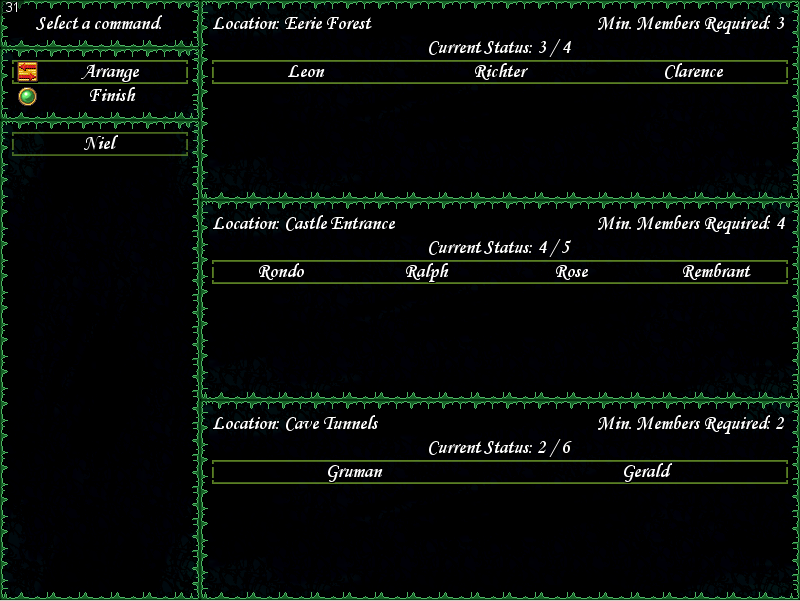
Here is a sample screenshot of how the scene looks right now:
Protected download
If I need to post the whole scene script, I can do that too later, I am not on my laptop now, writing this from memory.
This is far from being a finished scene, no visuals are done on it yet, I just put it up, so my explanation is made clear.
The problematic windows are on the right side of the screen.
So, my question, why can't I operate the cursor on those windows?
My guess is because of the method I used to make those windows in the scene, but I am not sure.
And if it is really the issue, than how could I make them in another way?
The 'info' used on the script call can be very different at each call, the size of it can vary too, so I thought that it is a good try. No so sure anymore.
Any help would be appreciated, thanks! *-*
This time I started my first scene completely made by me.
However, I got an issue, which I can't seem to fix...
So, the scene will be for Tsukihime's Party Manager script.
The link for the script, if it is needed:
http://forums.rpgmakerweb.com/index.php?/topic/17270-party-manager/
The scene will show the available party members, the new parties and all the info needed for them, and on this scene the player can arrange the actors how he/she likes. When the arrangement is completed, upon exiting the scene, the parties automatically spawn at the desired place and with the party members the player arranged on the scene.
Now, this all works just fine.
The only thing which is not fully working is the new parties windows.
I use this script call to initiate the scene:
def enter_party_scene(info=[]) SceneManager.call(Scene_Party_Manager_S) SceneManager.scene.prepare(info) endAnd the prepare looks like this:
Code:
def prepare(info) p "start! " @partiess = Array.new info.each do |party| # [party_id,[starting_actor_ids],[map_id, map_x, map_y],[min_mem,max_mem],"custom_text"] print "Party: "; p party @partiess[info.index(party)] = [party[0],party[1],party[2],party[3],party[4]] end endparty1 = [2,[],[21,3,4],[3,4],"Location: Eerie Forest"]party2 = [3,[],[21,4,4],[4,5],"Location: Castle Entrance"]party3 = [4,[],[21,7,4],[2,6],"Location: Cave Tunnels"]info = [party1,party2,party3]enter_party_scene(info)This is how I initiated the new party windows for showing the future party info:
Code:
def create_parties_window @parties = Array.new print "p.size: "; p @partiess.size #@partiess.size.times do |index| @partiess.each do |party| index = @partiess.index(party) @parties[index] = PM_Parties.new(@partiess[index],index,@partiess.size) @parties[index].set_handler(:on_member_new, method(:member_remove)) #@parties[index].set_handler(:on_cancel, method(:confirm_cancel_par)) # @parties[index].set_handler(:cancel, method(:confirm_cancel_par)) @parties[index].deactivate # index += 1 end endSo, the actual problem:
I can't move the cursor on any of these party windows.
It got a Command_Window parent class.
When printing the 'active' value, it always prints the normal value, which is true if activated and false if not.
In theory it is working, but in practice, the cursor won't move on any of these windows, I can't even press the direction buttons to move it, no sound effects, nothing happens.
The scene won't freeze or anything when I activate one of these windows, it just won't show any cursor change at all, and there will be no effect on any button presses aside from the "switch-back" button, which gets me back on the window on the left.
Here is a sample screenshot of how the scene looks right now:
Protected download
If I need to post the whole scene script, I can do that too later, I am not on my laptop now, writing this from memory.
This is far from being a finished scene, no visuals are done on it yet, I just put it up, so my explanation is made clear.
The problematic windows are on the right side of the screen.
So, my question, why can't I operate the cursor on those windows?
My guess is because of the method I used to make those windows in the scene, but I am not sure.
And if it is really the issue, than how could I make them in another way?
The 'info' used on the script call can be very different at each call, the size of it can vary too, so I thought that it is a good try. No so sure anymore.
Any help would be appreciated, thanks! *-*
Downloads / Referenced Files
Log in to download
Log in, then follow the RPG Maker Developers Group to see these download links.
Log in to downloadReferenced Images / Attachments
Creator Claims / Removal
If you are the original creator and want this listing reassigned, edited, or removed, join BMMPlay and contact the moderators with proof that matches the original RPG Maker Web profile, linked GitHub, itch.io page, or another public creator identity.
Replies (0)
No replies yet.
0
replies
10
views
Topic Summary
Loading summary...
