Preserved forum archive. This topic stores the original first post and locally mirrored RPG Maker Web attachments when available. It is posted by the BMMPlay archive account, not by the original creator.
Original Source
Original title: How do I make the character bust's appear under the choices?
Source forum path: Game Development Engines > Ruby Game System (RGSS) Scripts > RGSSx Script Support
Summary
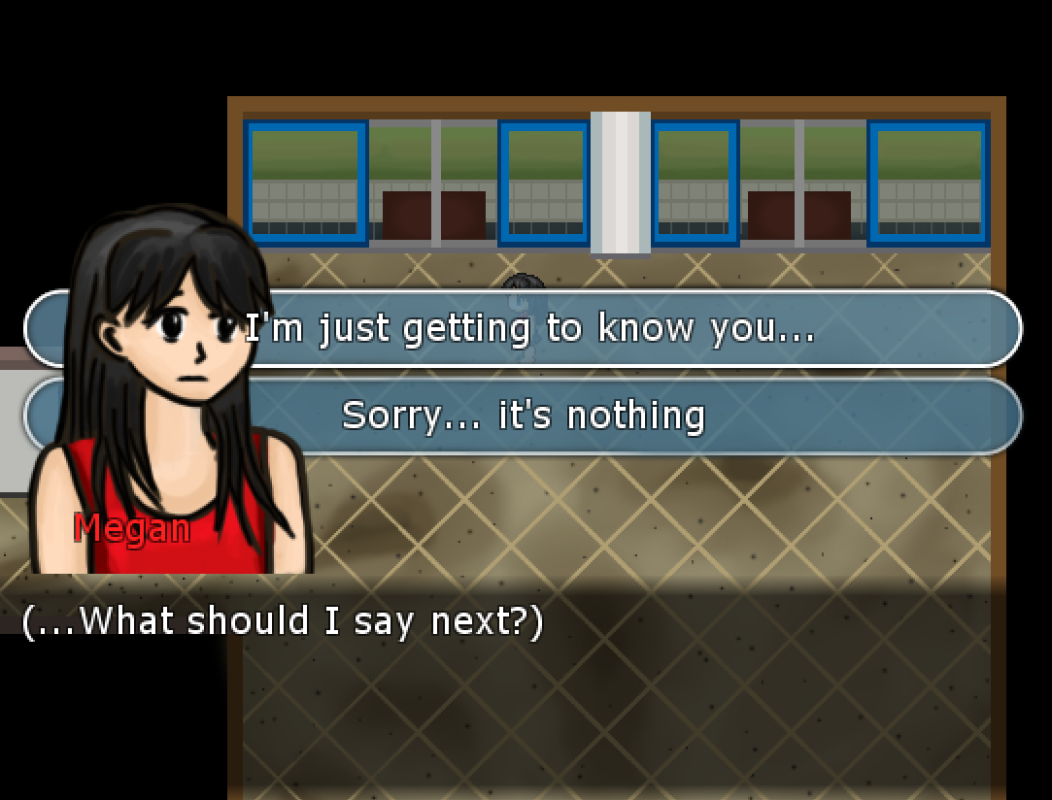
Hi everyone. I'm using both Galv's Visual novel Choices script and Fomar0153's Faces to Busts script in my game, and I realised that the character bust appears over the choices, which would cover up wordy choices. Is there a way for me to make the choices appear over the character bust? I also have an additional question: I can't seem to find a way to put the bust on the right side of the screen (Sometimes, things get covered up by the bust when it is on the left, so...
Archived First Post
Hi everyone. I'm using both Galv's Visual novel Choices script and Fomar0153's Faces to Busts script in my game, and I realised that the character bust appears over the choices, which would cover up wordy choices. Is there a way for me to make the choices appear over the character bust? I also have an additional question: I can't seem to find a way to put the bust on the right side of the screen (Sometimes, things get covered up by the bust when it is on the left, so I wish to move the bust to the right for those occasions). Is it possible to do that in Fomar0153's script?
Downloads / Referenced Files
RPG Maker Web attachments are mirrored locally when available. Other external links remain hosted by their original creator or third-party service.
Local mirror:8112-3a5aec50d84525e88dc468c1d00ecf47.png SHA-256: ab702f30ec1fe90b1baadfb83edfd5691e8fca6cc9f672187b5f2772c08087cf Original attachment URL: https://forums.rpgmakerweb.com/attachments/screenshot2-png.16989/
Referenced Images / Attachments
screenshot2.png
Creator Claims / Removal
If you are the original creator and want this listing reassigned, edited, or removed, join BMMPlay and contact the moderators with proof that matches the original RPG Maker Web profile, linked GitHub, itch.io page, or another public creator identity.