

Adding info to the Status Scene using Simple Notetags Grabber by Estriole
BMM_Archive · July 15, 2026

BMM_Archive
Preserved forum archive. This topic stores the original first post and locally mirrored RPG Maker Web attachments when available. It is posted by the BMMPlay archive account, not by the original creator.
Original Source
- Original title: Adding info to the Status Scene using Simple Notetags Grabber by Estriole
- Original author: Bethins
- Original date: September 15, 2014
- Source thread: https://forums.rpgmakerweb.com/threads/adding-info-to-the-status-scene-using-simple-notetags-grabber-by-estriole.32061/
- Source forum path: Game Development Engines > Ruby Game System (RGSS) Scripts > RGSSx Script Support
Summary
Here is a pic of what I'm trying to do... { "lightbox_close": "Close", "lightbox_next": "Next",
Archived First Post
Here is a pic of what I'm trying to do...
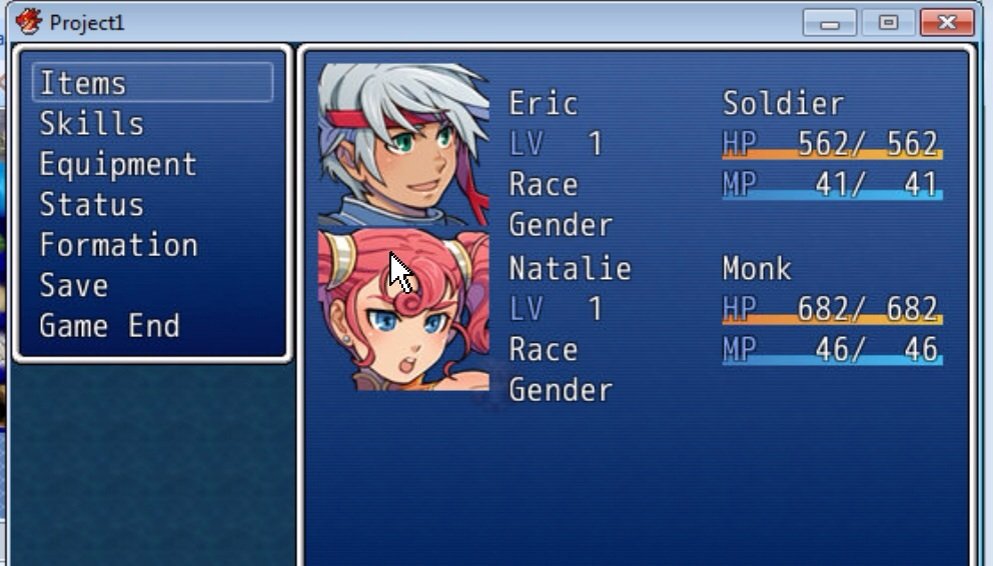
Only instead of "Gender" and "Race", I'd like to display the corresponding info located in the actors Notetag in this picture...
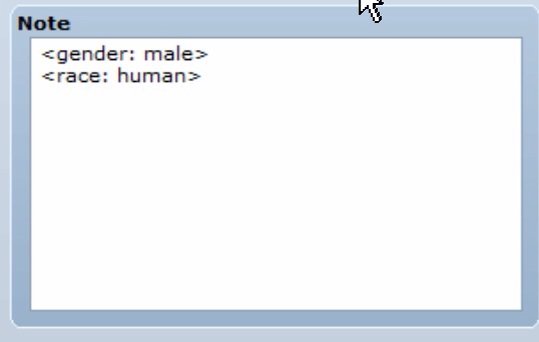
I put this together based on the default scripts...
#==============================================================================# ** Window_Base#------------------------------------------------------------------------------# This is a super class of all windows within the game.#==============================================================================class Window_Base < Window #-------------------------------------------------------------------------- # * Draw Simple Status #-------------------------------------------------------------------------- alias bluemith_draw_actor_simple_status draw_actor_simple_status def draw_actor_simple_status(actor, x, y) bluemith_draw_actor_simple_status(actor, x, y) draw_actor_race(actor, x, y + line_height * 2) draw_actor_gender(actor, x, y + line_height * 3) end def draw_actor_race (actor ,x ,y) @actor_race = "Race" draw_text_ex(x, y, @actor_race) end def draw_actor_gender (actor ,x ,y) @actor_gender = "Gender" draw_text_ex(x, y, @actor_gender) endendWhat I'm struggling with is how to make the script grab the note tag and display the proper information... I'm using this script, www.rpgmakervxace.net/topic/10545-est-simple-notetags-grabber/, but as I am a noob scripter, I just can't figure out how it should be written.Thanks!!
Edit, I have no idea why the editor did that it my code or why it made my pics so blurry...
#==============================================================================
# ** Window_Base
#------------------------------------------------------------------------------
# This is a super class of all windows within the game.
#==============================================================================
class Window_Base < Window
#--------------------------------------------------------------------------
# * Draw Simple Status
#--------------------------------------------------------------------------
alias bluemith_draw_actor_simple_status draw_actor_simple_status
def draw_actor_simple_status(actor, x, y)
bluemith_draw_actor_simple_status(actor, x, y)
draw_actor_race(actor, x, y + line_height * 2)
draw_actor_gender(actor, x, y + line_height * 3)
end
def draw_actor_race (actor ,x ,y)
@actor_race = "Race"
draw_text_ex(x, y, @actor_race)
end
def draw_actor_gender (actor ,x ,y)
@actor_gender = "Gender"
draw_text_ex(x, y, @actor_gender)
end
end
Only instead of "Gender" and "Race", I'd like to display the corresponding info located in the actors Notetag in this picture...
I put this together based on the default scripts...
#==============================================================================# ** Window_Base#------------------------------------------------------------------------------# This is a super class of all windows within the game.#==============================================================================class Window_Base < Window #-------------------------------------------------------------------------- # * Draw Simple Status #-------------------------------------------------------------------------- alias bluemith_draw_actor_simple_status draw_actor_simple_status def draw_actor_simple_status(actor, x, y) bluemith_draw_actor_simple_status(actor, x, y) draw_actor_race(actor, x, y + line_height * 2) draw_actor_gender(actor, x, y + line_height * 3) end def draw_actor_race (actor ,x ,y) @actor_race = "Race" draw_text_ex(x, y, @actor_race) end def draw_actor_gender (actor ,x ,y) @actor_gender = "Gender" draw_text_ex(x, y, @actor_gender) endendWhat I'm struggling with is how to make the script grab the note tag and display the proper information... I'm using this script, www.rpgmakervxace.net/topic/10545-est-simple-notetags-grabber/, but as I am a noob scripter, I just can't figure out how it should be written.Thanks!!
Edit, I have no idea why the editor did that it my code or why it made my pics so blurry...
#==============================================================================
# ** Window_Base
#------------------------------------------------------------------------------
# This is a super class of all windows within the game.
#==============================================================================
class Window_Base < Window
#--------------------------------------------------------------------------
# * Draw Simple Status
#--------------------------------------------------------------------------
alias bluemith_draw_actor_simple_status draw_actor_simple_status
def draw_actor_simple_status(actor, x, y)
bluemith_draw_actor_simple_status(actor, x, y)
draw_actor_race(actor, x, y + line_height * 2)
draw_actor_gender(actor, x, y + line_height * 3)
end
def draw_actor_race (actor ,x ,y)
@actor_race = "Race"
draw_text_ex(x, y, @actor_race)
end
def draw_actor_gender (actor ,x ,y)
@actor_gender = "Gender"
draw_text_ex(x, y, @actor_gender)
end
end
Downloads / Referenced Files
RPG Maker Web attachments are mirrored locally when available. Other external links remain hosted by their original creator or third-party service.
- Local mirror: 8054-e56f03baa33407c3199a348714c02202.jpg
SHA-256:2281e6fae44e9cf3767756993b39bd8d6cdbfbf7e3f5503fe28a79173a9741ee
Original attachment URL: https://forums.rpgmakerweb.com/attachments/image-jpg.16898/ - Local mirror: 8055-b1eefc0b563ed7984cdabd26eb6103b6.jpg
SHA-256:65716d582cda5eb6981c84e0983f3e0430d12130388b3dd4ea84ab7acd5a6f60
Original attachment URL: https://forums.rpgmakerweb.com/attachments/image-jpg.16899/
Referenced Images / Attachments
Creator Claims / Removal
If you are the original creator and want this listing reassigned, edited, or removed, join BMMPlay and contact the moderators with proof that matches the original RPG Maker Web profile, linked GitHub, itch.io page, or another public creator identity.
Replies (0)
No replies yet.
0
replies
15
views
Topic Summary
Loading summary...