

Changing battle message text color
BMM_Archive · July 15, 2026

Original Source
- Original title: Changing battle message text color
- Original author: Raen Andaleio
- Original date: August 2, 2014
- Source thread: https://forums.rpgmakerweb.com/threads/changing-battle-message-text-color.30638/
- Source forum path: Game Development Engines > Ruby Game System (RGSS) Scripts > RGSSx Script Support
Summary
Hello everyone, I have a problem concerning text color, maybe someone has a solution to that. I replaced the original message boxes with my own design. Looks just fine, but since it's brighter than the original, the white text with black outline didn't look that good on it. Removing the outline was simple, that's just one line of code, but now the text was white only and rather hard to read.
Archived First Post
I have a problem concerning text color, maybe someone has a solution to that.
I replaced the original message boxes with my own design. Looks just fine, but since it's brighter than the original, the white text with black outline didn't look that good on it.
Removing the outline was simple, that's just one line of code, but now the text was white only and rather hard to read.
Since I didn't know how to change the color of the interface text and was too lazy to add \c[...] to each dialog box, I simply swapped black and white in the Window.png file.
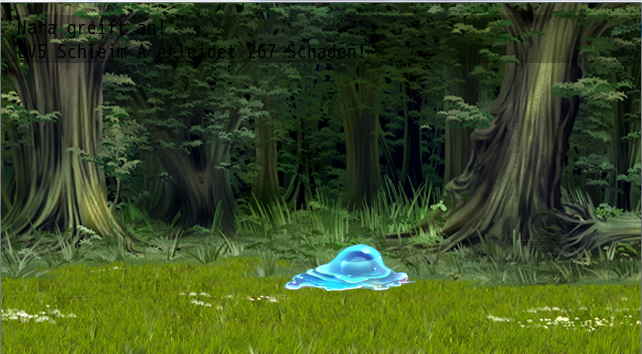
This worked just fine, and it looks good. However, the battle messages are now rather hard to read (see attached image).
So basically, I need to change the battle message text color back to white. And maybe increase the opacity of the text backgrounds a bit, so it stays readable on lighter backgrounds.
Does anyone know how to do that?
Regards
~Raen
Downloads / Referenced Files
RPG Maker Web attachments are mirrored locally when available. Other external links remain hosted by their original creator or third-party service.
- Local mirror: 7392-44ec7e4037f9d8ddf2ba19e8abc37864.png
SHA-256:4450354951f4b686fe6d1c708a9da0d30af1d07f5ea2891a74b03ce01ae52f61
Original attachment URL: https://forums.rpgmakerweb.com/attachments/battle-messages-png.15599/
Referenced Images / Attachments
Creator Claims / Removal
If you are the original creator and want this listing reassigned, edited, or removed, join BMMPlay and contact the moderators with proof that matches the original RPG Maker Web profile, linked GitHub, itch.io page, or another public creator identity.
Replies (0)
No replies yet.
Topic Summary
Loading summary...