

Move and resize battle command windows
BMM_Archive · July 15, 2026

Original Source
- Original title: Move and resize battle command windows
- Original author: tom88norman
- Original date: June 25, 2014
- Source thread: https://forums.rpgmakerweb.com/threads/move-and-resize-battle-command-windows.29015/
- Source forum path: Game Development Engines > Ruby Game System (RGSS) Scripts > RGSSx Script Support
Summary
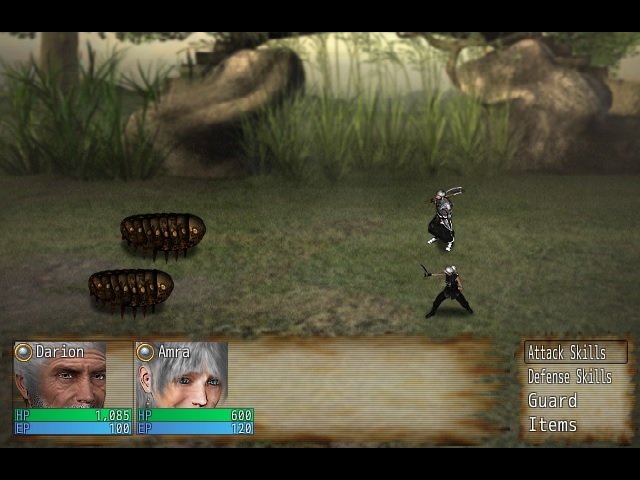
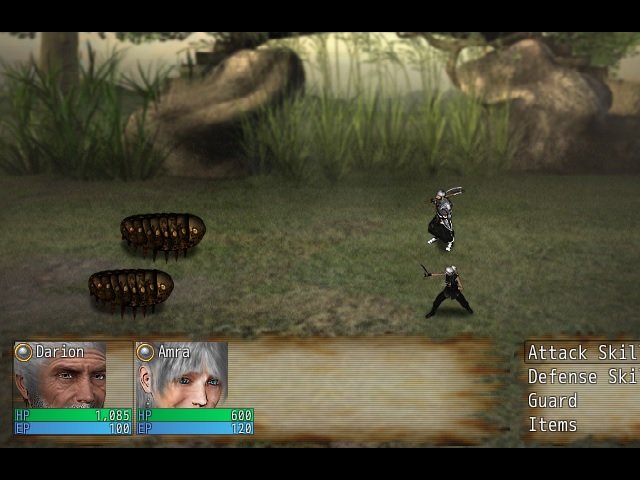
Hello, I'm using Yanfly's battle engine and I've created a couple of custom commands...I think the screenshots explain the problem best... As you can see in the first screenshot, the "attack skills" and "defense skills" commands are being squished because of how long they are. I don't really like how this looks. So I go to the Window_ActorCommand class and under the window_width method, I increase the width of the command window, the result is the second screenshot.
Archived First Post
I'm using Yanfly's battle engine and I've created a couple of custom commands...I think the screenshots explain the problem best...
As you can see in the first screenshot, the "attack skills" and "defense skills" commands are being squished because of how long they are. I don't really like how this looks.
So I go to the Window_ActorCommand class and under the window_width method, I increase the width of the command window, the result is the second screenshot.
So I just want to scooch the command window over to the left, and reduce the size of the big window with the faces in it (as my game only has those two heroes.)
However, I can't find a way to do this. Yanfly doesn't seem to have made an add-on for it, unless I'm being very dense and just missed it.
I've played around in the Window_battlestatus class and adjusted the window width there, but it seems to do...strange things. Things I can't make sense of...
Anybody have any ideas? Can't help but think it must be an easy problem to solve but I just can't seem to find a way.
Thanks in advance.
Downloads / Referenced Files
RPG Maker Web attachments are mirrored locally when available. Other external links remain hosted by their original creator or third-party service.
- Local mirror: 6567-ac00a5b6ca27a071c0d2c2629381c2ba.jpg
SHA-256:ce6096a600ee333bc3dba1502489330b0791bf93765a3e21db7cb87770cdbff3
Original attachment URL: https://forums.rpgmakerweb.com/attachments/command-window-jpg.14356/ - Local mirror: 6568-ddcebdd338b1e96c11347109badbf239.jpg
SHA-256:5a58f84988c6702d44306e944a0cd9e628e9a8c8492c19a79f0eadfbb05db865
Original attachment URL: https://forums.rpgmakerweb.com/attachments/command-window-big-jpg.14357/
Referenced Images / Attachments
Creator Claims / Removal
If you are the original creator and want this listing reassigned, edited, or removed, join BMMPlay and contact the moderators with proof that matches the original RPG Maker Web profile, linked GitHub, itch.io page, or another public creator identity.
Replies (0)
No replies yet.
Topic Summary
Loading summary...