

Fade to white
BMM_Archive · July 15, 2026

Original Source
- Original title: Fade to white
- Original author: givecake
- Original date: June 23, 2014
- Source thread: https://forums.rpgmakerweb.com/threads/fade-to-white.28902/
- Source forum path: Game Development Engines > Ruby Game System (RGSS) Scripts > RGSSx Script Support
Summary
Hi all. Using Khas's awesome light effects, and can't seem to fade to white. This is what I've got: s = $game_map.effect_surfaces.change_color(120,255,255,255,255)Some of you may be aware that the screen tinting event option is disabled with Khas' light effects script. So I must use this command somehow, to do fades to white. At the moment there is no effect here at all. Please could someone shed some light on this (harhar!) conundrum?
Archived First Post
Using Khas's awesome light effects, and can't seem to fade to white. This is what I've got:
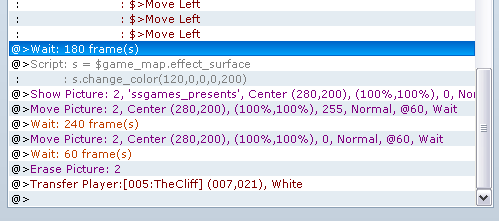
s = $game_map.effect_surfaces.change_color(120,255,255,255,255)Some of you may be aware that the screen tinting event option is disabled with Khas' light effects script. So I must use this command somehow, to do fades to white. At the moment there is no effect here at all.
Please could someone shed some light on this (harhar!) conundrum?
Thank ye,
GC
P.S. As the screenshot shows, it also doesn't fade to black
Here's a link to the script.
Downloads / Referenced Files
RPG Maker Web attachments are mirrored locally when available. Other external links remain hosted by their original creator or third-party service.
- Local mirror: 6541-1609efa32e37f0a6a90993c513c22081.png
SHA-256:429af539f39c9ccdada3c93b94d420aa4f227bf9afa015f602ec9b06d584aede
Original attachment URL: https://forums.rpgmakerweb.com/attachments/fadeto-png.14319/
Referenced Images / Attachments
Creator Claims / Removal
If you are the original creator and want this listing reassigned, edited, or removed, join BMMPlay and contact the moderators with proof that matches the original RPG Maker Web profile, linked GitHub, itch.io page, or another public creator identity.
Replies (0)
No replies yet.
Topic Summary
Loading summary...