

YEA - Battle Engine [Battle Scene Issues]
BMM_Archive · July 15, 2026

Original Source
- Original title: YEA - Battle Engine [Battle Scene Issues]
- Original author: The Forgotten
- Original date: June 23, 2014
- Source thread: https://forums.rpgmakerweb.com/threads/yea-battle-engine-battle-scene-issues.28922/
- Source forum path: Game Development Engines > Ruby Game System (RGSS) Scripts > RGSSx Script Support
Summary
UPDATE: I figured out the issue with the borders around the face sets, now I just need to figure out how to move the face sets to the center of the HP/MP bars. This is the script that fixed the issue. I'm not sure where in this overwrite_method I can adjust the location of the bitmap. #-------------------------------------------------------------------------- # overwrite method: draw_face #-------------------------------------------------------------------------- def draw_face(face_name, face_index, dx, dy, enabled = true) bitmap = Cache.face(face_name) fx = [(96 - item_rect(0).width + 1) / 2, 0].max fy = [(96 - item_rect(0).width + 1)...
Archived First Post
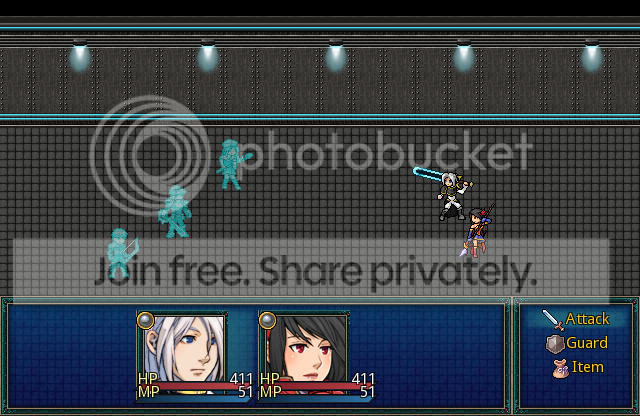
#-------------------------------------------------------------------------- # overwrite method: draw_face #-------------------------------------------------------------------------- def draw_face(face_name, face_index, dx, dy, enabled = true) bitmap = Cache.face(face_name) fx = [(96 - item_rect(0).width + 1) / 2, 0].max fy = [(96 - item_rect(0).width + 1) / 2, 0].max fw = [item_rect(0).width - 4, 1].min rect = Rect.new(fx, fy, fw, 96) rect = Rect.new(face_index % 4 * 96 + fx, fy, fw, 96) contents.blt(dx, dy, bitmap, rect, enabled ? 255 : translucent_alpha) bitmap.dispose end So, I am using Yanfly Battle Engine Ace and I have a window around the inside of the actor's portraits for beautification purposes. What happens when I go into battle is that the actor face portrait gets several pixels cut off of it in battle.

You can see how the left side has the full border on it, but the top and right side are cut off. I would like the full border visible as well as the graphic centered in the middle of the status bars. =/
YEA - Battle Engine can be found [HERE]
The second issue might be related to YEA Battle Engine, it might not. When the enemy attacks (or when the actors attack) sometimes the attack animation ends up in the middle of the screen due to the fact the actors (and enemies) are bouncing back and forth across the screen when attacking. Is there any way to make sure the actors or enemies have returned to their original positions before attacking?
I am using Galv's Animated Battlers for processing the actor and enemy battlers.
Downloads / Referenced Files
RPG Maker Web attachments are mirrored locally when available. Other external links remain hosted by their original creator or third-party service.
- Source: [HERE]
Referenced Images / Attachments
Creator Claims / Removal
If you are the original creator and want this listing reassigned, edited, or removed, join BMMPlay and contact the moderators with proof that matches the original RPG Maker Web profile, linked GitHub, itch.io page, or another public creator identity.
Replies (0)
No replies yet.
Topic Summary
Loading summary...