

Minor GUI Modification of Battle Screen
BMM_Archive · July 15, 2026

Original Source
- Original title: Minor GUI Modification of Battle Screen
- Original author: alexnidhogg
- Original date: June 21, 2014
- Source thread: https://forums.rpgmakerweb.com/threads/minor-gui-modification-of-battle-screen.28806/
- Source forum path: Game Development Engines > Ruby Game System (RGSS) Scripts > RGSSx Script Support
Summary
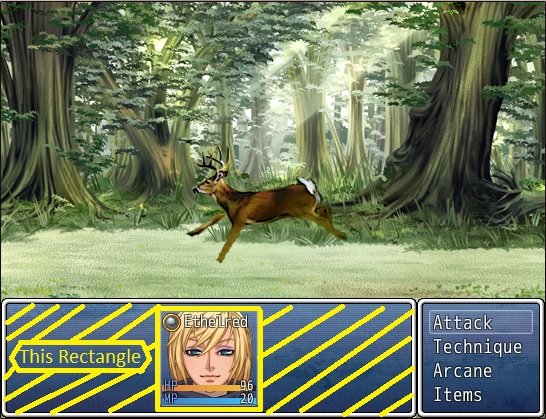
Hello, I'm currently making an rpg using the yanfly battle system with no add-ons except for the animation fix. I'd like to remove the rectangle that appears behind the units' portraits at the bottom of the screen. I'm not able to find the location in the code where that rectangle is defined or drawn. The reason for the removal is that the screen looks rather bare until additional characters join the party, and rpg maker's default resolution leaves the effects looking rather squished. Picture while selecting action: {
Archived First Post
I'd like to remove the rectangle that appears behind the units' portraits at the bottom of the screen. I'm not able to find the location in the code where that rectangle is defined or drawn. The reason for the removal is that the screen looks rather bare until additional characters join the party, and rpg maker's default resolution leaves the effects looking rather squished.
Picture while selecting action:
Picture during attack:
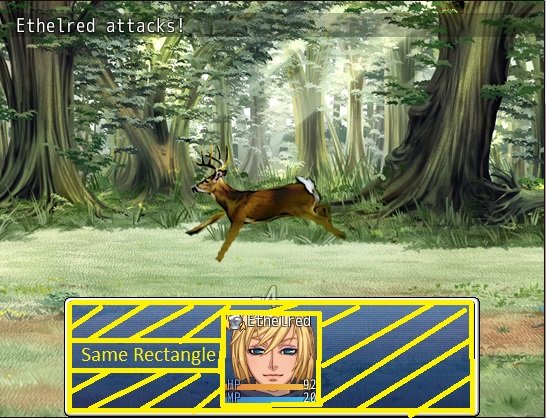
EDIT: Well I kept at it, and found a fix. In case anyone else wants to do this, by adding self.opacity = 0 in window_battlestatus.initialize the rectangle becomes invisible without ruining the gui like x = 0 y = 0 does.
Downloads / Referenced Files
RPG Maker Web attachments are mirrored locally when available. Other external links remain hosted by their original creator or third-party service.
- Local mirror: 6517-cb252e4d379ead79e5fc0cc9f3b63c08.jpg
SHA-256:811423ad0d63c7cce09461a61f4cb3d201f47cbde6fd0b9f53ecb429165c645e
Original attachment URL: https://forums.rpgmakerweb.com/attachments/battle-no-attack-jpg.14290/ - Local mirror: 6518-0d7e55050bed2ae60ba9cf8ae9d8fb40.jpg
SHA-256:e31c8b89f746b89ab49dbe32b548086a46e7e017af424e3f90b79a87334e4e2c
Original attachment URL: https://forums.rpgmakerweb.com/attachments/battle-yes-attack-jpg.14291/
Referenced Images / Attachments
Creator Claims / Removal
If you are the original creator and want this listing reassigned, edited, or removed, join BMMPlay and contact the moderators with proof that matches the original RPG Maker Web profile, linked GitHub, itch.io page, or another public creator identity.
Replies (0)
No replies yet.
Topic Summary
Loading summary...