

Help! Khas Light Effects affecting Choice List
BMM_Archive · July 15, 2026

Original Source
- Original title: Help! Khas Light Effects affecting Choice List
- Original author: RazeyMclovin
- Original date: March 3, 2014
- Source thread: https://forums.rpgmakerweb.com/threads/help-khas-light-effects-affecting-choice-list.24443/
- Source forum path: Game Development Engines > Ruby Game System (RGSS) Scripts > RGSSx Script Support
Summary
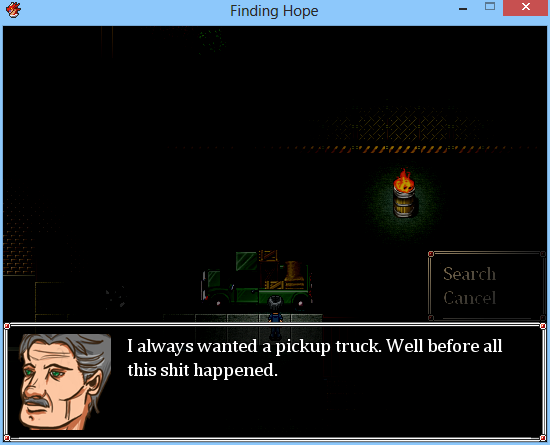
Hello all. I have searched the forums as well as Google and can't find a solution for this problem I am having. I am making a horror themed game using RPG Maker VX Ace and am using Khas Awesome Light Effects to dim the maps and create the lighting effects. However, this affects the Choices List. The main text windows are not affected but for some strange reason the Choices List is affected by the dim lighting and you can't see it properly. (Please see screenshot.) You can't even see...
Archived First Post
Downloads / Referenced Files
RPG Maker Web attachments are mirrored locally when available. Other external links remain hosted by their original creator or third-party service.
- Local mirror: 4673-94ead56fbe74dc19906bfce90cd62431.png
SHA-256:548f3750891a5e949712955c68c830963573258885f75b46befdc839bad59b88
Original attachment URL: https://forums.rpgmakerweb.com/attachments/screenshot-2014-03-03-17-43-29-png.11673/
Referenced Images / Attachments
Creator Claims / Removal
If you are the original creator and want this listing reassigned, edited, or removed, join BMMPlay and contact the moderators with proof that matches the original RPG Maker Web profile, linked GitHub, itch.io page, or another public creator identity.
Replies (0)
No replies yet.
Topic Summary
Loading summary...